You plug in a serial-to-Ethernet box, you can ping it, the TCP connection opens, and every Modbus read times out. Most of the time the problem is not the wiring. It is the gateway mode. A Modbus RTU over TCP gateway and a Modbus TCP gateway look identical on the network, but they put different bytes on the wire, and a client set to the wrong one gets nothing back.
This guide explains what each type of gateway does, shows the real bytes, how to find out which mode your box uses, and how to set unit IDs and timeouts. It ends with a step-by-step test with real screenshots that you can repeat on your PC without hardware.
What does a Modbus serial-to-Ethernet gateway do?
A Modbus gateway connects RS-485 (or RS-232) devices, such as meters, VFDs and HVAC controllers, to an Ethernet network where a BMS, PLC, SCADA or laptop reads them. It receives a request on TCP, puts it on the serial bus, waits for the answer and sends it back. What changes is how much the gateway understands Modbus:
| Gateway type | Common names in manuals | What it sends on TCP | Client mode to use |
|---|---|---|---|
| Protocol gateway (converter) | Modbus gateway, Modbus TCP to RTU, protocol conversion | Standard Modbus TCP (MBAP header, no CRC) | Modbus TCP |
| Transparent serial server | Transparent, raw socket, TCP server mode, pass-through | Raw RTU frames (address + PDU + CRC) | Modbus RTU over TCP |
| Virtual COM port | Real COM, virtual serial port | Serial data through a vendor driver | Modbus RTU on the virtual COM port |
A fourth kind polls the serial devices itself and keeps the values in its own registers (agent or cached mode). You read it with plain Modbus TCP, from the gateway's register table.
Many boxes offer several of these modes in their web page. A "Modbus gateway" may also have a transparent mode, and a cheap serial server may gain a "Modbus TCP to RTU" option in newer firmware. The label on the box is not enough: you need the setting.
Modbus RTU over TCP vs Modbus TCP: what is on the wire?
Both carry the same PDU (function code plus data) from the MODBUS Application Protocol Specification V1.1b3. Only the wrapper differs. Here is one real request, "unit 1, read 3 holding registers from address 0", and its answer, with the values from the screenshots later in this article (0x009B, 0x41AE, 0xCB5A):
| Mode | Direction | Bytes (hex) |
|---|---|---|
| Modbus TCP | Request | 00 01 00 00 00 06 01 03 00 00 00 03 |
| Modbus TCP | Response | 00 01 00 00 00 09 01 03 06 00 9B 41 AE CB 5A |
| RTU over TCP | Request | 01 03 00 00 00 03 05 CB |
| RTU over TCP | Response | 01 03 06 00 9B 41 AE CB 5A E6 7F |
- Modbus TCP starts with a 7-byte MBAP header: transaction ID (
00 01), protocol ID (00 00), length (00 06) and unit ID (01). No CRC: TCP already checks the data. The format comes from the MODBUS Messaging on TCP/IP Implementation Guide V1.0b. - RTU over TCP is exactly the RS-485 frame: slave address (
01), the PDU, then a 2-byte CRC (05 CB), carried inside a TCP connection.
Modbus RTU over TCP is not defined in the modbus.org specifications. It is a common vendor practice, which is why software calls it "RTU over TCP", "RTU encapsulated" or "RTU via TCP".
Why the wrong mode gives timeouts, not errors
Send Modbus TCP to a transparent gateway and it copies your 12 bytes onto RS-485 unchanged. Every slave reads the first byte as the address and the last two as a CRC. The CRC is wrong, so per MODBUS over Serial Line V1.02 every slave silently discards the frame. Nobody answers: timeout.
The other way round, a converting gateway reads the start of your RTU frame as an MBAP header, finds a nonsense length and unit ID, and drops the frame or waits for bytes that never come. Again a timeout, never an exception.
The rule on site: if the gateway accepts the TCP connection but every unit ID times out, check the mode before you touch the wiring.
How to tell which mode your gateway uses
- The web page. Find the serial port's operating mode. Transparent, raw, TCP server, pass-through or socket mean RTU over TCP. Modbus gateway, Modbus TCP to RTU or protocol conversion mean Modbus TCP. Real COM or virtual COM means a driver on your PC.
- The port. A converting gateway usually listens on 502, the registered Modbus TCP port. Transparent servers often use another port set in their web page. A non-502 port is a hint, not proof.
- The datasheet. A "protocol gateway" converts. A "serial device server" usually tunnels raw bytes unless Modbus conversion is listed.
- A test. Try Modbus TCP. If the connection is accepted but every unit ID times out, switch to RTU over TCP. If it answers now, the gateway is transparent. The method below shows this test.
Don't change the gateway's mode on a running site to suit your laptop: the BMS or SCADA already uses that mode. Change your client instead.
Unit ID through a Modbus gateway
On a native Modbus TCP device the unit ID is often ignored, and the TCP implementation guide recommends 255 (0xFF). Behind a gateway the unit ID chooses which serial device answers.
- Converting gateway: the MBAP unit ID becomes the slave address of the RTU frame. Unit ID 5 on TCP means slave 5 on RS-485, so it must match the device, in the 1 to 247 range of a serial line.
- Transparent gateway: the slave address is the first byte of the RTU frame your client builds. Same rule.
- Unit ID 0 is the serial broadcast address: slaves act on broadcast writes but never answer. Some gateways use 0 or 255 for their own settings, and behaviour varies by vendor, so check the manual before writing to unit 0.
Worked example: one IP, three devices
A gateway at 192.168.10.50, port 502, Modbus TCP mode, with an RS-485 bus at 19200 baud 8E1 behind it:
| RS-485 device | Slave address | Unit ID on TCP | Request |
|---|---|---|---|
| AHU controller | 1 | 1 | FC03, address 0, 3 registers |
| Power meter | 2 | 2 | FC04 (input registers) |
| Tank / weather station | 3 | 3 | FC03, address 0 |
Same IP and port for all three; only the unit ID changes. In RTU over TCP mode, reading 2 registers from address 0 on slave 5 would be 05 03 00 00 00 02 C5 8F, address byte first. Some converting gateways also have a routing table that maps unit IDs to serial ports or other addresses; if the IDs don't match what you expected, look for it.
Timeouts and polling speed through a gateway
How long does one serial transaction take?
An RTU character is 11 bits on the wire (start, 8 data, parity or second stop, stop), as set by the serial line specification. At 9600 baud that is about 1.15 ms per byte:
| Frame | Bytes | At 9600 baud | At 19200 baud |
|---|---|---|---|
| Read request (FC03) | 8 | 9.2 ms | 4.6 ms |
| Response, 3 registers | 11 | 12.6 ms | 6.3 ms |
| Response, 125 registers (maximum) | 255 | 292 ms | 146 ms |
| Silence between frames (3.5 characters) | — | 4.0 ms | 2.0 ms |
Add the device's reaction time and the gateway's processing: a large read at 9600 baud takes well over 300 ms end to end.
Setting the two timeouts
There is the gateway's serial response timeout and your client's timeout. The client's must be longer. Otherwise your client gives up first, and the late answer arrives while it waits for the next request. On a transparent gateway, with no transaction ID to match replies, values then look random. Start with 1 s on the gateway and 2 s on the client; go higher on radio links.
One bus, many clients
Several clients can connect over Ethernet, but the RS-485 bus carries one request at a time, so a converting gateway queues them. An offline device costs the full serial timeout on every poll, and everyone waits. Remove dead devices from polling lists, and if random timeouts disappear when you poll slowly, add a 20 to 100 ms pause between requests.
Common errors through a gateway and what they mean
| Symptom | Likely cause | What to check |
|---|---|---|
| Connection refused | Wrong port, or the only allowed connection is taken | Port; close other software; max connections setting |
| Connects, every unit ID times out | Client mode does not match gateway mode | Switch Modbus TCP ↔ RTU over TCP |
| One unit ID times out, others answer | Wrong slave address, device offline, different serial settings | Unit ID scan; device address and baud rate |
| Exception 0A (10) Gateway Path Unavailable | No route for that unit ID | Routing table, serial port assignment |
| Exception 0B (11) Gateway Target Device Failed to Respond | Request sent on RS-485, no answer | Wiring, A/B polarity, baud rate, parity, address, termination |
| Exception 02 Illegal Data Address | The device answered: that register doesn't exist | Register map, 40001 = address 0, function code |
| Random timeouts under load | Client timeout too short, polling too fast, dead devices | Raise timeout; add a pause; remove offline devices |
| CRC errors in an RTU over TCP client | Wrong mode, or noisy serial data | Mode first, then the RS-485 side |
Exceptions 0A and 0B are defined in the Application Protocol specification and only come from gateways. An 0B is useful: it proves the Ethernet side and the mode are right and points you to RS-485. A transparent gateway never sends them; there you only get timeouts. For the serial side, see the RS-485 wiring guide; for wrong addresses, exception code 2.
Common mistakes
- Calling a transparent serial server "Modbus TCP". It is on Ethernet, but it doesn't speak Modbus TCP.
- Leaving unit ID 255 or 0 behind a gateway. Fine for a native TCP device, wrong for a serial device.
- Gateway serial settings that don't match the devices. Baud rate, parity and stop bits must match every device on that bus.
- Debugging the wiring first. If every device times out at once, test the mode first: it takes a minute.
How to test a Modbus RTU over TCP gateway (step by step in ModLens)
You can practise without hardware. ModLens Sim, the free Modbus simulator, can answer in RTU over TCP framing, exactly like a transparent serial gateway, while ModLens plays your laptop. The simulator answers as three devices: an AHU controller (unit 1), a power meter (unit 2) and a tank and weather station (unit 3).
Step 1: Know what the gateway sends
In the ModLens Sim manager, Settings shows the Modbus TCP card on port 5020 with Framing: RTU over TCP, the same as a serial server in transparent mode.
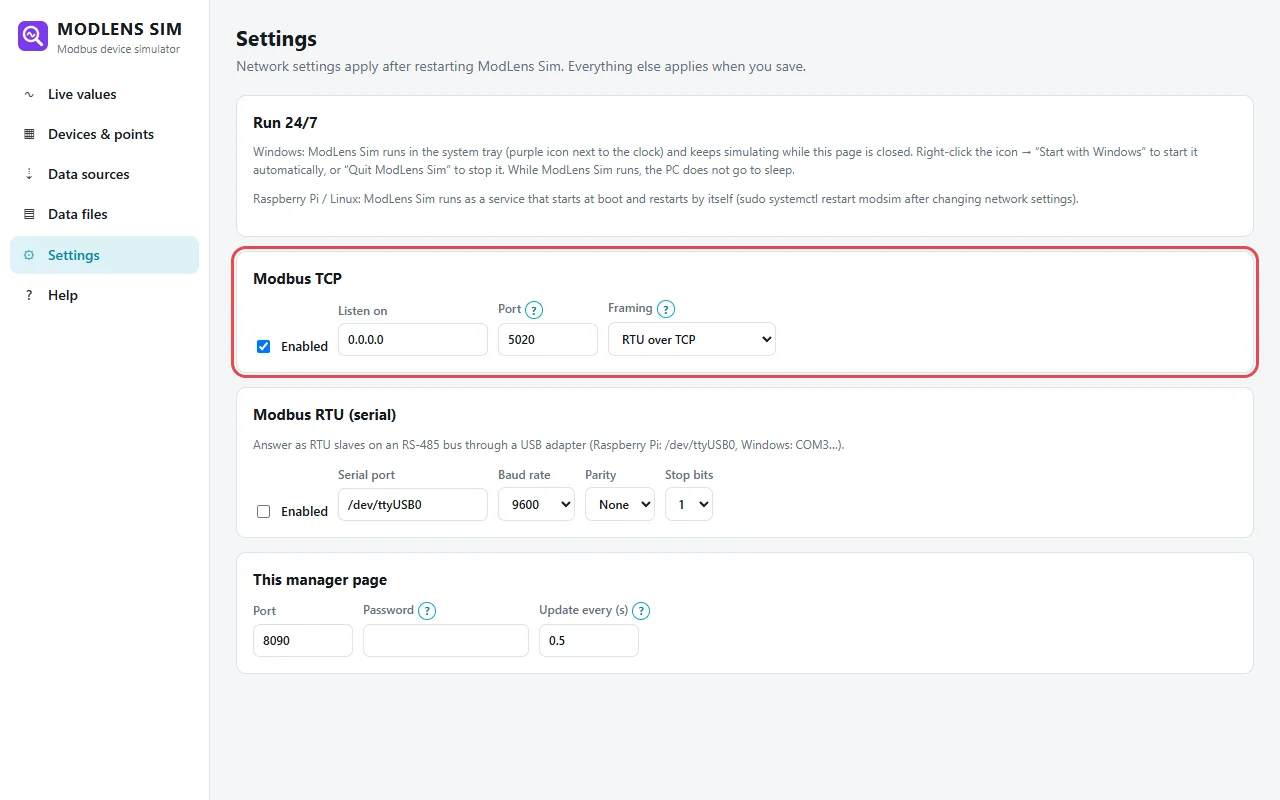
On site, this is the gateway's web page: its serial operating mode and TCP port.
Step 2: See the symptom with the wrong mode
The ModLens device is first set to plain Modbus TCP (127.0.0.1, port 5020). In Explorer: unit 1, Holding registers (4x), start address 0, count 3, Read. The connection works, but the result is "No response from unit 1 (timeout)".
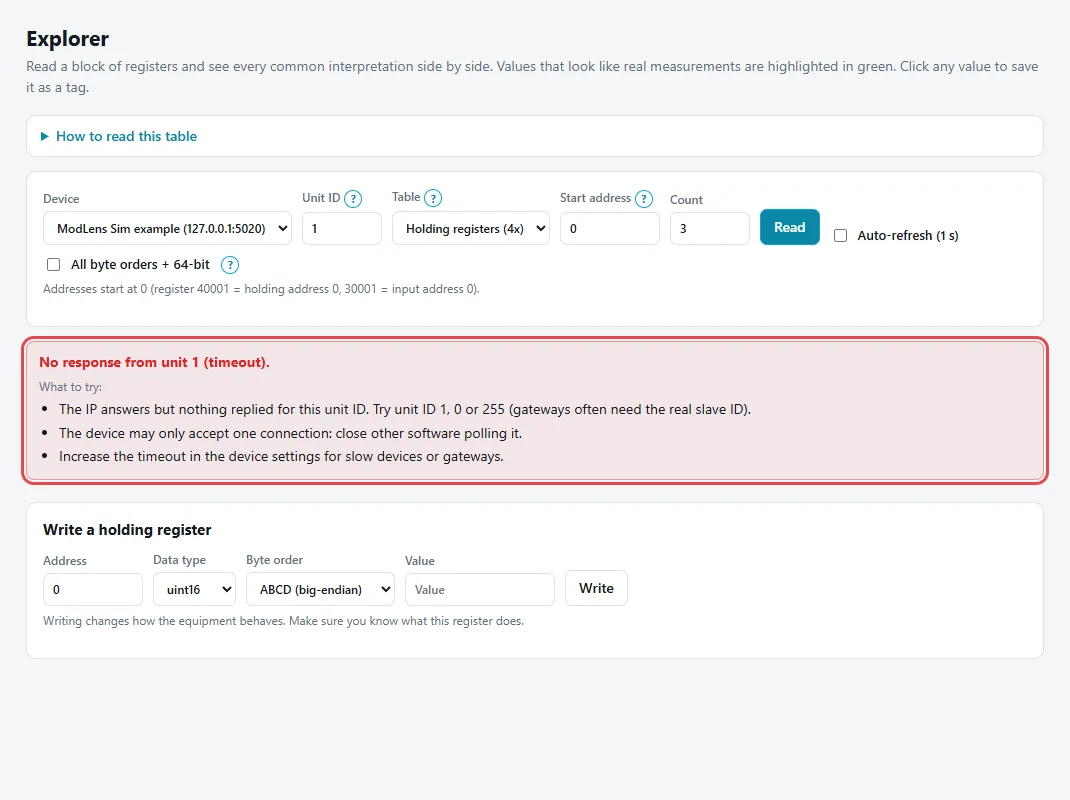
This is the classic site symptom. Other unit IDs give the same result, so the problem is not one device.
Step 3: Switch the connection to RTU over TCP
In Devices, click Edit and set Connection to Modbus RTU over TCP (serial gateway in transparent mode). IP and port stay the same. There is no baud rate or parity here: in transparent mode they live in the gateway.
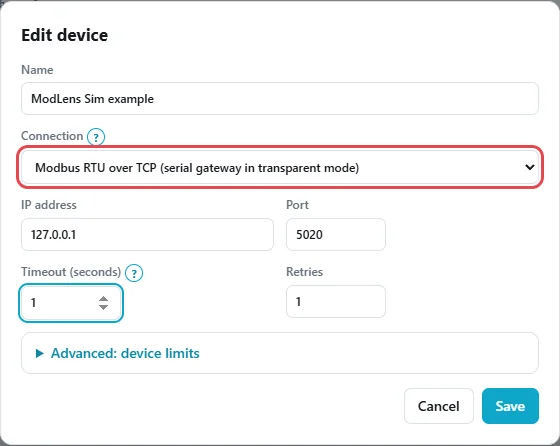
Click Save. ModLens now sends RTU frames with a CRC, like the 01 03 00 00 00 03 05 CB request above.
Step 4: Read again and check the values
Same read in Explorer, and the table fills in. Raw values: 155, 16814, 52058 (0x009B, 0x41AE, 0xCB5A). Address 0 as int16 is 155, the supply air temperature with a ×0.1 scale, so 15.5 °C. Addresses 1-2 as float32 ABCD give 21.84929, the return air temperature, highlighted in green.
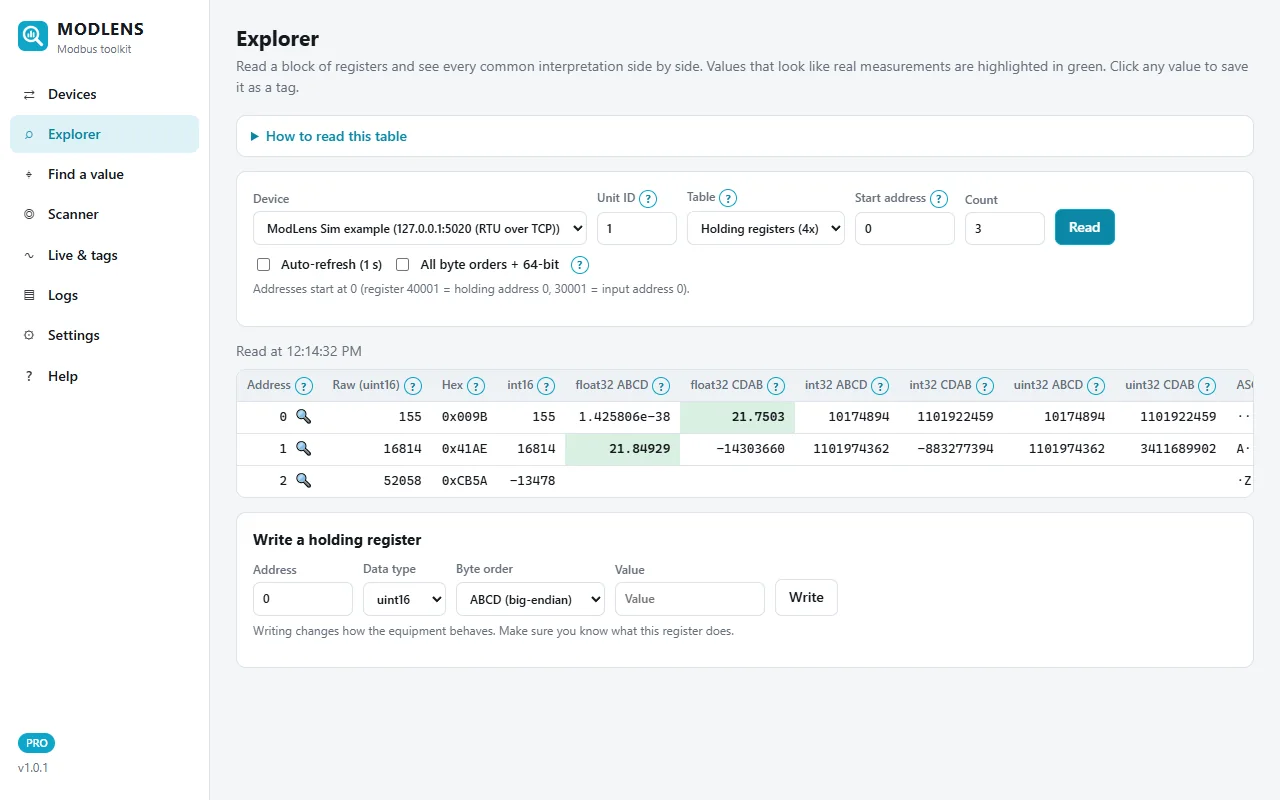
These are the bytes from the frame table. If values look wrong now, the issue is address, type or byte order, not the gateway; the free Modbus register converter checks a float by hand.
Step 5: Find every device behind the gateway
Scanner → Find unit IDs (slave addresses), choose the gateway, scan 1 to 10, Scan. Result: done in 14.5 s, 3 found:
- Unit 1:
holding 0 = 155(the AHU). - Unit 2: responds (Illegal data address). The meter is there; its data is in input registers.
- Unit 3:
holding 0 = 645(tank level, ×0.1).
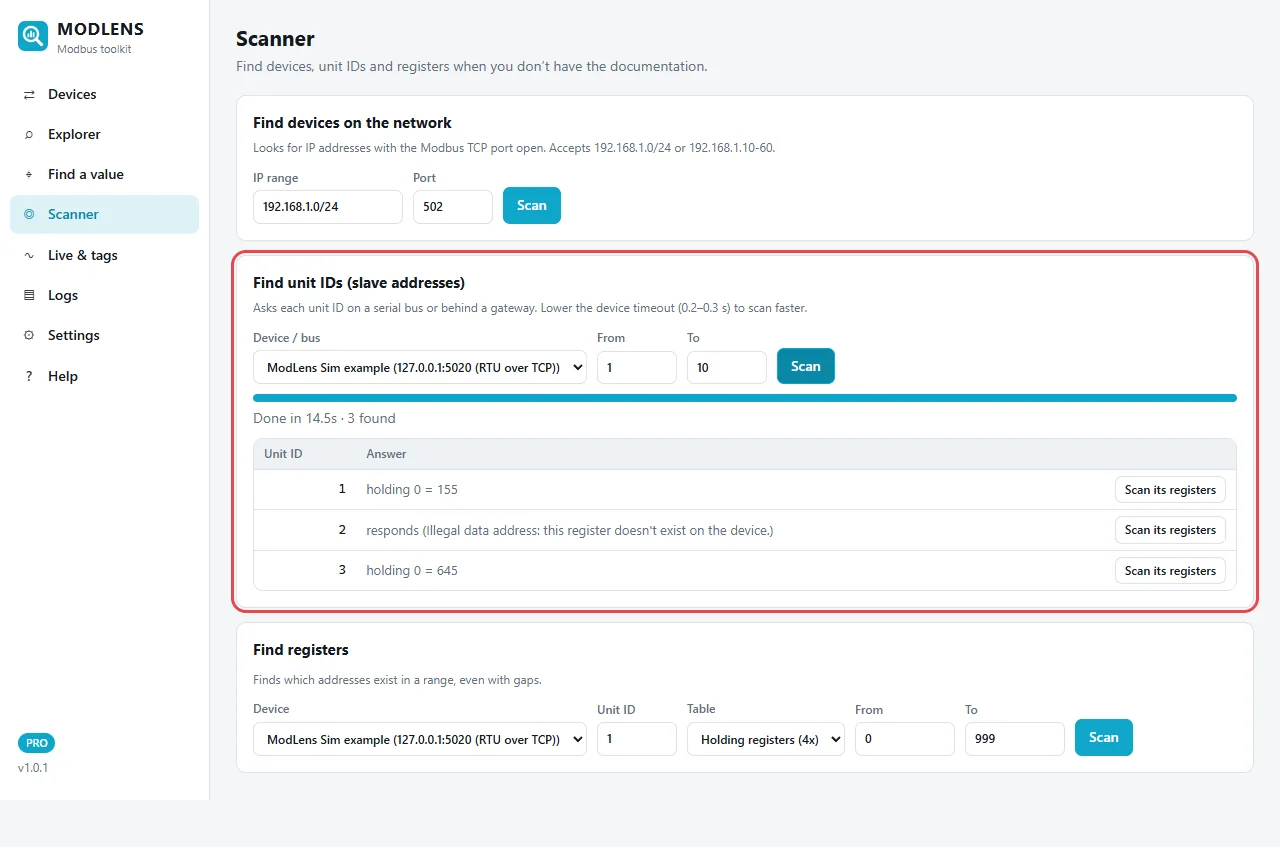
Most of the 14.5 s goes to the seven missing unit IDs: each is tried twice (1 retry) with a 1 s timeout. On a big bus, use 0.2 to 0.3 s while scanning. To map registers without documentation, continue with how to find a Modbus register address.
Step 6: Set the timeout and pause for a real gateway
Edit the device and open Advanced: device limits. For a real gateway, set Timeout to 2 s (longer than the gateway's) and, if you see random timeouts, a Pause between requests of 20 to 100 ms; here 2 s and 50 ms.
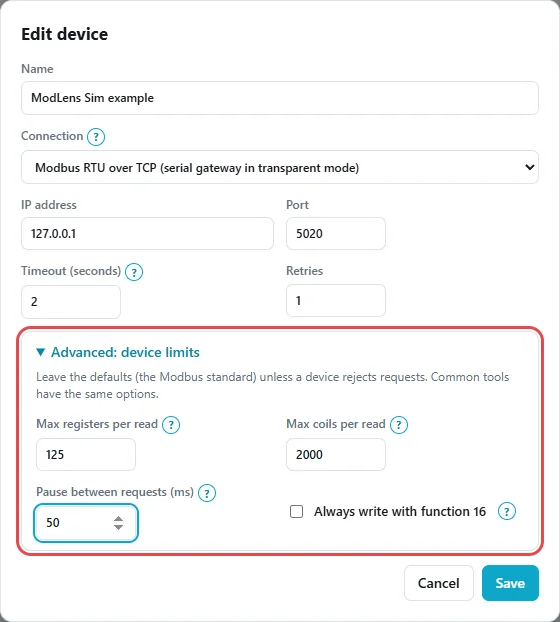
If big reads fail and small ones work, lower Max registers per read to 64 or 32.
To test your own gateway, the ModLens free trial unlocks every Pro feature for 14 days; the install and user guide covers device settings, and Modbus TCP vs RTU covers the transports in general.
Which gateway mode should you choose?
If the client only speaks Modbus TCP (most BMS controllers and PLC function blocks), use a converting gateway: port 502, standard frames, request queuing for several clients, and 0A/0B exceptions that point to the problem. If the client supports RTU over TCP and you already have a serial server, transparent mode works, ideally with one client at a time. Software that only opens a COM port needs the virtual COM mode.
FAQ
What is the difference between Modbus RTU over TCP and Modbus TCP?
Modbus TCP wraps the request in a 7-byte MBAP header and has no CRC. Modbus RTU over TCP sends the complete RTU frame, with slave address and CRC, inside a TCP connection. Registers and function codes are the same, but the client must match the gateway's mode.
Why does my Modbus gateway connect but every read times out?
Usually a mode mismatch: a Modbus TCP client on a transparent gateway, or the reverse. Neither side can parse the other's frames, so nothing answers. Switch the client mode. If only some unit IDs time out, check slave addresses and serial settings instead.
What unit ID should I use behind a Modbus TCP gateway?
The slave address of the RS-485 device, from 1 to 247. The gateway copies the unit ID into the RTU frame. The value 255 used for native TCP devices does not reach a serial device. If you don't know the addresses, scan unit IDs through the gateway.
What do exception codes 0A and 0B mean?
Both come only from gateways. 0A (10), Gateway Path Unavailable, means no route for that unit ID. 0B (11), Gateway Target Device Failed to Respond, means the request went out on RS-485 but the device did not answer: check wiring, baud rate, parity and slave address.
Is Modbus RTU over TCP a standard?
No. The modbus.org specifications define Modbus over serial line and Modbus TCP, not RTU frames over TCP. It is a widespread vendor practice, so most Modbus software supports it under names like RTU over TCP or RTU encapsulated.
Can several clients read through one gateway at the same time?
Often yes with a converting gateway, which queues requests because RS-485 handles one at a time. Transparent gateways often accept one connection, or can mix up replies because RTU frames have no transaction ID. Check the maximum connections setting.
What timeout should I set through a Modbus gateway?
Longer than the gateway's serial timeout, for example 2 s on the client and 1 s on the gateway. At 9600 baud a full 125-register response takes about 292 ms on the wire alone. Use short timeouts only while scanning.
Does the gateway change register addresses or byte order?
No, a normal gateway only changes the wrapper. Addresses, function codes, data types and byte order stay as on the RS-485 side, so the device's register map works unchanged. Gateways that poll and cache data are the exception: you read the gateway's own map.