You are on site, the laptop is connected, the device answers, and you still read the wrong number. Most of the time the problem is not the wiring or the protocol. It is the address. This guide shows how to find a Modbus register address step by step: how to read a register map correctly, how to convert 40001-style numbers into the address that really goes on the wire, which register table to use, and what to do when there is no map at all.
At the end you will have a method that works on any Modbus TCP or Modbus RTU device: start from a value you can see on the device display, find the register that holds it, and confirm it with a second reading. The worked example uses real readings from an air handler controller, so every number below comes from a real screen.
Why finding a Modbus register address is confusing
Modbus itself is simple: a master asks, a device (the "slave") answers. The confusion comes from three things.
1. Register numbers and addresses are not the same thing. The Modbus Application Protocol specification (V1.1b3, from modbus.org) says that in a Modbus message every data item is addressed from 0 to 65535. But it also describes a data model where items are numbered from 1: "register 1" in the data model is sent as address 0. Manuals then add the old Modicon convention on top: a leading 4 for holding registers, a leading 3 for input registers. So the same register can be written as 40001, 4x0001, 400001, holding register 1 or address 0.
2. There are four tables, not one. Coils, discrete inputs, input registers and holding registers are separate tables, each with its own address 0. Input register 0 and holding register 0 are two different values. The function code you send chooses the table.
3. The map is often missing, old or for another model. Register maps are set by each manufacturer. The specification does not say which data goes where, so there is no universal list. If the PDF you found is for another firmware version, every address after a certain point can be shifted.
The four Modbus tables (holding register vs input register)
Before converting any address, know which table you are reading. This is the data model from the Modbus Application Protocol specification, with the function codes and the reference numbers you see in manuals.
| Table | Size | Access | Read function | Write function | Manual reference |
|---|---|---|---|---|---|
| Coils | 1 bit | Read/write | 01 | 05, 15 | 00001–09999 (0x) |
| Discrete inputs | 1 bit | Read only | 02 | – | 10001–19999 (1x) |
| Input registers | 16 bits | Read only | 04 | – | 30001–39999 (3x) |
| Holding registers | 16 bits | Read/write | 03 | 06, 16 | 40001–49999 (4x) |
Some notes from the field:
- Holding registers (function 03) are the most common: setpoints, configuration, and on many devices the measurements too.
- Input registers (function 04) hold measured values on many energy meters. If a meter answers nothing useful on holding registers, try input registers.
- Larger maps use 6 digits: 400001–465536 instead of 40001–49999.
- Coils and discrete inputs are bits. On BMS controllers they often hold run commands, alarms and schedules.
How to convert 40001 to the real Modbus address
This is the most common source of wrong readings: the off-by-one error. The rule:
Address on the wire = register number − table offset. For holding registers the offset is 40001, for input registers 30001, for discrete inputs 10001, for coils 1.
Worked conversions:
| What the manual says | Table | Function code | Address to type in a 0-based tool | Hex |
|---|---|---|---|---|
| 40001 | Holding | 03 | 0 | 0x0000 |
| 40108 | Holding | 03 | 107 | 0x006B |
| 30001 | Input | 04 | 0 | 0x0000 |
| 30775 | Input | 04 | 774 | 0x0306 |
| 00017 | Coil | 01 | 16 | 0x0010 |
The 40108 line is the same example the Modbus specification uses for function 03: reading registers 108 to 110 sends a starting address of 0x006B (107) and a quantity of 3. Over Modbus TCP the request PDU is 03 00 6B 00 03.
The traps in the conversion
- Your software may already subtract 1. Some tools want the register number (40108), others the raw address (107). Check before you type. ModLens, for example, uses 0-based addresses and shows the reminder "register 40001 = holding address 0, 30001 = input address 0" under the Explorer settings.
- Some manuals list addresses that are already 0-based. A map that starts at "40000" or "address 0" is usually 0-based already. A map with a column called "offset" or "PDU address" is too. If the manual shows hex addresses (0x0000, 0x006B), they are almost always the real wire addresses.
- Some devices are just off by one. Even with the correct conversion, a few devices or gateways expect address N+1. The test is simple: read the address and the one next to it, and compare with the display.
If you need to convert many addresses or check a hex value, the free Modbus register converter does the decoding in the browser.
Reading a Modbus register map correctly
When you do have a register map, read every column, not just the address. A typical line in an energy meter or HVAC controller map looks like this:
| Register | Description | Type | Words | Units / scale | Access |
|---|---|---|---|---|---|
| 30001 | Phase 1 voltage | Float32 | 2 | V | R |
| 40011 | Supply temp setpoint | Int16 | 1 | °C × 10 | R/W |
What each column tells you:
- Register: convert it as above (30001 → input address 0, 40011 → holding address 10).
- Type: int16, uint16, int32, uint32, float32 or float64. A 32-bit type takes two registers, a 64-bit type takes four.
- Words: confirms how many registers to read. If a float32 is listed at 30001, the next value usually starts at 30003, not 30002.
- Units / scale: "× 10" or "0.1" means the raw integer must be divided by 10. A raw 140 becomes 14.0 °C.
- Byte or word order: often hidden in a note at the top of the map, or not written at all. For 32-bit values the specification does not define the word order, so manufacturers choose. You meet ABCD (big-endian), CDAB (word swap), BADC and DCBA.
A common mistake is to start a 32-bit value one register off. Reading address 1 instead of 0 for a float makes a "value" out of the second half of one number and the first half of the next. That gives garbage, or worse, a number that looks almost right.
How to find a Modbus register address without a register map
No map, or a map you don't trust? You know the value (it is on the device display, in the vendor's software, or on a thermometer next to the sensor), so search the device for a register that decodes to it.
The method has five steps:
- Connect and confirm the unit ID. If the device does not answer at all, no address will work. Find the unit ID first.
- Scan which registers exist. Many devices only answer on some address ranges. A register scan shows where the data is, including gaps.
- Read the block and decode it in every format. Look for numbers that look like real measurements.
- Search for the value from the display. Try every type, byte order and scale on every candidate register.
- Confirm with a second, different value. A real register follows the display when it changes. A false match does not.
You can do this by hand with any Modbus master, decoding one format at a time, but it is slow and easy to miss a CDAB float or a × 0.01 integer. Below is the same method in ModLens, where decoding and search are automatic.
The method step by step in ModLens (worked example)
The example device is an air handler (AHU) controller on Modbus TCP, unit ID 1. The display shows a return air temperature, and we have no register map. The screenshots come from ModLens connected to ModLens Sim, the free Modbus simulator, so you can repeat every step on your own PC without hardware.
Step 1: connect to the device
In Devices, add the device (IP address and port for Modbus TCP, or the COM port, baud rate and parity for Modbus RTU), then click Connect. The green dot and the "Connected ✓" message mean the TCP connection is open.
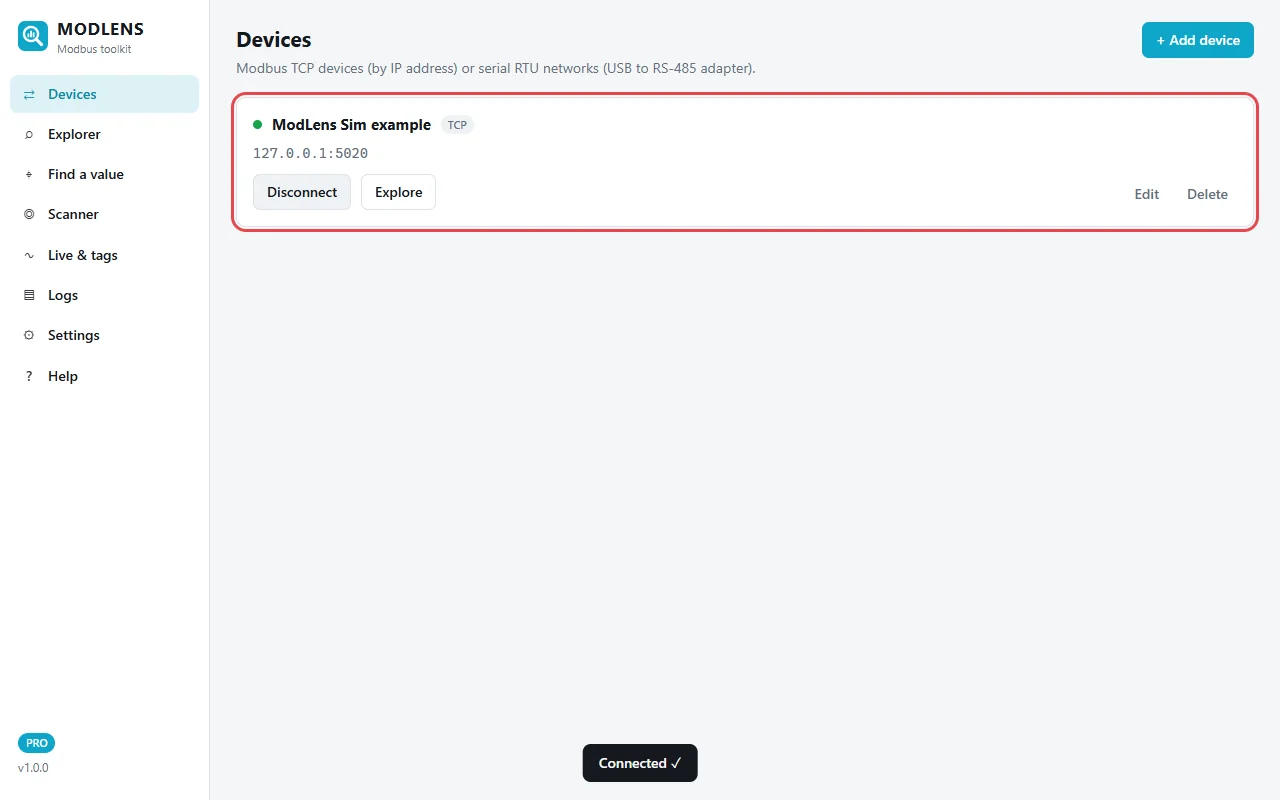
A TCP connection proves the IP and port, not the unit ID. If you don't know the unit ID, use Scanner → Find unit IDs (slave addresses) first. If no ID answers on RS-485, see the Modbus RS-485 wiring guide.
Step 2: scan which registers exist
Open Scanner → Find registers. Choose the device, unit ID 1, table Holding registers (4x), from 0 to 30, and click Scan.
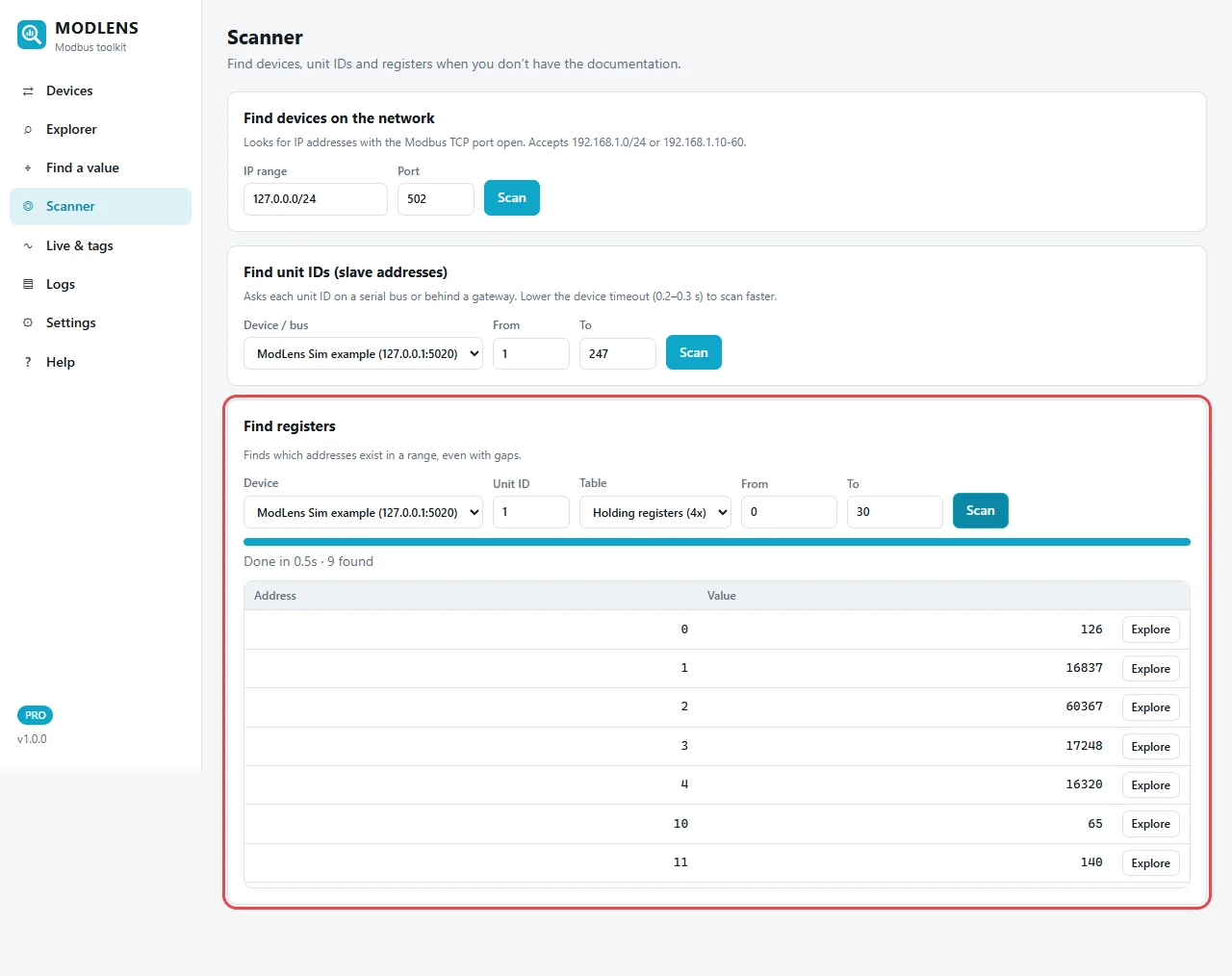
The scan finishes in 0.5 s with 9 addresses found: 0 to 4, 10, 11, and further down the list 20 and 21. Addresses 5 to 9 and 12 to 19 do not exist on this device. This tells you two useful things:
- The data sits in small groups with gaps. On many real devices, one block read across a gap fails with exception 02 (Illegal Data Address).
- The raw values already give hints. Address 0 reads 126 and address 11 reads 140: small integers, typical of temperatures stored × 10 (12.6 °C and 14.0 °C). Addresses 1 to 4 hold large numbers like 16837 and 16320, typical of the first word of a float32.
Click Explore on any line to open that address in the Explorer.
Step 3: read the block and see every format side by side
In Explorer, read unit 1, holding registers, start address 0, count 12. Each row is one register, and the columns decode it as raw uint16, hex, int16, float32 ABCD, float32 CDAB, int32 and uint32 in both word orders. Values that look like real measurements are highlighted in green.
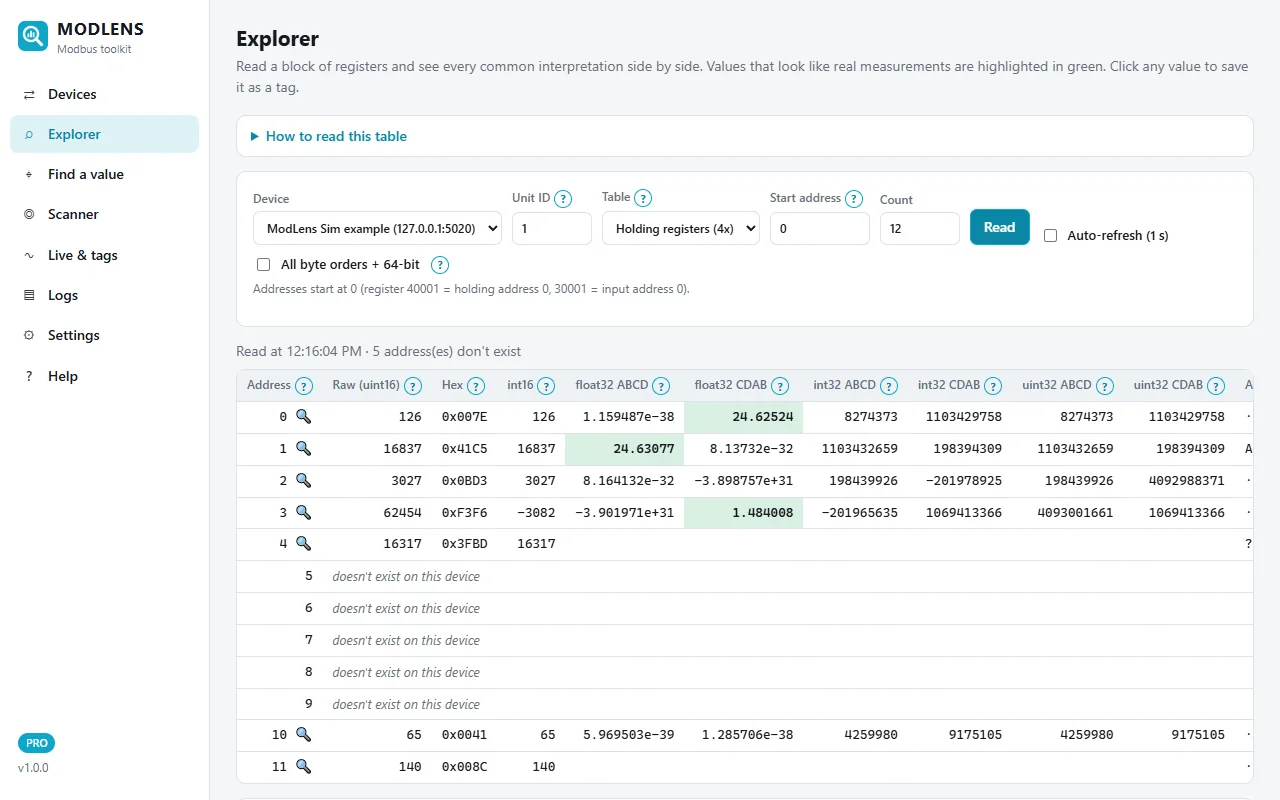
Read it line by line:
- Address 0: raw 126 (0x007E). As int16 with a × 0.1 scale that is 12.6, a supply air temperature.
- Address 1: float32 ABCD gives 24.63077, highlighted in green. That looks like a return air temperature in °C.
- Address 3: float32 CDAB gives 1.484008, also green. A duct static pressure in inches of water column is in that range.
- Addresses 5 to 9 don't exist (the scanner's gap). Address 10 reads 65 (fan speed, %) and address 11 reads 140 (setpoint 14.0 °C).
Notice the trap on the first line: address 0 read as float32 CDAB also gives 24.62524, in green. It is made of register 0 (low word) and register 1 (high word). Because the high word of a float sets most of its value, any register paired with the real high word gives a number close to the real one. Remember this, it comes back in step 4.
Step 4: type the value from the display
Open Find a value. Type the value the display shows, here 24.7. Keep the defaults: unit IDs 1-5, Holding + input registers, addresses 0 to 199, tolerance "auto".
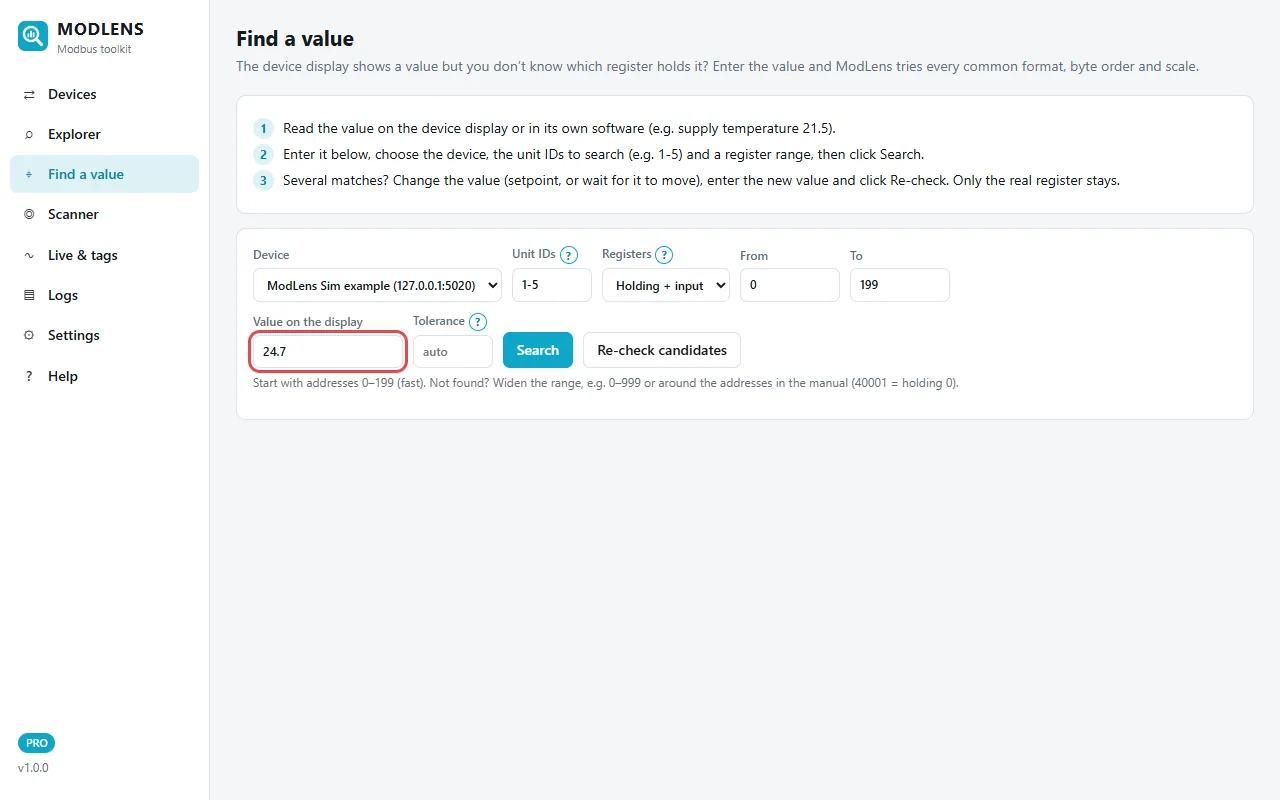
Click Search. ModLens reads the registers and tries the 16, 32 and 64-bit types, the four byte orders and the usual scales (× 1, × 0.1, × 0.01, × 0.001), then ranks the matches.
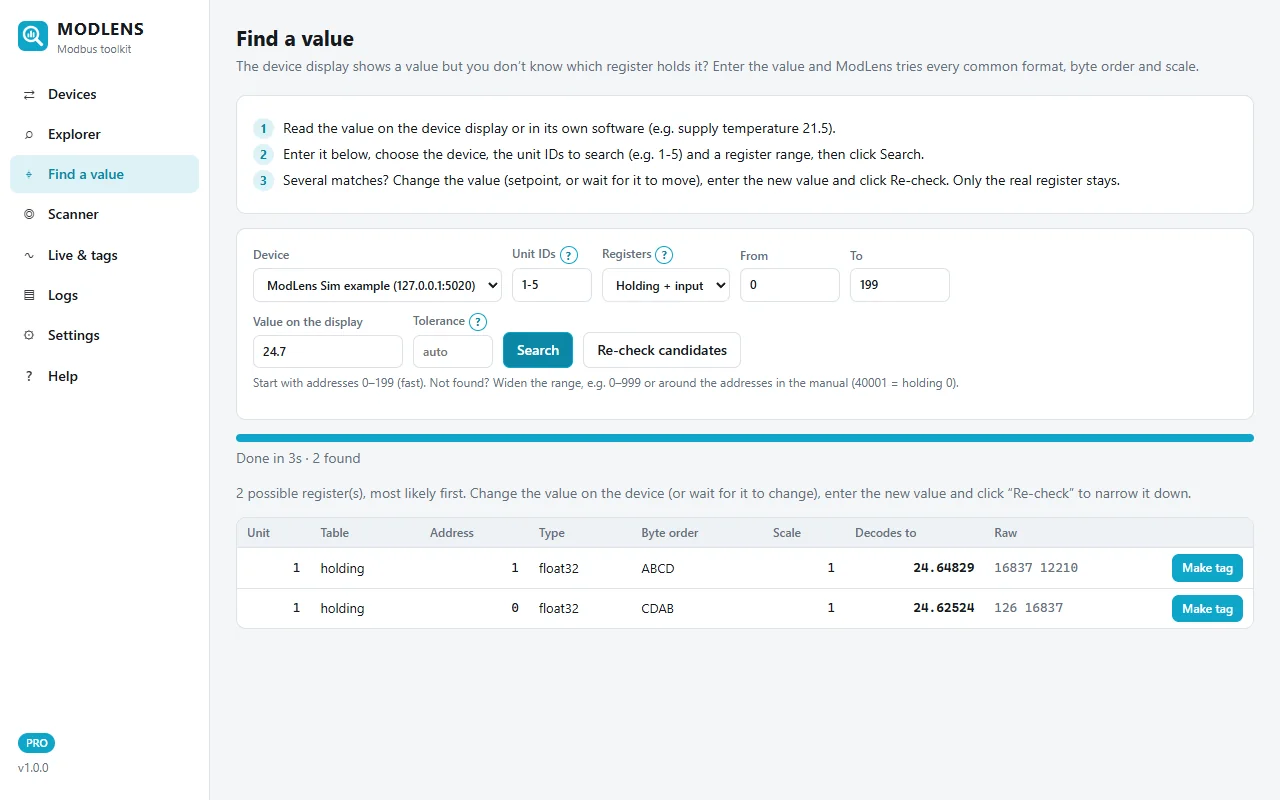
The search takes 3 s and finds 2 possible registers: holding address 1 as float32 ABCD (24.64829, raw 16837 12210) and holding address 0 as float32 CDAB (24.62524, raw 126 16837).
Both share the raw word 16837. That is the false match from step 3: the second line borrows the real high word. You cannot tell them apart from one reading.
Step 5: re-check with a new value
Wait for the value on the display to change, or change a setpoint if the value is writable. Type the new value, here 24.71. Set the tolerance to 0.01 (the display shows two decimals now) and click Re-check candidates. Only the candidates are read again, so this takes half a second.
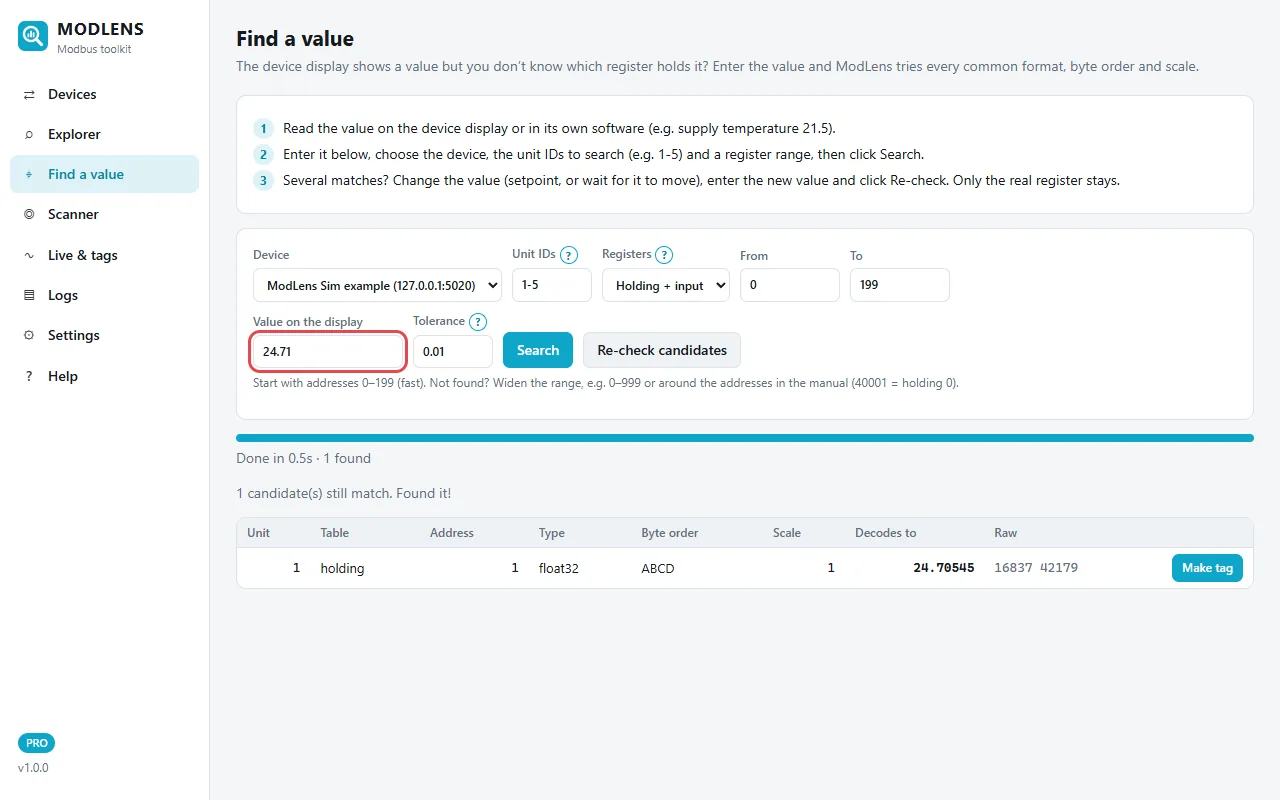
Result: "1 candidate(s) still match. Found it!" The return air temperature is unit 1, holding register address 1, float32, byte order ABCD, scale 1, which decodes to 24.70545. In manual terms it is register 40002–40003. The CDAB candidate dropped out because its low word (register 0, the supply temperature) does not follow the return temperature.
Click Make tag to save it with a name and unit, so you can trend it, set alarms or log it to CSV. The ModLens user guide explains tags and logging in detail.
Common mistakes when finding Modbus registers
Off by one (40001 read as address 1)
Symptom: values look shifted. The voltage appears where the current should be, or a float is garbage while the address next to it decodes fine.
Fix: subtract the full offset (40001, not 40000). If it still looks shifted, read one address earlier and one later, and compare with the display.
Wrong table (holding instead of input)
Symptom: exception 02 (Illegal Data Address) on every address, or zeros everywhere.
Fix: a 3xxxx register needs function 04, a 4xxxx register needs function 03. Try the other table before you decide the device is broken.
Wrong unit ID
Symptom: no response at all (timeout) on RS-485, or on a gateway, an exception 0B (Gateway Target Device Failed to Respond), or answers from the wrong device.
Fix: scan unit IDs. Valid addresses for individual devices are 1 to 247 on a serial line (Modbus over Serial Line specification V1.02); 0 is the broadcast address and never gets a reply. Some Modbus TCP devices accept any unit ID, but gateways use it to choose the RS-485 device behind them.
Reading across a gap
Symptom: a block read of 0 to 30 fails with exception 02, but reading single addresses works.
Fix: read in smaller blocks that stay inside the existing groups. A register scan shows where the gaps are. If you get exception 03 (Illegal Data Value) instead, the count is too high: functions 03 and 04 allow 1 to 125 registers per request, and some devices accept far fewer.
Wrong word order or scale on a correct address
Symptom: the address is right but the value is 9.2 × 10²³, 0.0000001, or ten times too big.
Fix: try CDAB if ABCD gives nonsense, and check the scale (× 0.1, × 0.01). Signed values (int16) read as unsigned show 65535 instead of −1.
A false match accepted too early
Symptom: the value looked right at commissioning, then stops following the display.
Fix: always confirm with a second, different value. As the worked example showed, a float built from the wrong pair of registers can be within 0.1 of the real value.
FAQ
How do I find the Modbus register address of a value on my device?
Read the value on the display, then search for a register that decodes to it in every common type, byte order and scale. Then wait for the value to change and check again: only the real register follows. ModLens automates this with Find a value; you can test it with the free 14-day trial.
Is Modbus register 40001 address 0 or address 1?
In the Modbus message, register 40001 is address 0. The "4" means holding register (function 03) and the numbering in manuals starts at 1, so you subtract 40001. Some software asks for the 40001-style number and subtracts it for you, so check which form your tool expects.
What is the difference between a holding register and an input register?
Both are 16-bit registers, but holding registers (4x, function 03) can be read and written, while input registers (3x, function 04) are read only. They are separate tables, so holding address 0 and input address 0 are different values. Energy meters often put measurements in input registers; HVAC controllers often use holding registers for everything.
Can I find Modbus registers without a register map?
Yes, for any value you can see or measure. Scan which addresses exist, read them in every format, and match a known value from the display, then confirm with a second value. Values you cannot see, such as status bits or configuration, still need the manufacturer's map.
Why do I get "Illegal Data Address" (exception 02)?
The requested address does not exist in that table. Usual causes: the wrong table (holding instead of input), an off-by-one address, or a block read that crosses a gap in the map. Read a single address, try the other table, or scan the registers to see which ones exist.
Why does a 32-bit value use two registers?
A Modbus register holds 16 bits, so a 32-bit integer or float needs two consecutive registers. The specification does not say which register holds the high word, so devices use different orders (ABCD, CDAB, BADC, DCBA). Always read both registers together, starting at the first one.
How do I find the unit ID (slave ID) of a Modbus device?
Check the device menu or DIP switches first. Otherwise scan unit IDs 1 to 247 with one small request each and note which ones answer; even an exception proves the device is there. Lower the timeout to 0.2–0.3 s so a full scan does not take long.