BacLens Sim · free BACnet device simulator
A whole BACnet building on your laptop, for free
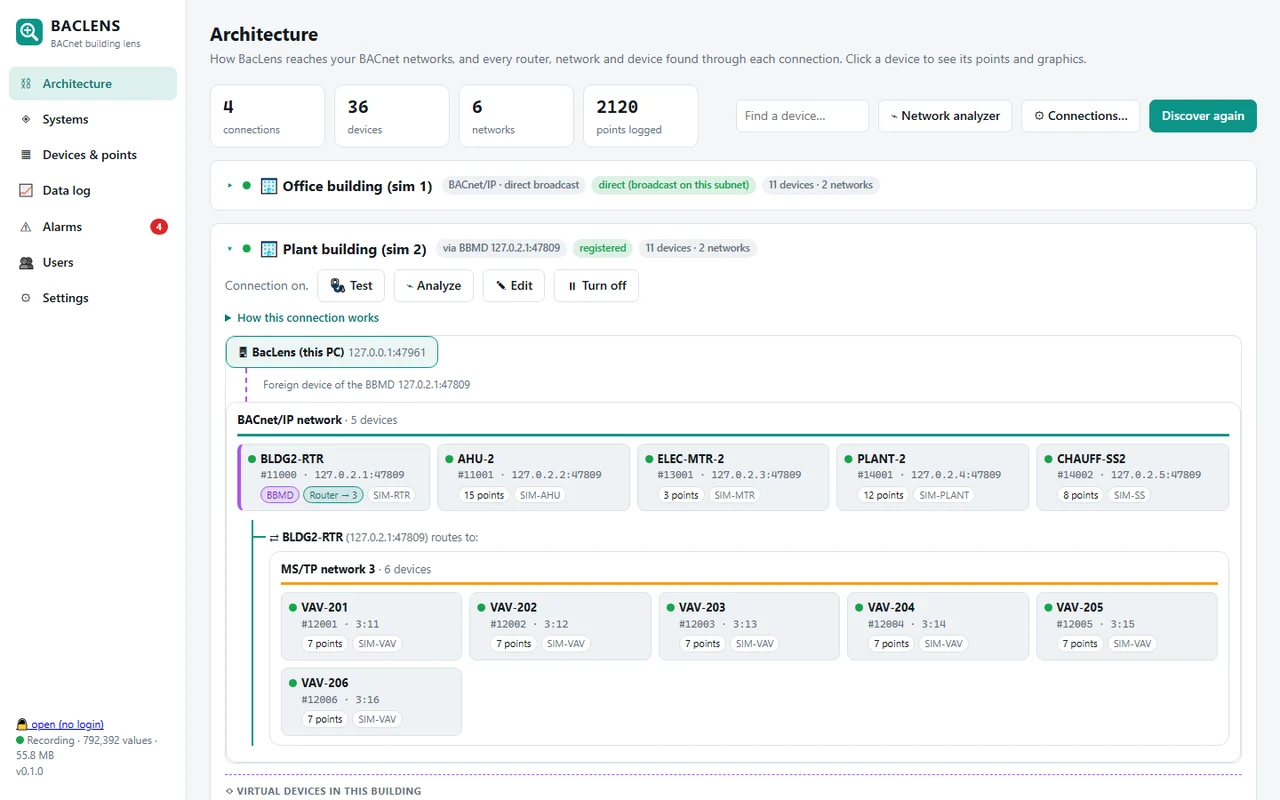
BacLens Sim turns a Windows PC into a small BACnet/IP site: a router that is also the BBMD, an air handler, six VAV boxes, a boiler plant, an electrical meter and a basement controller. Values move like a real building, and every output has a priority array. Point any BACnet tool at it and test, train or demo without real equipment.
Use cases
Why techs and integrators use a BACnet simulator
Test a front end
Build and check BMS graphics, trends and alarms against realistic devices before you go on site.
Try BACnet tools
Discovery, routing, foreign device registration, reads, writes and priority arrays: see how a tool behaves on a real topology.
Train new techs
Practise Who-Is, overrides at priority 8, releasing points and finding faults without touching a live building.
What's inside
A real topology, not a flat list of points
By default the router answers on your PC's IP at UDP 47808, the standard BACnet/IP port, and the controllers sit behind it on routed networks, so a normal Who-Is finds all of them, just like on site. Port, BBMD, topology, network numbers and device instances are all yours to change.
| Device | Name | Where | What it has |
|---|---|---|---|
| 1000 | BLDG-RTR | BACnet/IP, your PC's IP | BACnet/IP to MS/TP router and BBMD (accepts foreign devices) |
| 1001 | AHU-1 | network 3 | Outdoor, return, mixed and supply air temperatures, duct static pressure, fan power, damper, coil valves, fan speed, setpoints, fan status and command, occupancy |
| 2001–2006 | VAV-101 … VAV-106 | network 2 (MS/TP style) | Zone temperature, airflow, damper, reheat valve, zone setpoint, minimum and maximum airflow setpoints |
| 3001 | ELEC-MTR-1 | network 3 | Demand (kW), energy (kWh), voltage |
| 4001 | PLANT-1 | network 3 | Two boilers (status, enable, firing rate), two pumps, hot water supply and return, setpoint, differential pressure |
| 4002 | CHAUFF-SS | network 3 | Basement controller with French point names: baseboard heater, unit heater, exhaust fan, room temperature and setpoint |
- Outdoor temperature follows the time of day, zones warm up with people and sun, the AHU and VAVs react, the meter adds it all up
- Simulated control writes at priority 16: write at priority 8 and you override it, release and it takes over again, like a real controller
- Optional: 4 fan coil units on a real RS-485 MS/TP line through a USB adapter (
--mstp COM5) - Make it your network: change the UDP port, turn the BBMD on or off, choose routed or flat topology, and set the network numbers and device instances in
BacLensSim.ini(Notepad is enough) - Optional: run the building clock faster (
--speed 30= a day in 48 minutes) for trend and schedule tests
A little challenge
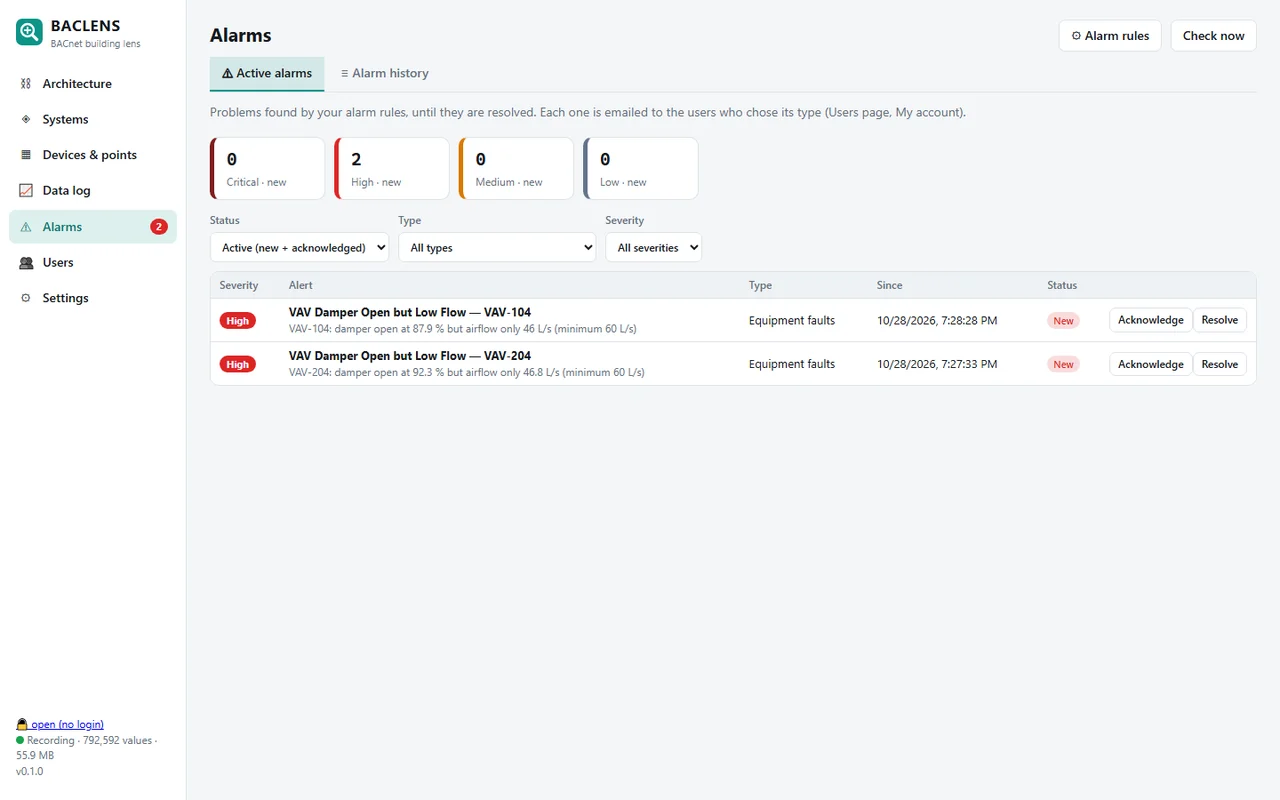
Three faults are hidden in the building
One VAV box has a stuck damper, one zone setpoint was left in override, and one heating pump is commanded on but never runs. Can your tool find them? BacLens finds them by itself and raises the alarms.
BACnet simulator FAQ
Is BacLens Sim really free?
Yes. BacLens Sim is free to download and use. We ask for an email to send the download link and to tell you when BacLens, our BACnet explorer, is ready.
How do I connect to the simulator from the same PC?
Only one program can use UDP port 47808 on a PC. Start BacLens Sim, then in your BACnet tool use another UDP port (for example 47809) and register as a foreign device with the BBMD shown in the simulator window (your PC's IP, port 47808). From another computer on the same network, a normal discovery finds every device.
Which BACnet objects and services does it support?
Device, analog input, analog output, analog value, binary input, binary output and binary value objects, with names, descriptions, units and status flags. Who-Is/I-Am, Who-Is-Router-To-Network, ReadProperty, ReadPropertyMultiple and WriteProperty with priority (commandable outputs and values have a full priority array).
Can I change the port, network numbers and device instances?
Yes. Open BacLensSim.ini next to the program with Notepad: UDP port (47808 or any other), BBMD on or off, routed topology (controllers behind the router) or flat (every controller directly on BACnet/IP, one UDP port each), the BACnet network numbers of the IP side, the controller network and the VAV network, and the first device instance. Save and restart. The same settings exist as command-line options.
Does it simulate BBMDs and foreign devices?
Yes. The router is also a BBMD that accepts foreign device registrations, which is the usual way to reach a BACnet/IP network from another subnet or a VPN.
Can it simulate MS/TP devices on RS-485?
Yes, optionally: with a USB to RS-485 adapter, --mstp COM5 puts 4 fan coil units (MAC 11 to 14) on a real MS/TP line at 38400 baud, so you can test an MS/TP tool or router on real wires.
Does it run on Mac or Linux?
The download is for Windows 10 and 11. A Raspberry Pi / Linux version is planned.