You send a read, the device answers in a few milliseconds, and your software says "Modbus exception code 2: illegal data address". Good news: the device is alive, the wiring works and the unit ID is right. It received your request and refused it. Something about where you asked to read is wrong.
This guide explains what Modbus exception code 2 means in the specification, its five field causes, and a step-by-step method to fix it in minutes.
What a Modbus exception response is
Every Modbus request carries a function code (for example 03 = read holding registers). When the device is happy, it answers with the same function code and the data. When it refuses, it sends an exception response:
- The function code comes back with its highest bit set, so the device adds 0x80: 03 becomes 0x83, 04 becomes 0x84, 16 (0x10) becomes 0x90.
- One extra byte follows: the exception code, which says why.
Here is a real example on Modbus RTU. You ask unit 1 for one holding register at address 5:
| Direction | Bytes (hex) | Meaning |
|---|---|---|
| Request | 01 03 00 05 00 01 94 0B |
Unit 1, function 03, start address 5, quantity 1, CRC |
| Exception response | 01 83 02 C0 F1 |
Unit 1, function 03 + 0x80, exception code 02, CRC |
On Modbus TCP the idea is identical. The MBAP header (transaction ID, protocol ID, length, unit ID) comes first, then 83 02. There is no CRC on TCP because Ethernet already checks the frame.
An exception is a valid, complete reply. A timeout (no reply at all) points to wiring, unit ID or serial settings. With exception 02, stop checking the cable.
The common exception codes in one table
The MODBUS Application Protocol Specification V1.1b3 (modbus.org) defines these codes. The table shows the ones you meet on site (05, 06 and 08 also exist but are rare).
| Code | Name | What it usually means in the field |
|---|---|---|
| 01 | Illegal Function | The device does not support that function code (for example coils, or function 16). |
| 02 | Illegal Data Address | The address, or the address plus the quantity, is not valid on this device. |
| 03 | Illegal Data Value | A value in the request is not accepted: often the quantity is too large, or a written value is out of range. |
| 04 | Server Device Failure | The device had an internal error while doing the request. |
| 0A (10) | Gateway Path Unavailable | The gateway cannot route the request to that unit ID. |
| 0B (11) | Gateway Target Device Failed to Respond | The gateway forwarded the request but the serial device behind it did not answer. |
What Modbus exception code 2 (illegal data address) actually means
The specification describes code 02 like this: "The data address received in the query is not an allowable address for the server." It then adds the detail that catches most people: the combination of the starting address and the quantity must be valid, not just the starting address.
The spec gives an example with a device that has 100 registers (addresses 0 to 99):
- Start at 96, read 4 registers → addresses 96, 97, 98, 99 → OK.
- Start at 96, read 5 registers → the fifth would be address 100, which does not exist → exception 02.
So "illegal data address" does not always mean the address you typed is wrong. It can mean one register anywhere inside your block is not there.
The spec limits a read of holding or input registers to 125 registers, coils to 2000, and a write of multiple registers to 123. Asking for more is an exception 03 (illegal data value) by the spec.
A quantity that is legal but runs into a missing register is a code 02 problem. In practice, some devices return 02 or even nothing at all for an oversized read, so if a big block fails, test a small one before drawing conclusions.
The 5 causes of Modbus exception code 2
1. The off-by-one problem (40001 vs address 0)
This is the number one cause. Register maps often use reference numbers like 40001 or 30001. The address that actually travels in the Modbus frame starts at 0:
| In the manual | Table | Address on the wire |
|---|---|---|
| 40001 | Holding register | 0 |
| 40002 | Holding register | 1 |
| 40100 | Holding register | 99 |
| 30001 | Input register | 0 |
| 400001 (6-digit style) | Holding register | 0 |
If the manual says "Supply temperature: 40011" and you read address 11, you are one register too far. If address 11 happens to be the last register in a block, the device answers exception 02. If it exists, you get a wrong value instead, which is worse because nothing warns you.
The catch: not every manual uses the 4xxxx style; some list addresses that already start at 0. When code 02 appears on an address taken from a manual, try the address minus one first, then plus one.
2. The wrong register table
Modbus has four separate tables: coils, discrete inputs, input registers and holding registers. Address 0 in the holding table and address 0 in the input table are two different things. Many meters put their measurements only in input registers (function 04). If you read them with function 03, the device looks in its holding table, finds nothing at that address and answers exception 02 (some devices answer 01 instead).
Hints in the manual: "3x", "30001", "input register" or "FC04" all mean function 04. "4x", "40001", "holding register" or "FC03" mean function 03.
3. The block crosses a gap in the register map
A controller might have registers 0 to 4, nothing from 5 to 9, then 10, 11 and 20. Each address alone is fine. Read 0 to 11 in one request and many devices reject the whole request with exception 02, because 5 to 9 are inside it.
This is very common with SCADA, BMS and data-logger software that groups nearby tags into one request to save time. You configure 12 tags that all work alone, and the system still logs "illegal data address" because the driver merged them into one block. Meter manufacturers describe exactly this in their support notes, and the usual fix is to lower the "maximum number of registers per request" in the client.
4. Reading past the end of the map
The spec's own example. The last documented register is 99, but you ask for a block of 10 starting at 95. It works for 96 to 99 and fails because 100 to 104 do not exist. It often happens when a client reads a 64-bit value where the map has a 32-bit one.
5. Device-specific rules
Some devices add their own rules on top of the spec. These are less common but they explain the "it should work" cases:
- Partial reads of a 32-bit value. Some devices refuse a read that starts in the middle of a float or a 32-bit counter, or that reads only one of its two registers.
- Writing to a read-only register. Some devices answer 02 when you write to a measurement register; others answer 01, 03 or 04. The spec does not fix one answer for every case.
- Firmware or option differences. A register listed in the latest manual may not exist on older firmware or on a model without that option card. The answer is exception 02.
- Different maps per unit ID behind a gateway. Two devices on the same RS-485 bus may be different models. The map that works for unit 1 does not have to work for unit 2.
When everything looks correct, the manual or the manufacturer's support is the final word.
Step-by-step: how to fix Modbus exception code 2 with ModLens
The method below works with any Modbus tool. We show it in ModLens because it explains exceptions in plain words and has a register scanner, so every step is one click. The screenshots come from ModLens connected to the free ModLens Sim simulator, which behaves like a real device: addresses not used by any point do not exist and answer "illegal data address".
The simulated device is an air handling unit controller at unit ID 1. Its holding registers are: 0 (supply air temperature, int16 ×0.1), 1-2 (return air temperature, float32 ABCD), 3-4 (duct static pressure, float32 CDAB), 10 (fan speed command), 11 (supply temperature setpoint, int16 ×0.1) and 20-21 (run hours, uint32). Nothing else exists.
Step 1: Reproduce the error with a single register
Before changing anything, read one register at the failing address. This rules out the gap and end-of-map causes.
In the Explorer, choose the device, unit ID 1, Holding registers (4x), start address 5, count 1, and click Read.
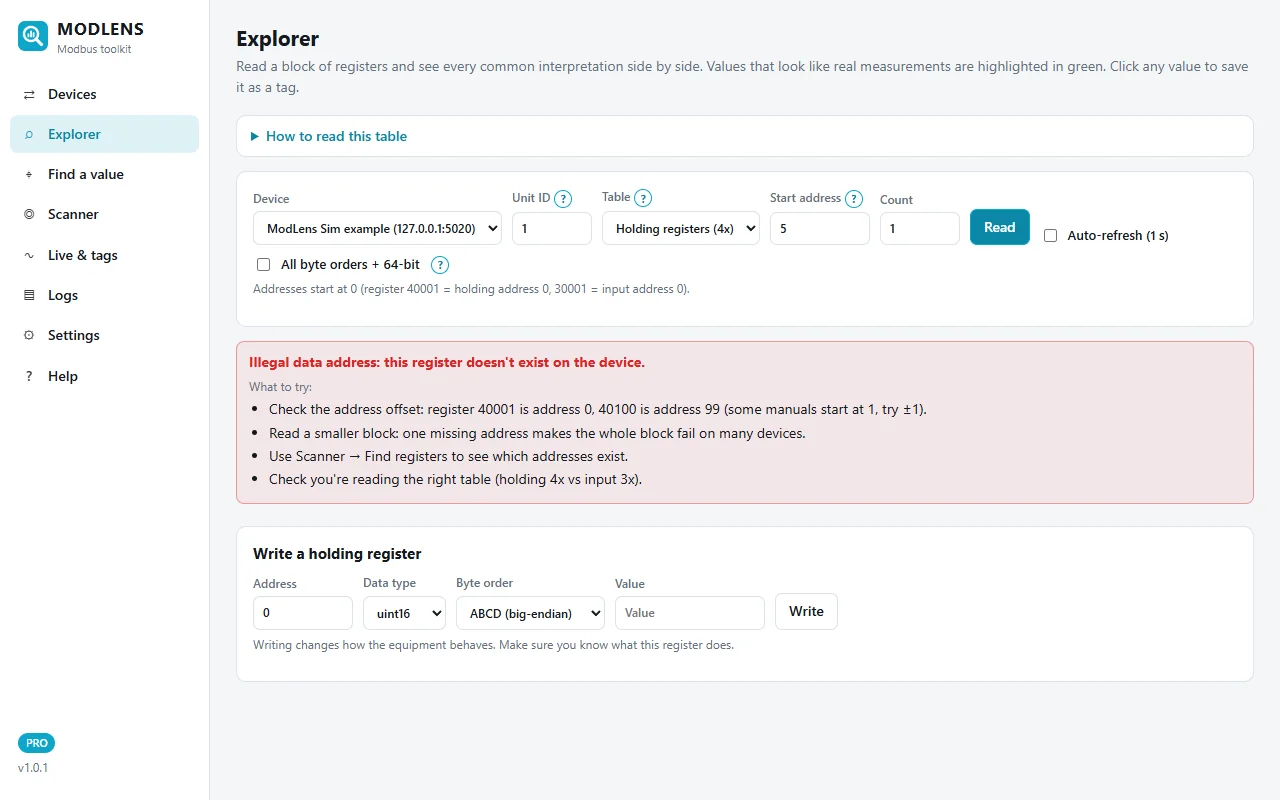
The device answers exception 02 and ModLens shows it in plain words: "Illegal data address: this register doesn't exist on the device." Under it, a "What to try" list gives the same checks as this article: the 40001 offset (try ±1), a smaller block, Scanner → Find registers, and the right table (holding 4x vs input 3x).
If one register alone fails, the address or the table is wrong (causes 1, 2 or 5). If one register alone works but your block fails, go to step 2.
Step 2: Read the block and see which addresses are missing
Now read the block your SCADA or logger is trying to read. Here: start 0, count 12, holding registers.
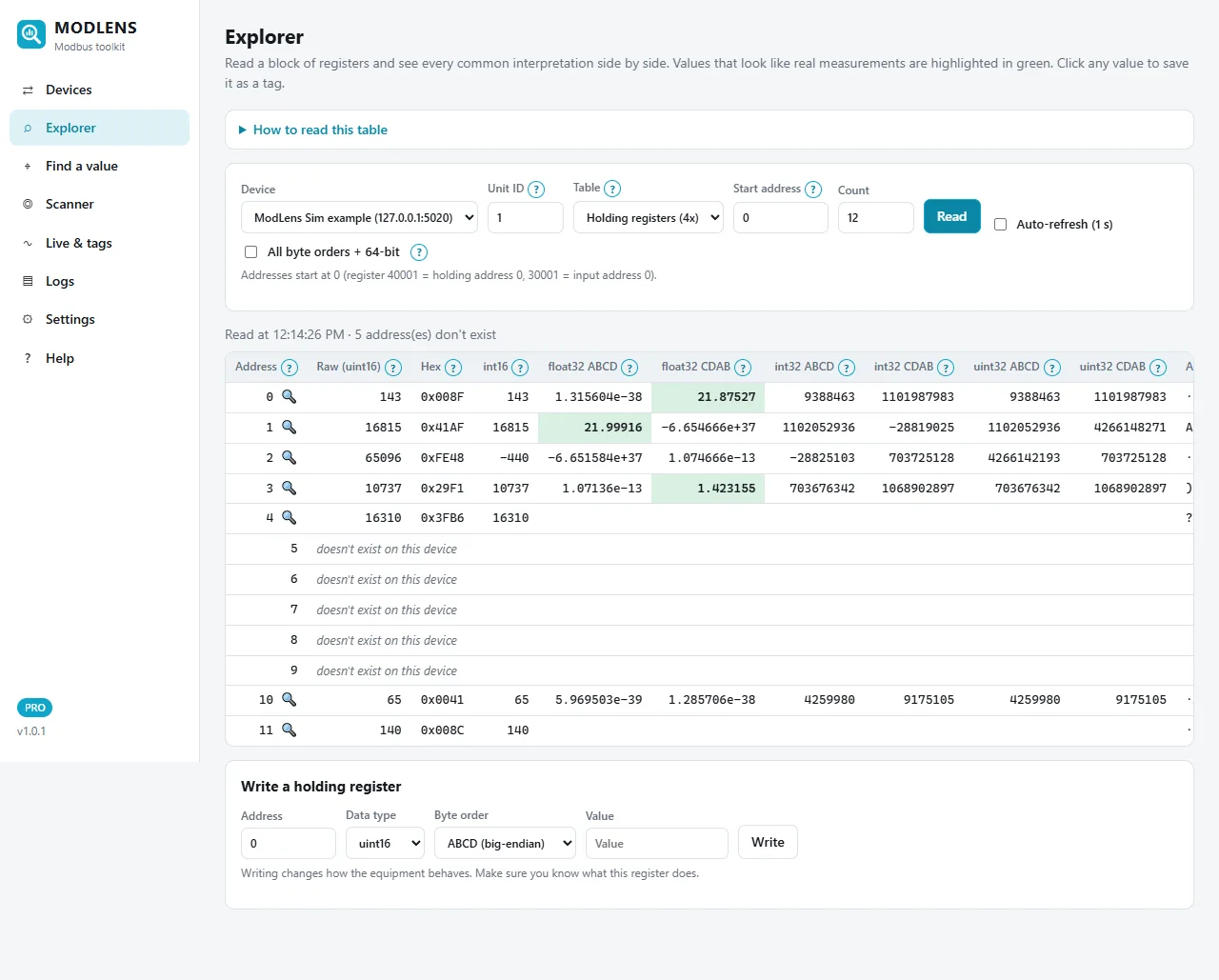
A 12-register request to this device fails with exception 02 because of the gap. When that happens, ModLens re-reads the addresses one by one so you can see exactly which ones exist. The status line says "5 address(es) don't exist": addresses 5 to 9 are marked "doesn't exist on this device", while 0 to 4, 10 and 11 return real data. The green cells show the return air temperature at address 1 (float32 ABCD, about 22 °C) and the duct pressure at address 3 (float32 CDAB, about 1.4 inWC).
This is the typical "block crosses a gap" case. The fix is not to change any address: it is to split the request into 0-4 and 10-11.
Step 3: Map every address that really exists
When you have no reliable register map, or you suspect the map is for another firmware, let a scanner find out. In ModLens, open Scanner → Find registers, choose unit ID 1, the table, a range (here 0 to 30), and click Scan.
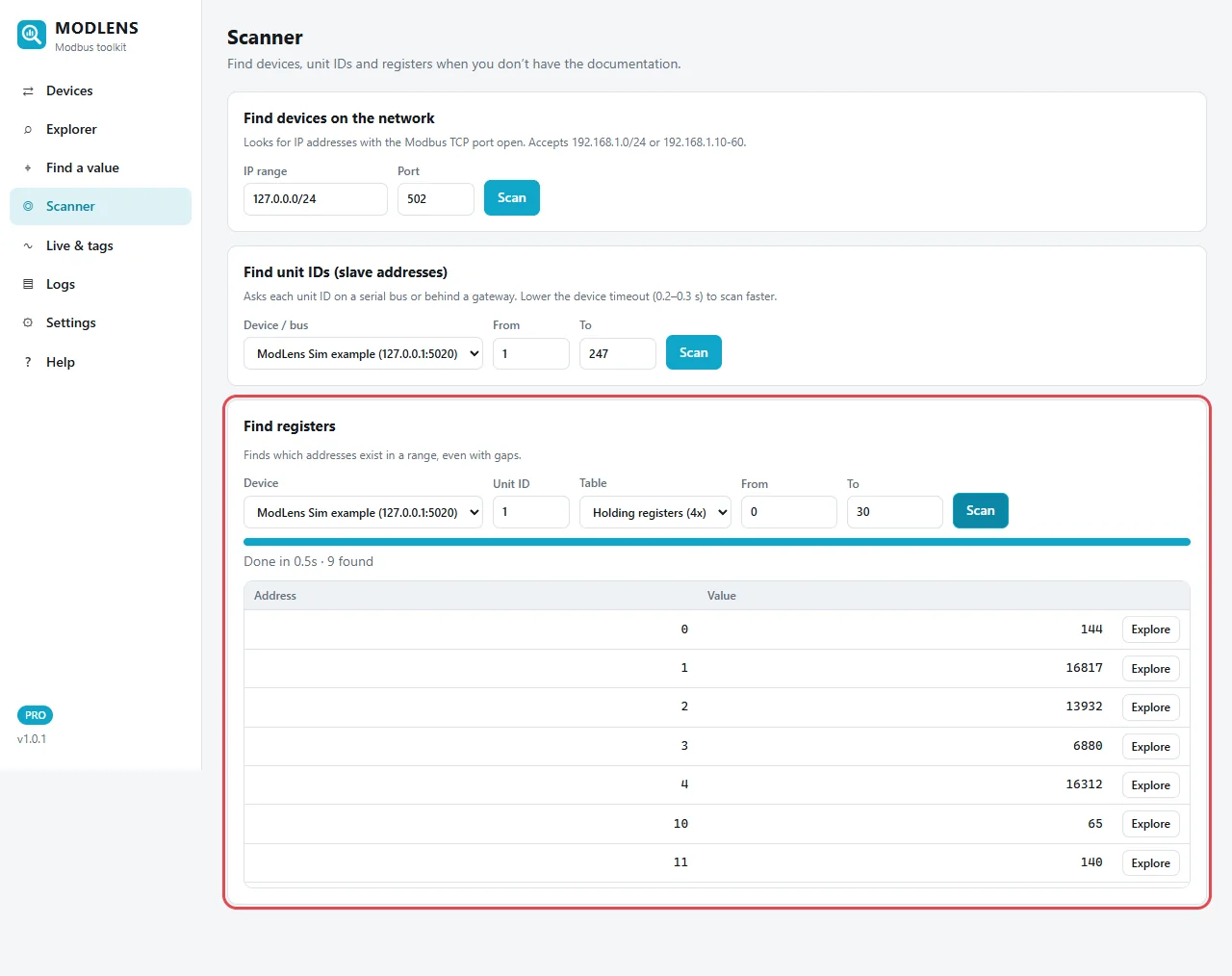
The scan reads in blocks. When a block is rejected, it splits it in halves until the valid addresses are isolated, so gaps do not hide registers. Result here: 9 found in 0.5 s: addresses 0 to 4, 10, 11, 20 and 21 (the last two are below the visible part of the list). That is the real map of this device. Compare it with your documentation: any address your system reads that is not in this list will produce exception 02.
Run the same scan on the input registers table too. If your values appear there and not in holding registers, you have found cause 2.
Step 4: Read the right block
Read only addresses that exist. Here: start 10, count 2.
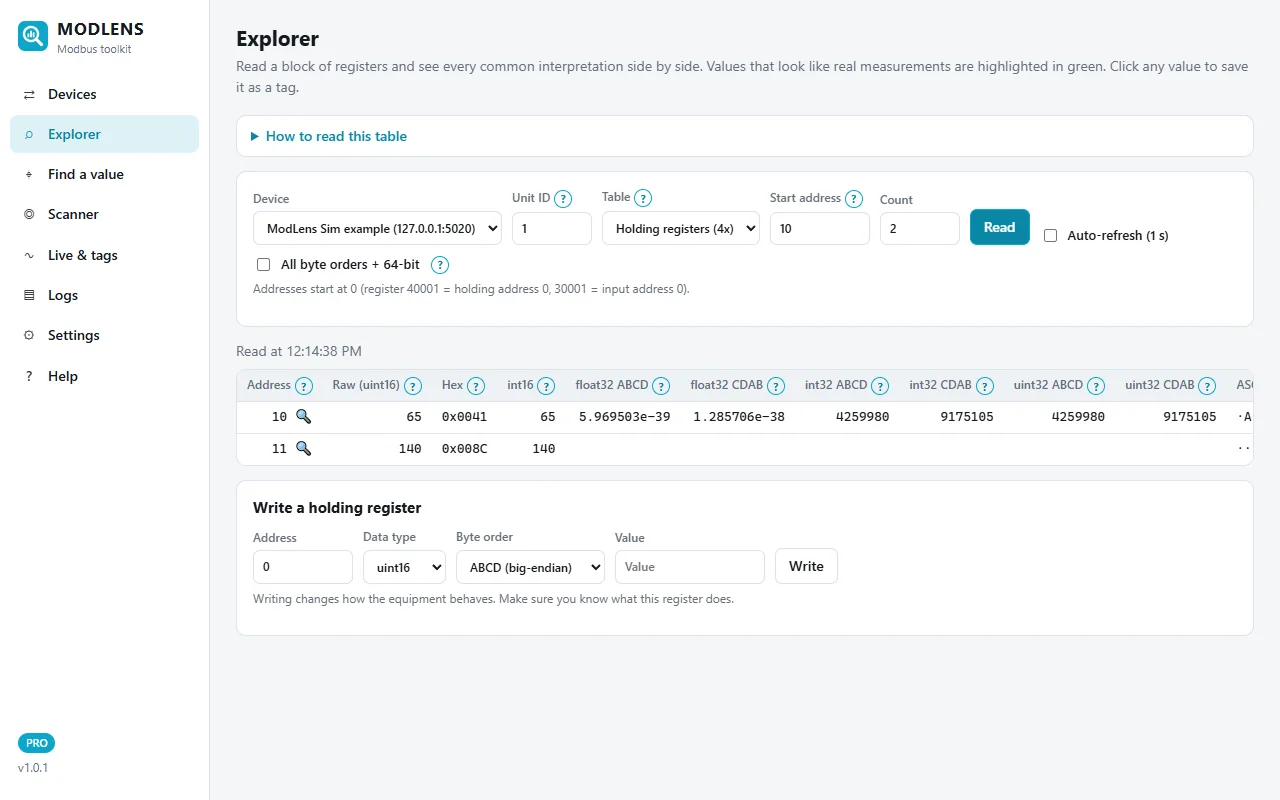
No error. Register 10 reads 65 (the fan speed command, 65 %) and register 11 reads 140, which is the setpoint 14.0 °C once you apply the ×0.1 scale. Configure the same blocks in your BMS, SCADA or PLC driver.
Step 5: Limit the block size for picky devices
If your SCADA or driver groups registers automatically, give it a limit. Most drivers have a setting called "max registers per request", "block size" or "maximum read length". In ModLens it is under Devices → Edit → Advanced: device limits.
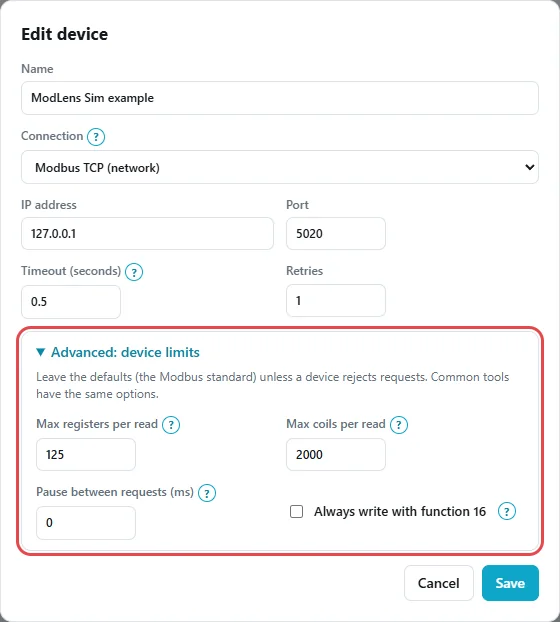
The defaults follow the standard: 125 registers and 2000 coils per read. Lower them only when a device rejects big reads (values like 32, 64 or 100 are common in manuals). ModLens then splits bigger reads by itself.
Worked example: an energy meter that "suddenly" returns exception 2
A technician adds a meter to a BMS. The manual lists:
| Value | Register (manual) | Type |
|---|---|---|
| Voltage L1-N | 30001 | float32 |
| Current L1 | 30007 | float32 |
| Total active power | 30013 | float32 |
| Total energy import | 30073 | float32 |
The technician creates four points with holding register addresses 1, 7, 13 and 73, function 03. Every point shows "exception 02".
- Table check. "3xxxx" means input registers, function 04. Change the table.
- Offset check. 30001 is input address 0, not 1. So the addresses are 0, 6, 12 and 72.
- Gap check. The BMS driver merges points that are close. 0, 6 and 12 become one block 0-13. That works only if all of 0 to 13 exist on this meter. If it fails, lower the driver's block size or split the points.
- Byte order check. Once the exception is gone, the voltage might read 1.4e-41 instead of 230 V. That is not an address problem any more; it is the float word order. See Modbus float byte order explained.
Table and offset can be checked before you even go to site. The free Modbus register converter turns 30001-style numbers into table + address and back.
Common mistakes and how to avoid them
- Changing addresses by trial and error forever. Verify one register against the display (a setpoint, a voltage), then apply the same offset to every point.
- Testing with a big block. Always prove one register works before reading 50. A single read tells you more than ten failed blocks.
- Mixing up exception 02 and a timeout. Exception = the device answered. Timeout = no answer. They need completely different fixes.
- Ignoring the gateway. Behind a Modbus TCP to RTU gateway, exception 02 can come from the serial device itself, while 0A and 0B come from the gateway. Read the code carefully.
If you are still searching for where a value lives, follow how to find a Modbus register address. For a full walk-through of the ModLens screens, see the install and user guide.
You can try the whole method on your laptop before going to site: install ModLens with the free 14-day trial key and run the free ModLens Sim. Then compare with the pricing page if it saves you time on site.
FAQ
What does Modbus exception code 2 mean?
Modbus exception code 2 means "illegal data address": the device received your request but the address, or the address plus the quantity, is not valid for that device. The device is reachable and the unit ID is correct, because it answered. Check the address offset, the register table and whether your block includes addresses that do not exist.
How do I fix "illegal data address" in Modbus?
Read one register alone at the failing address. If it fails, try the address minus one (40001 is address 0), then the other table (holding vs input). If one register works but a block fails, split the block or lower the "max registers per request" setting. A register scanner shows which addresses really exist.
Why do single registers work but a block read gives exception 2?
Because the block includes at least one address that does not exist. Many devices reject the whole request if any register in it is missing. This often happens when SCADA or BMS drivers merge nearby tags into one request. Split the block around the gap or reduce the maximum block size in the driver.
Is exception 2 a wiring or communication problem?
No. An exception response is a valid, complete answer from the device, so the wiring, baud rate, parity and unit ID are working. Wiring and settings problems show up as timeouts or CRC errors instead. With exception 2, look at the addresses, the table and the block size.
What is the difference between exception code 2 and exception code 3?
Code 2 (illegal data address) is about where you read or write: the address range is not valid on the device. Code 3 (illegal data value) is about what is in the request: a quantity outside the allowed range (for example more than 125 registers) or a written value the device refuses. Some devices mix them up, so test a small read to be sure.
Does 40001 mean address 40001 or address 0?
In the usual convention, 40001 is the first holding register, which is address 0 in the Modbus frame. 40002 is address 1, and 30001 is input register address 0. Some software asks for the 40001-style number and converts it, others want the 0-based address, so check what your tool expects.
Can writing to a register cause exception 2?
Yes, on some devices. Writing to an address that does not exist, or to a read-only measurement register, can return exception 2. Other devices answer exception 1, 3 or 4 for a read-only register, so check the device manual for its behaviour.
What does exception code 2 mean behind a Modbus gateway?
If the code is 02, it normally comes from the serial device behind the gateway: the gateway forwarded the request and passed the device's answer back. Gateway problems have their own codes, 0A (path unavailable) and 0B (target device failed to respond). Check the map of the exact device at that unit ID.