BacLens · from the makers of ModLens
See, understand and replay any BACnet building
Connect a laptop to a BACnet network. BacLens finds every router, network and controller, recognizes the equipment behind the points, draws live system graphics, raises alarms when something is wrong, and records every value so you can replay what happened.
Why BacLens
Walk into any BACnet site and understand it in minutes
No graphics, no point list, an old front end, or a front end you don't have a license for? BacLens builds the picture from the network itself.
Full architecture
Every connection, BBMD, router, BACnet/IP and MS/TP network and device, laid out the way the building is wired.
Equipment recognized
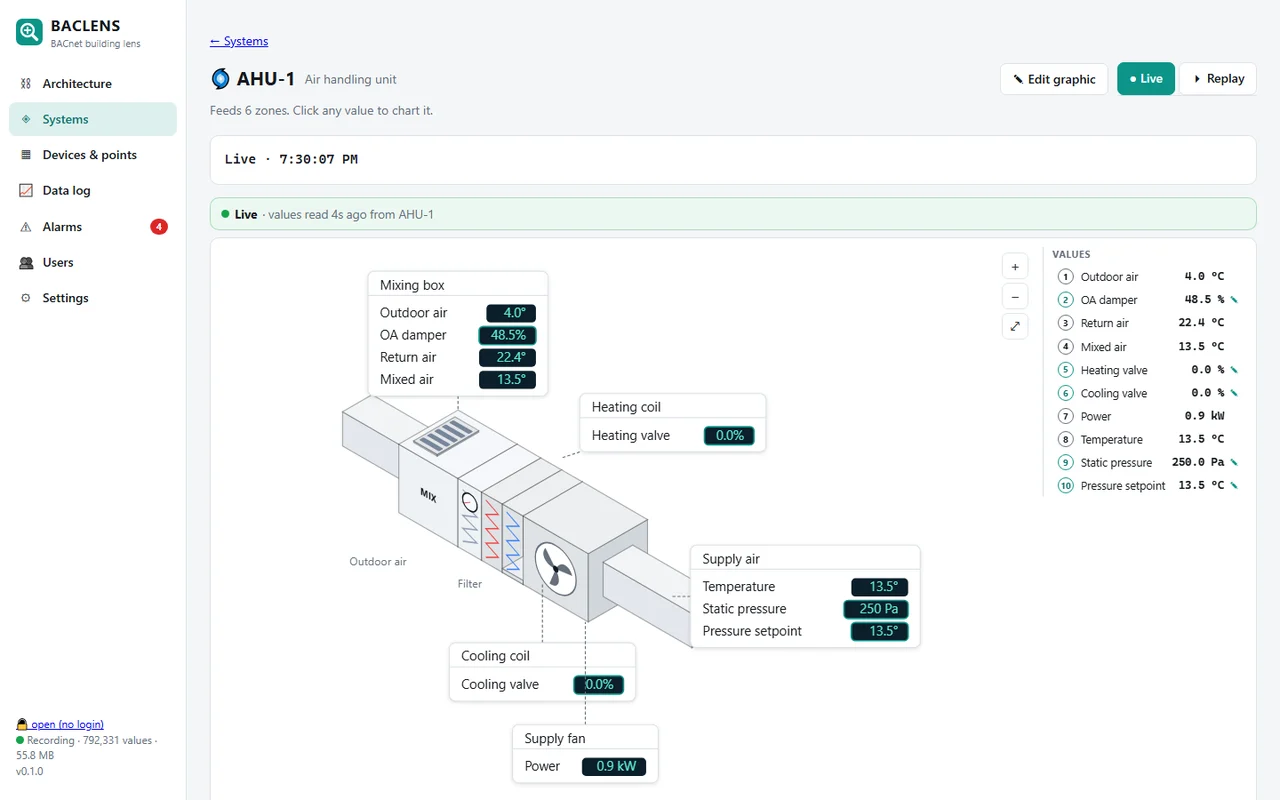
Points are grouped into AHUs, VAVs, boilers, chillers, pumps, meters and more, from English and French point names.
Live system graphics
Each piece of equipment gets a readable graphic with its live values. Click a value to chart it or override it.
Alarms that explain
Built-in rules spot real problems (stuck damper, pump commanded but not running, zone too cold) and email the right people.
Record and replay
Every value is logged. Go back to any moment and watch what the system did, on the same graphics.
Network analyzer
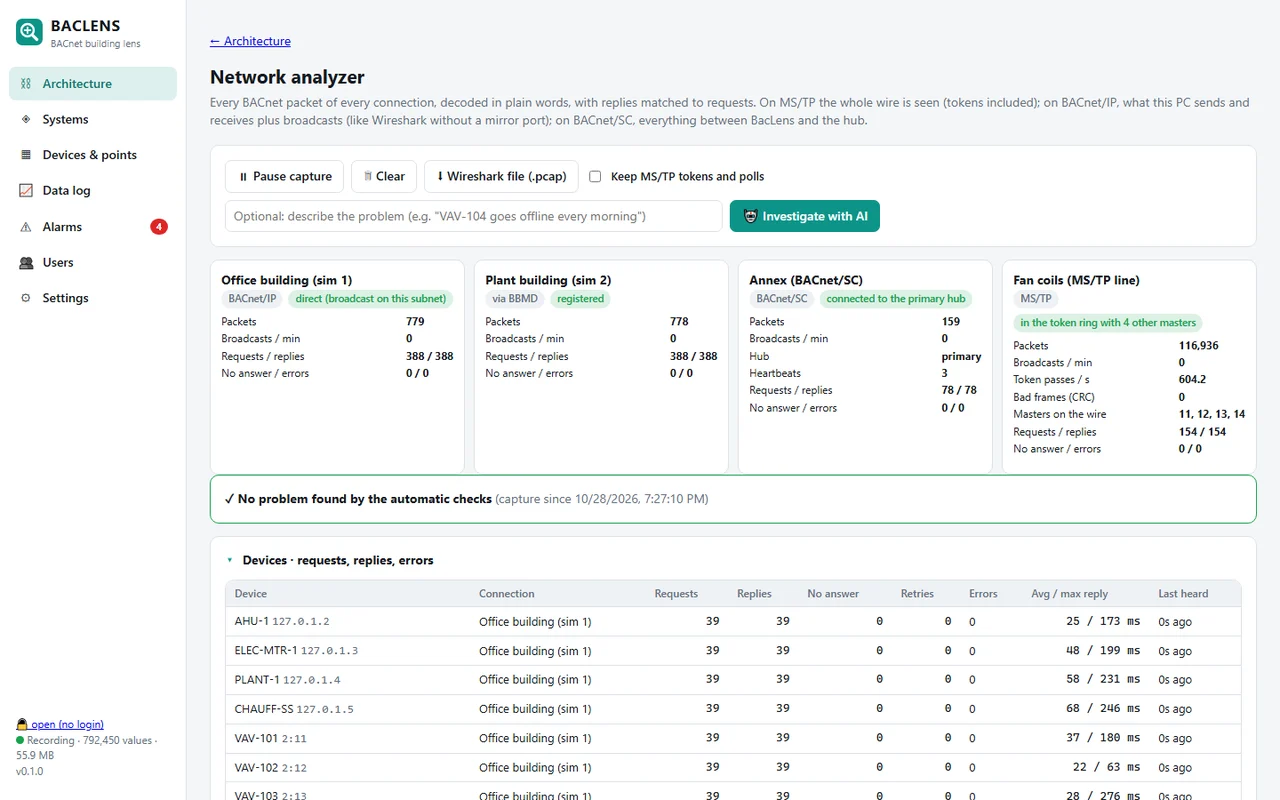
Every BACnet packet decoded in plain words, with response times, errors and an AI that investigates the capture.
Example 1 · Architecture
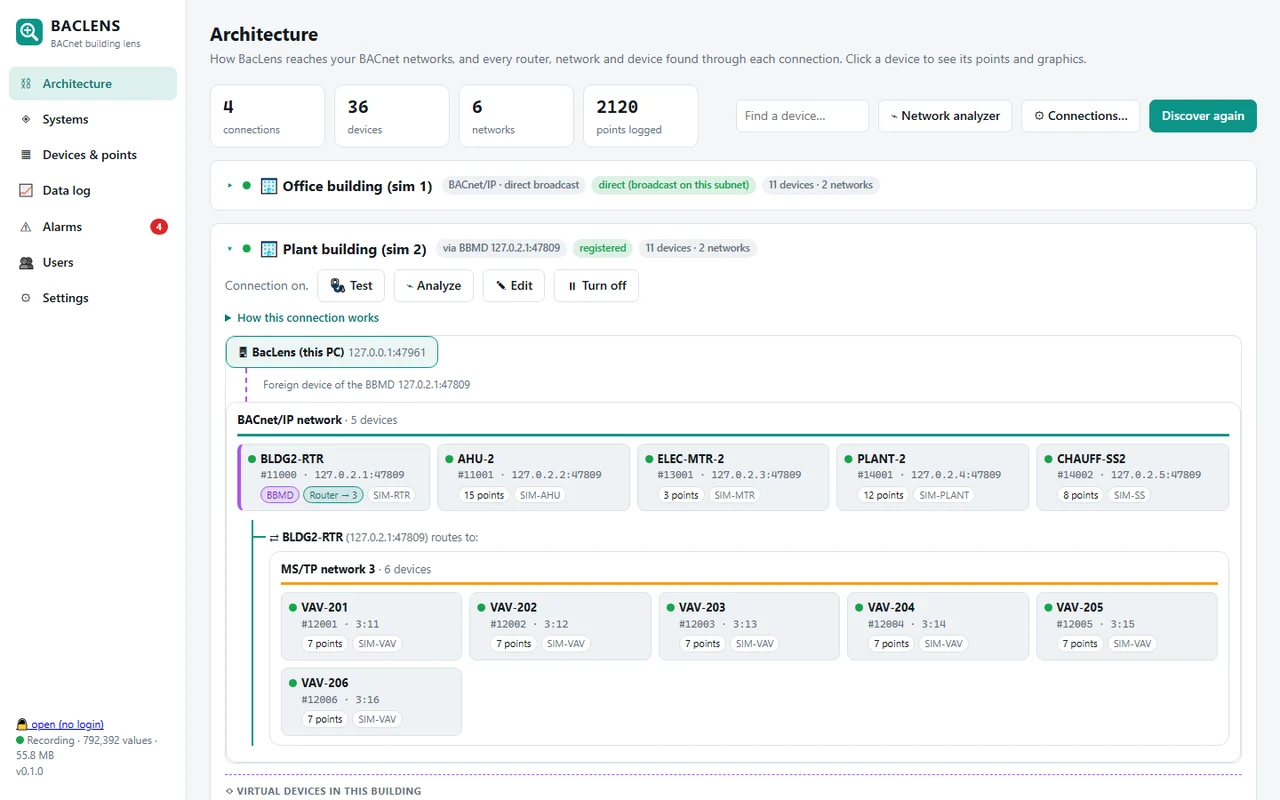
Every router, network and controller on one page
BacLens shows how it reaches each network: direct broadcast on the local subnet, as a foreign device registered with a BBMD, through a router to an MS/TP trunk, or through a BACnet/SC hub. Several sites or subnets can be connected at the same time.
- BBMDs and routers highlighted, registration status shown
- MS/TP networks drawn behind their router, with MAC addresses
- Device instance, address, point count and model for every controller
Example 2 · System graphics
Graphics built from the points, not drawn by hand
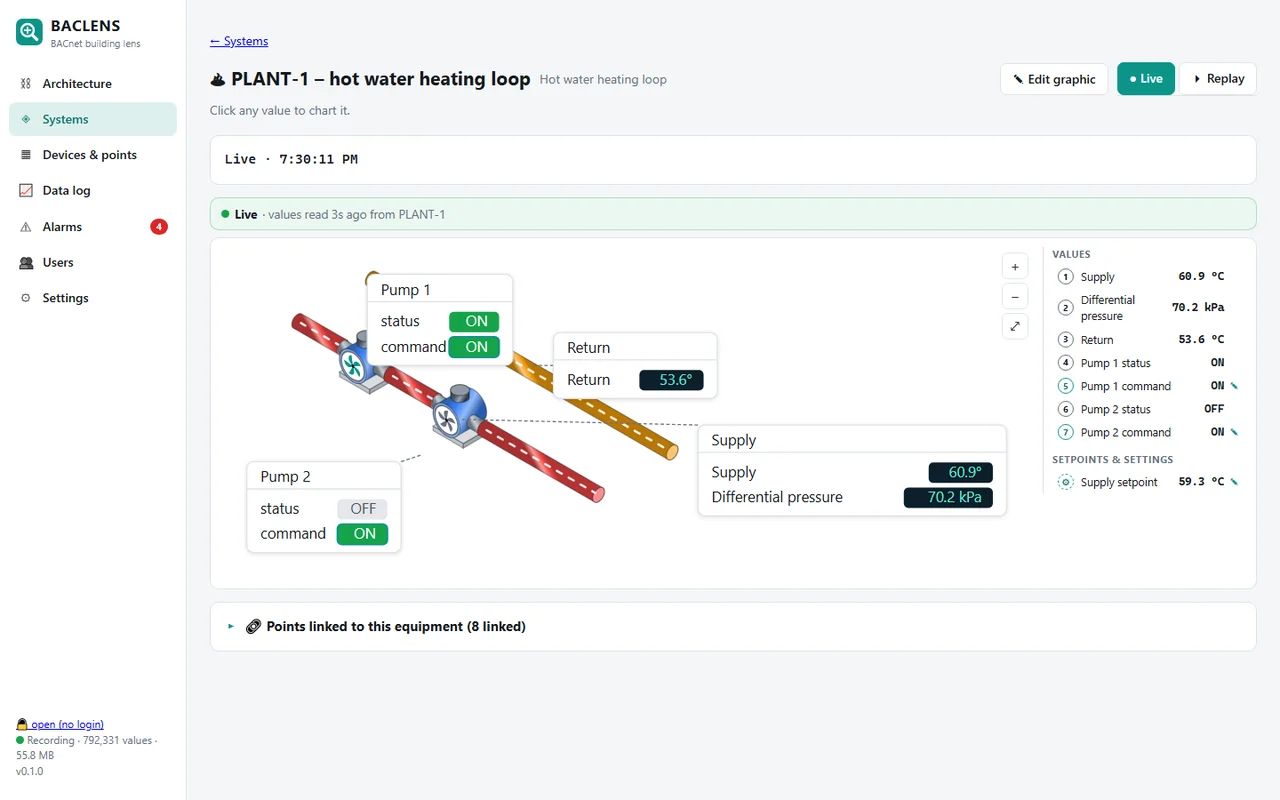
BacLens recognizes the role of each point (supply temperature, valve command, pump status, setpoint…) and draws the equipment with its live values. Pumps and fans follow their status. You can edit any graphic, or ask the AI to change it in plain words.
- AHU, RTU, VAV, fan coil, ERV/HRV, heat pump, boiler, chiller, cooling tower, hot and chilled water loops, pumps, exhaust fans, meters
- Point names in English and French (TEMP ALIM, VOLET, POMPE, CHAUDIÈRE…)
- Click any value: chart, override at a BACnet priority, release, priority array
Example 3 · Alarms
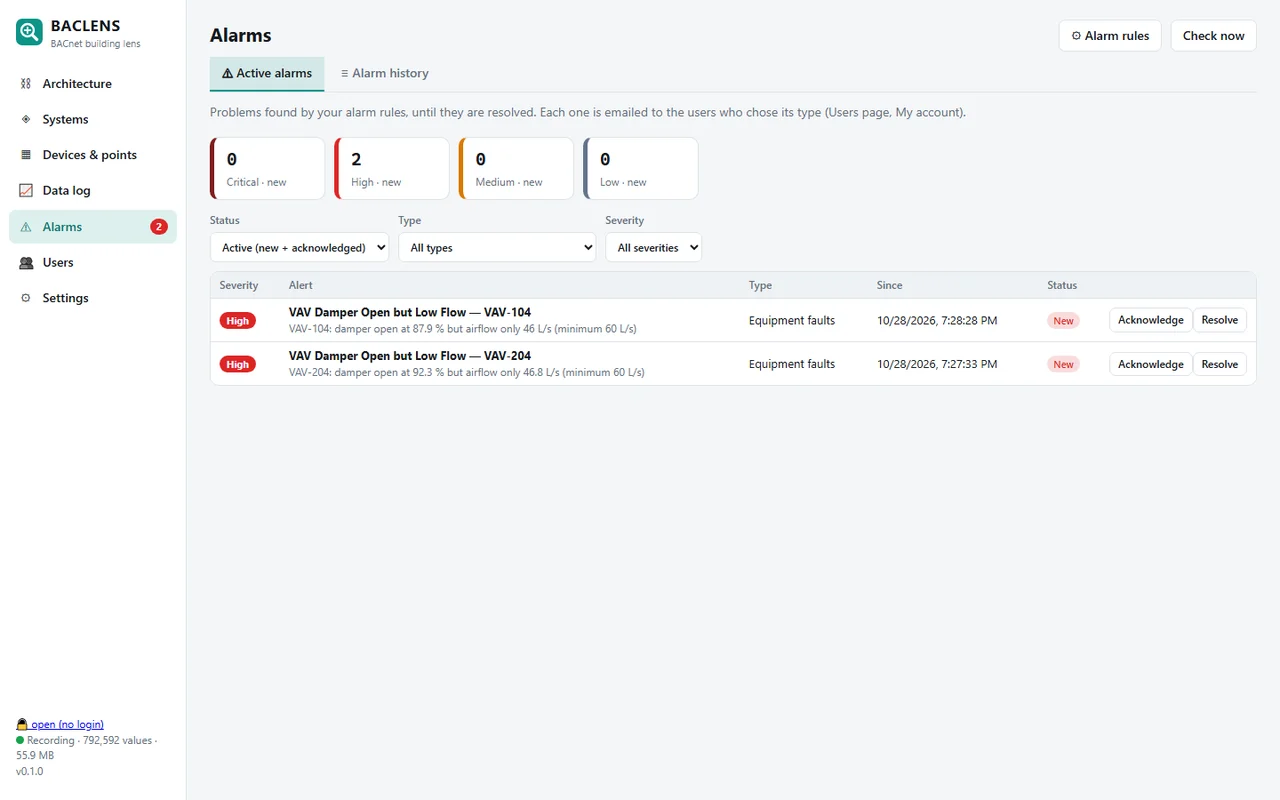
Problems found for you, with the numbers
Alarm rules run on the recognized equipment, so they work on any site without writing logic point by point. Each alarm says what is wrong with the real values, and goes by email to the users who chose that alarm type.
- Damper open but low airflow, pump commanded but not running, exhaust fan failed
- Hot water below setpoint, chilled water above setpoint, zone too hot or too cold
- Each user picks alarm types (comfort, energy, equipment, communication, override…) and a minimum severity
Example 4 · Network analyzer
Find communication problems without Wireshark skills
BacLens captures the BACnet traffic of every connection and decodes it in plain words. It matches each request to its reply, measures response times, counts retries and errors, and runs automatic checks. When something is wrong, the AI investigates the capture and cites the packets it used.
- BACnet/IP, MS/TP (the whole wire, tokens included) and BACnet/SC
- Duplicate device instances or MAC addresses, slow devices, BBMD and router rejects
- Export to a Wireshark .pcap file
AI on your terms
An assistant that uses tools, not guesses
The AI in BacLens maps points to equipment, explains alarms, edits graphics and investigates network captures. It works through BacLens's own tools and real values, so its answers come with the numbers they are based on. Use Claude, or a local model with Ollama for sites that must stay off the cloud. Without AI, the built-in rules still recognize equipment and raise alarms.
Free and Pro
Start free, upgrade when the job needs it
BacLens Free
For quick troubleshooting, free forever.
- Discover the whole network: every router, network and controller
- 20 live points of any type (AI, AO, AV, BI, BO, BV, multistate…), picked with filters by object type, instance range and device
- 1 live system graphic
- Read values and override / release at a BACnet priority
BacLens Pro
For commissioning, service and monitoring.
- Every point, live
- Graphics for every piece of equipment, editable, with AI help
- Alarms emailed to the right people, by alarm type
- Record every value and replay any moment
- Network analyzer with AI investigation, Wireshark export
Pricing will be announced at launch. Waitlist members hear it first.
Available today
Try our free BACnet simulator now
BacLens Sim puts a whole BACnet building on your laptop: a router and BBMD on UDP 47808, an AHU, six VAV boxes, a boiler plant, a meter and a basement controller, with live values and three hidden faults. Use it with any BACnet tool.
BacLens FAQ
When will BacLens be available?
BacLens is in development and being tested on real sites. Waitlist members get early access first and hear the launch price before anyone else.
What BACnet connections does BacLens support?
BACnet/IP on the local subnet, BACnet/IP as a foreign device registered with a BBMD, MS/TP on RS-485 through a USB adapter, and BACnet Secure Connect (BACnet/SC) through a hub. Several connections can run at the same time.
Does BacLens replace my BMS front end?
No. BacLens is a tool for technicians and integrators to discover, understand, troubleshoot and record a BACnet system. It reads the controllers directly and can work next to any existing front end.
Can BacLens write to BACnet points?
Yes, users with the right role can override a value at a chosen BACnet priority and release it. Every write is signed with the user's name in the log.
Do I need the AI to use BacLens?
No. Discovery, equipment recognition, graphics, alarms, recording and the network analyzer work without AI. The AI (Claude, or a local model with Ollama) adds explanations, graphic editing and capture investigation.
Will there be a free version of BacLens?
Yes. BacLens Free shows the whole network architecture, 20 live points of any type that you pick with filters (object type, instance range, device), and 1 live system graphic. BacLens Pro adds every point, all graphics, alarms, recording and replay, and the network analyzer.
Is there a BACnet simulator to test with?
Yes, BacLens Sim is free today: a simulated BACnet/IP building with a router, BBMD and 10 controllers. Get BacLens Sim.
Which computers will it run on?
Windows first. A Raspberry Pi version for permanent recording on site is planned, like ModLens.