PeakLens · energy meter & peak manager for BACnet
Cut demand charges on any BACnet building
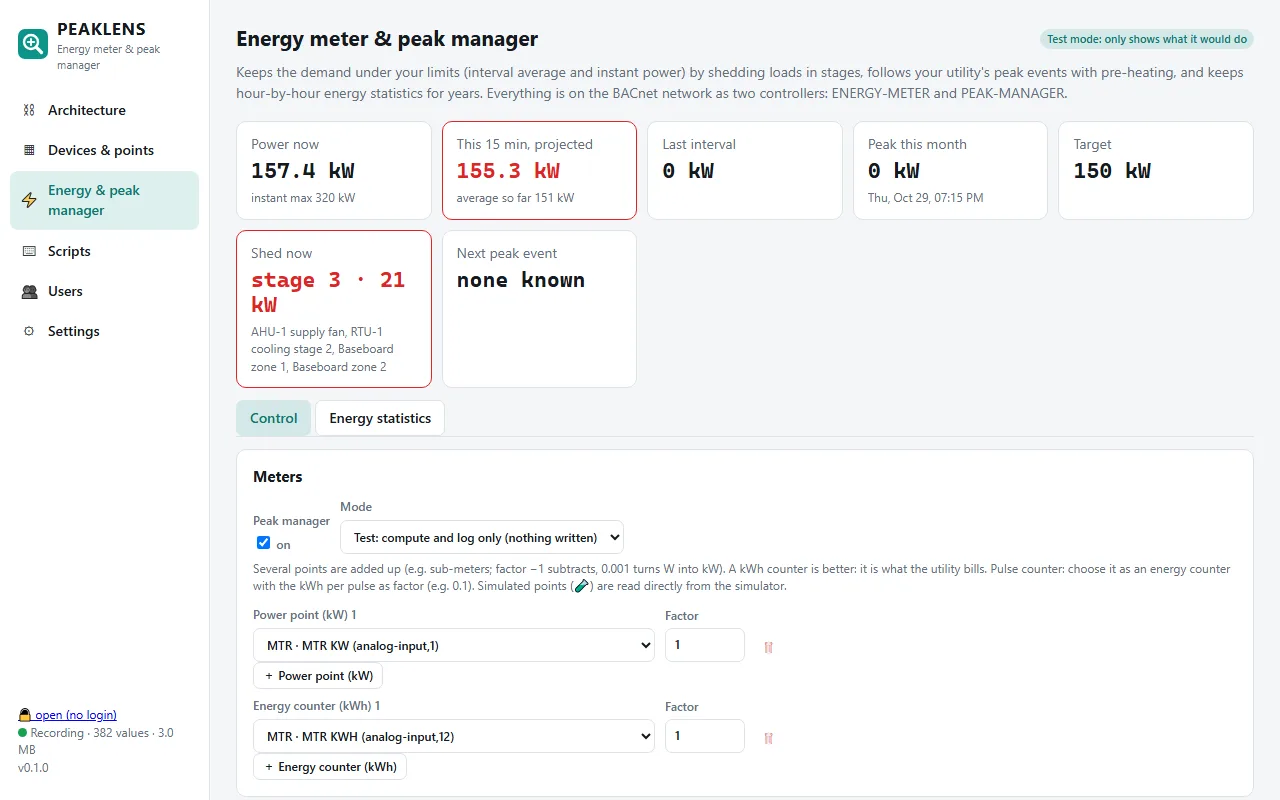
PeakLens reads your meters over BACnet, projects every demand interval, and sheds loads in stages before the building sets a new peak. It follows your utility's peak events (Hydro-Québec, EDF Tempo, ERCOT 4CP, PJM 5CP, Ontario ICI or your own), pre-heats before them, and puts everything back on the BACnet network as two controllers your BMS can read.
The problem, everywhere
One bad quarter-hour sets the whole month's bill
Most commercial electricity bills charge for demand: the highest average power over a 15-minute interval in the month (30 or 60 minutes with some utilities, sometimes a sliding window). Many contracts also add a fee when an instant power limit is passed, and utilities pay buildings to cut their load during peak events. A chiller, a fan and the morning warm-up starting together is all it takes.
| Where | What drives the cost | PeakLens source |
|---|---|---|
| Québec · Hydro-Québec | Monthly billed demand; winter peak events for the offer in the contract (GDP-Affaires, Latitude, Engagement, Flex rates, winter credits) | Hydro-Québec's public peak event data, for your offer |
| France · EDF Tempo | Red days (22 a year) and white days with much higher prices from 6:00 to 22:00 | The day colours published by RTE (today and tomorrow) |
| Texas · ERCOT | 4CP: the four summer coincident peaks set next year's transmission charge | Risk hours (June–September afternoons) plus your alert provider's calendar |
| PJM region (US) | 5CP / PLC: the five summer peak hours set next year's capacity charge | Risk hours plus your supplier's alerts |
| Ontario · IESO | ICI / Class A: the five system peaks set the Global Adjustment share | Risk hours plus your peak alert feed |
| Anywhere | Time-of-use peak hours, a demand ratchet, a subscribed power with a fee | Fixed windows, a calendar (.ics), a JSON API, a relay signal on the BMS, or events typed in |
The customer picks the program written in their own contract; PeakLens reads the signal published for it. Several sources can run together.
How it works
Measure, project, shed in stages, bring back one by one
Reads your meters
Any BACnet point: kW, a kWh counter (best: it is what the utility bills) or a pulse counter. Several meters are added up, each with a factor, across networks, BBMDs and MS/TP.
Projects the interval
Every few seconds it projects where the current 15, 30 or 60 minutes will end, and watches the instant power against your maximum.
Sheds by stages
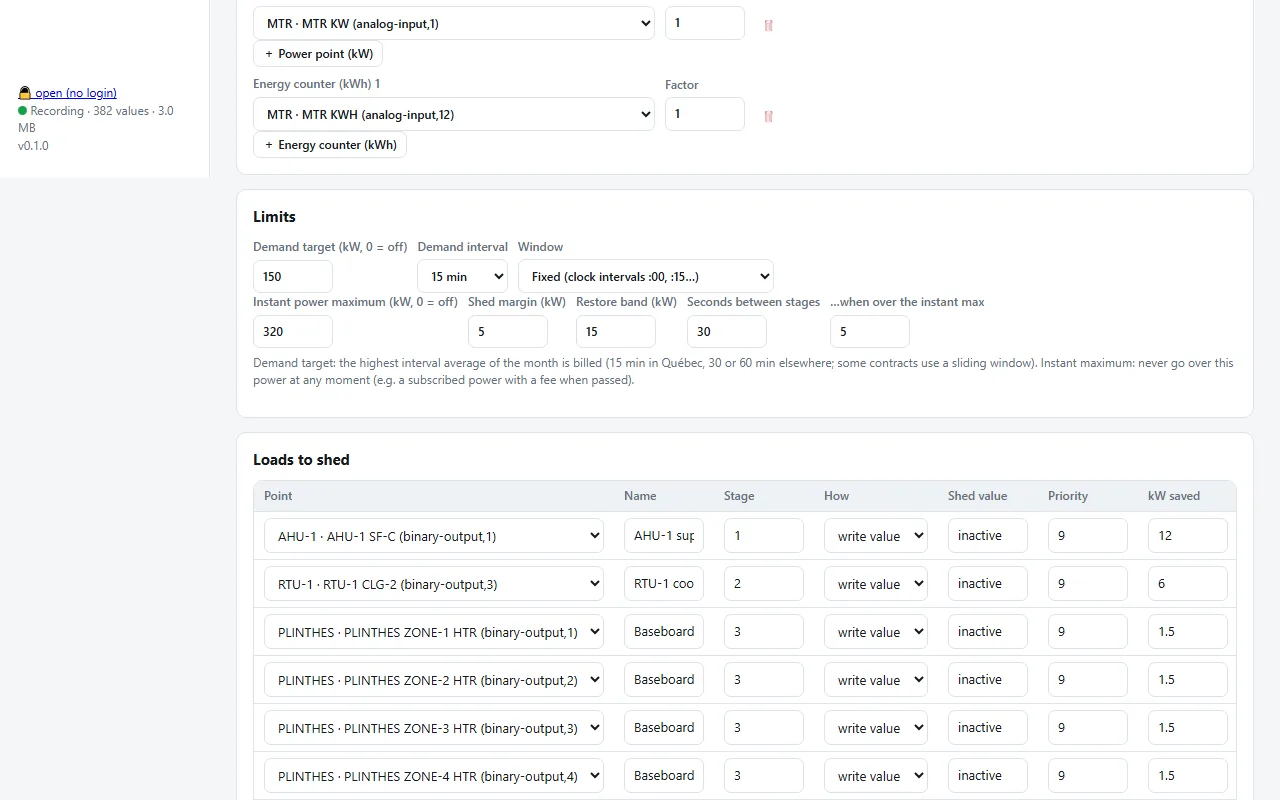
Stage 1 first, then 2, 3… A stage is a group. A load can be switched off, limited (60 % on a VFD or a dimmer) or offset (−2 °C on a setpoint).
Takes turns
Baseboards and similar loads cycle: a third off for ten minutes, then the next third. Nothing stays off for long, comfort stays.
Pre-heats before events
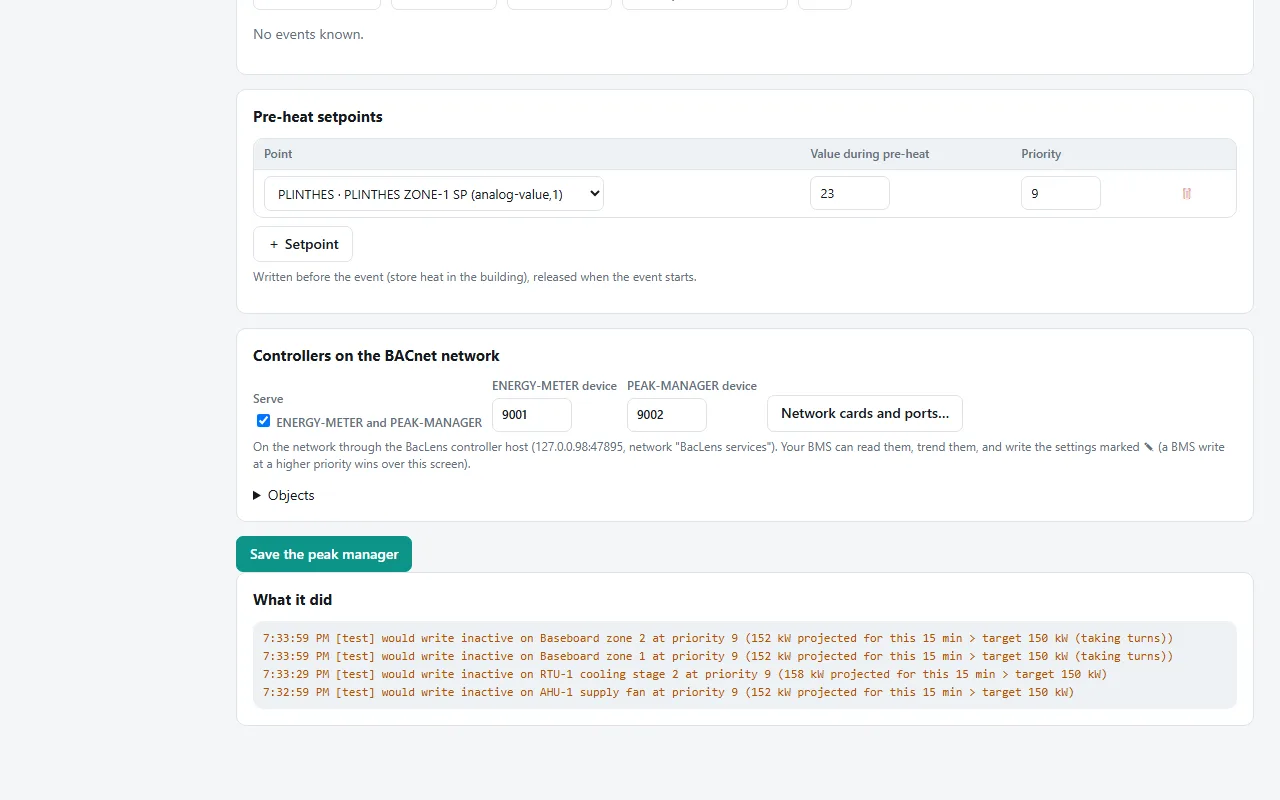
Setpoints go up before a peak event to store heat, the event loads are shed during it, and stages come back one at a time after it (no rebound peak).
Safe on real buildings
Minimum off and on times, a comfort limit, writes at a priority (release gives control back), and a test mode that only logs what it would do.
Choose the source in a minute
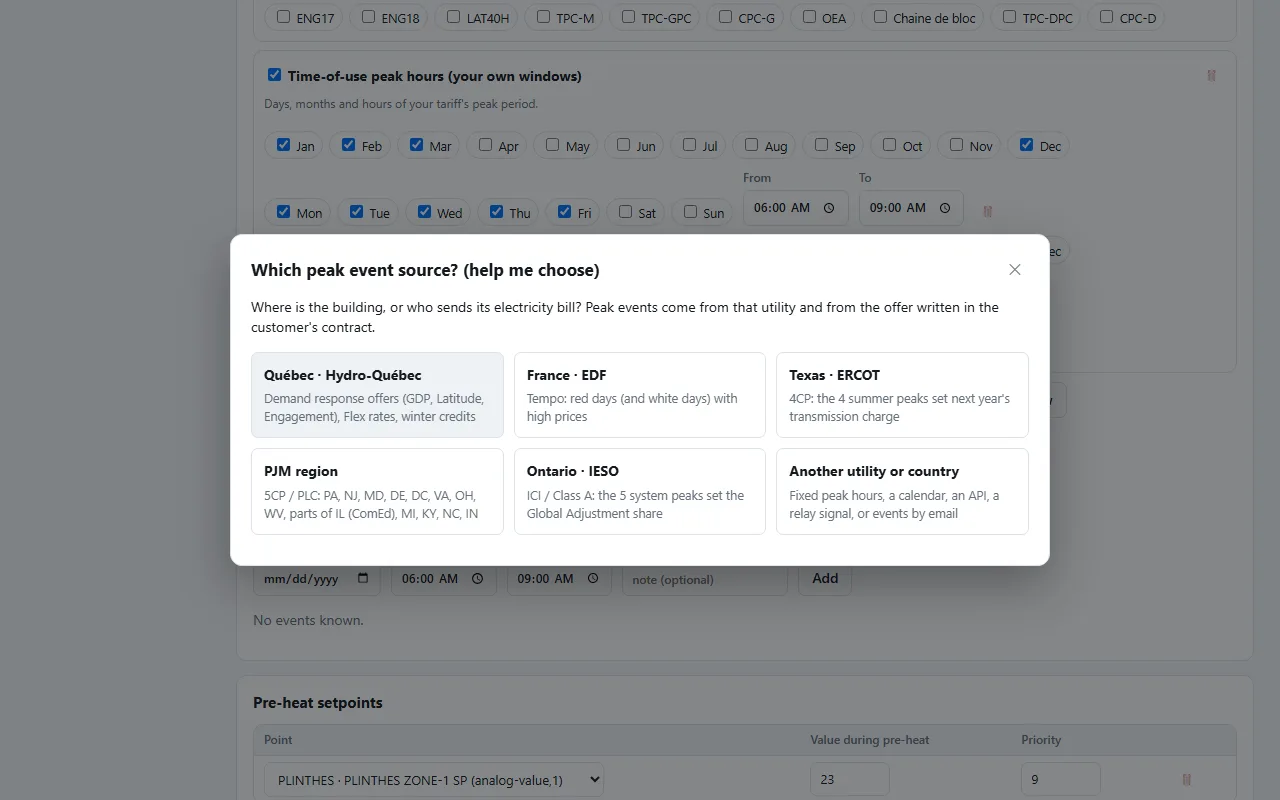
"Help me choose" asks where the building is
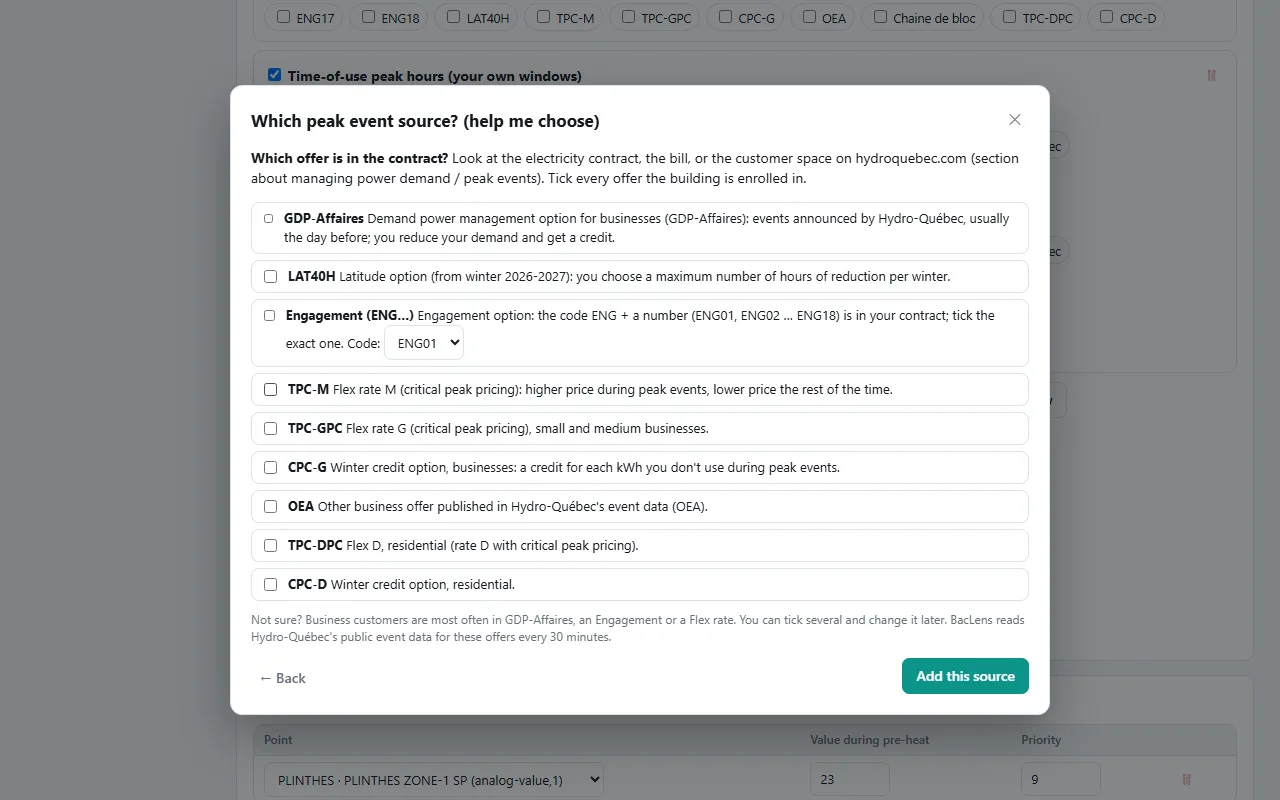
Québec, France, Texas, PJM, Ontario, or another utility. For Hydro-Québec it lists the offers with what they mean (GDP-Affaires, Latitude, Engagement ENG01–ENG18, Flex rates, winter credits) and where to find yours in the contract. For EDF it explains red and white Tempo days. Anywhere else: fixed peak hours, a calendar link, an API, a relay contact, or events typed in by hand.
Hydro-Québec
Tick the offer in the contract, PeakLens does the rest
PeakLens reads Hydro-Québec's public peak event data for the offers you tick, every 30 minutes, pre-heats for the minutes you choose before each event, sheds the event loads during it, and keeps the 15-minute demand under your target the rest of the winter.
On the BACnet network
Two controllers your BMS can read and trend
- ENERGY-METER: total power and energy, each input, and energy, min, max, average and peak demand for this and the last hour, day, week, month and year
- PEAK-MANAGER: demand so far and projected, month peak, stage, kW shed, minutes to the next event, event and pre-heat status
- The BMS can write the target, the instant maximum and the enable: an operator adjusts it from the usual graphics
- Every interval and every hour is kept for years, with CSV exports (the 5-year history engineers ask for)
Runs all the time
A PC or a Raspberry Pi on the network
Windows 10/11 or a Raspberry Pi (MS/TP with a USB-RS485 adapter or an RS-485 HAT). One click makes the computer always on: PeakLens starts before anyone logs in, is restarted if it stops, and the computer never sleeps. Start in test mode: PeakLens writes in its log what it would do, then switch to live when you are sure.
PeakLens FAQ
Is PeakLens really free?
Yes, PeakLens is a free download for Windows and Raspberry Pi. We ask for an email to send you the download and to tell you about BacLens, our BACnet building explorer.
Which meters does it work with?
Any meter or controller whose power (kW) or energy (kWh) is a BACnet point, on BACnet/IP, through a BBMD or on MS/TP. Pulse counters work too: choose the counter and enter the kWh per pulse. Several meters can be added up or subtracted.
How does it shed without hurting comfort?
Loads are shed by stages, with minimum off and on times and a maximum off time. Loads like baseboards take turns instead of all stopping, setpoints can be offset instead of turned off, and after an event the stages come back one at a time. Every write is at a BACnet priority: releasing it gives control back to the building's own program.
Does it work with my utility?
Built in: Hydro-Québec peak events (for the offer in your contract), EDF Tempo red and white days, risk hours for ERCOT 4CP, PJM 5CP and Ontario ICI. For any other utility: fixed peak hours, a calendar link (.ics) or a JSON API from your utility or alert provider, a relay or BMS signal read as a BACnet point, or events typed in by hand. "Help me choose" in the app walks you through it.
Can I try it before it touches the building?
Yes: PeakLens starts in test mode. It reads the meters and decides, but only writes in its log what it would do ("would write inactive on AHU-1 supply fan at priority 9"). Switch to live when the log looks right.
What happens after a power cut?
On a Raspberry Pi installed with our installer, PeakLens starts again by itself when the power comes back (it waits for the right time first). On a Windows PC made always on, it starts before anyone logs in; set "Restore on AC power loss" to "Power On" in the BIOS so the PC switches on by itself.