Modbus TCP · RTU · RTU over TCP
The display says 21.5 °C.
ModLens finds the register.
ModLens is the Modbus tool for technicians and integrators. Scan a network, decode every register format side by side, find the register behind any number on a display, and log it 24/7 on a laptop or a Raspberry Pi.
Why technicians use it
Stop guessing registers, byte orders and scale factors
Manuals are missing, wrong, or count from 1 instead of 0. ModLens shows you what the device really sends, and what it means.
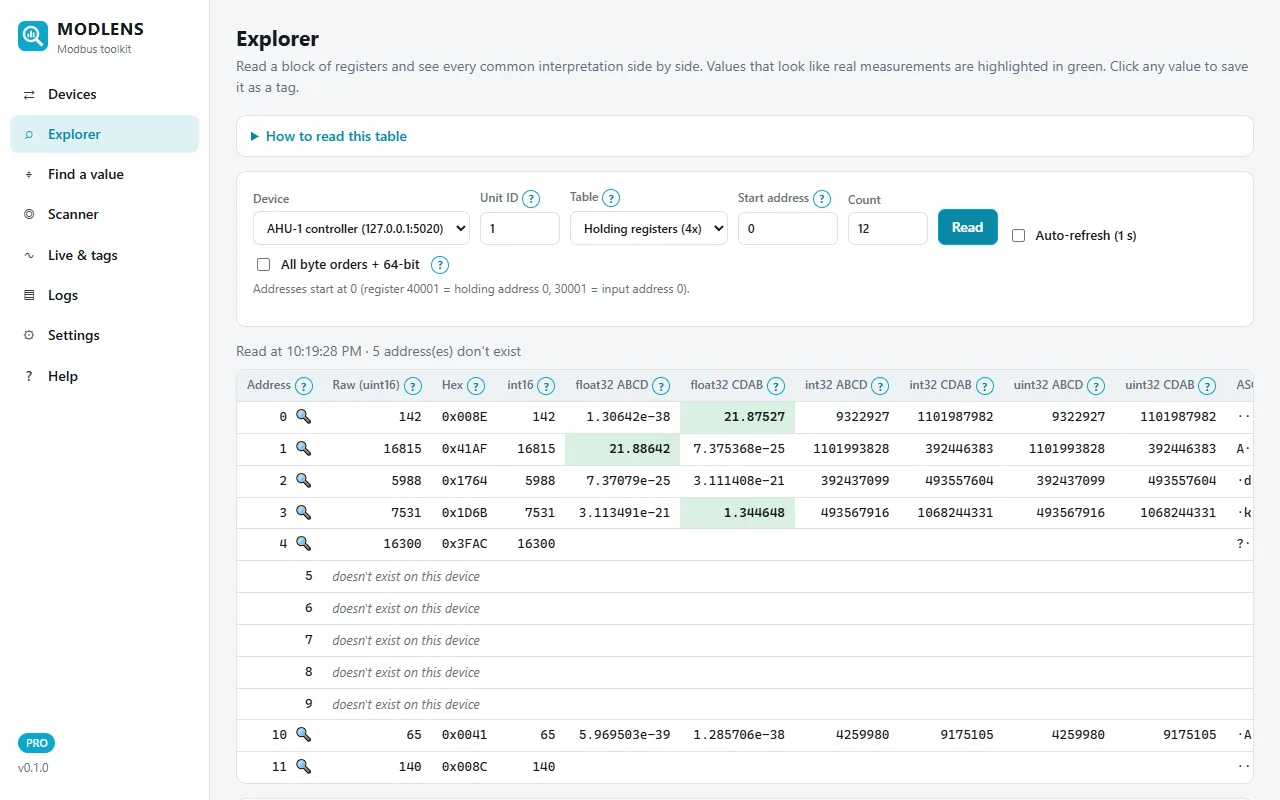
Explorer
Read a block of registers and see uint16, int16, float32, int32 and uint32 in every common byte order at once. Values that look like real measurements are highlighted.
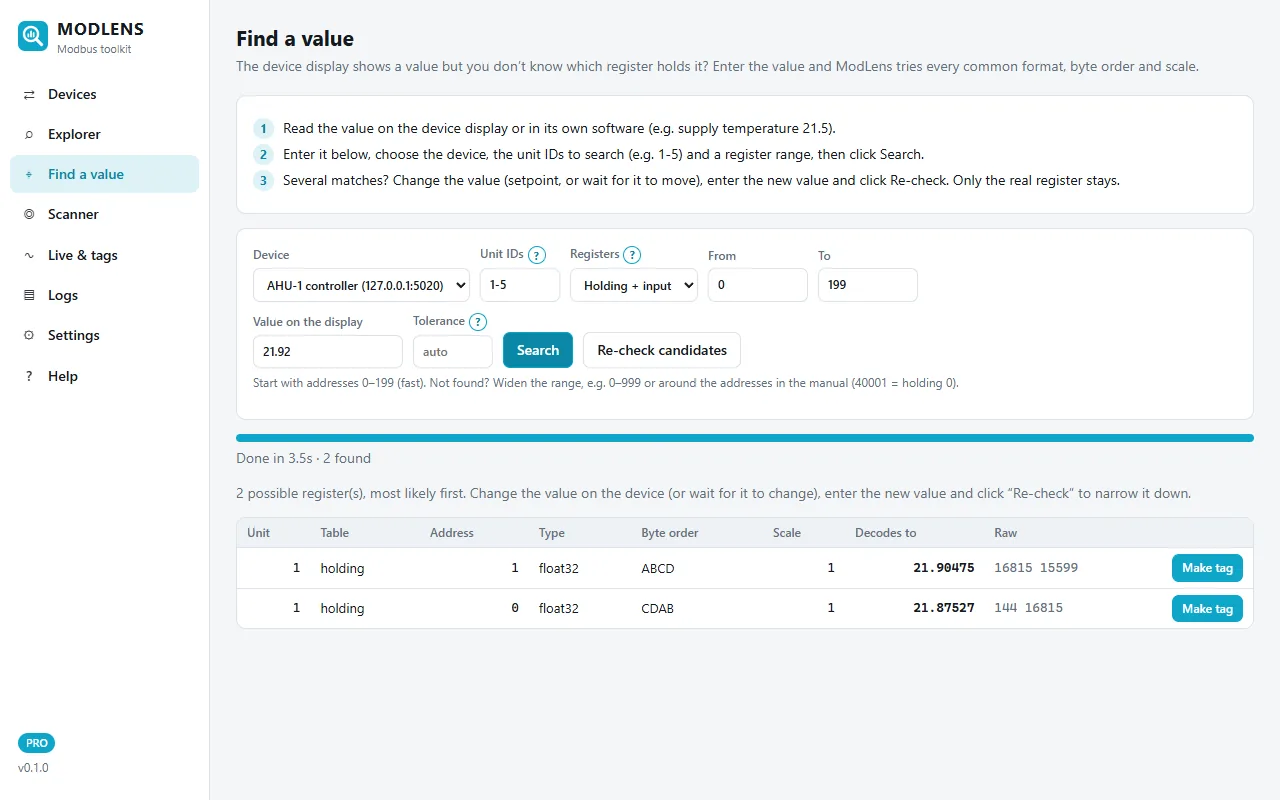
Find a value
Type the number on the device display. ModLens tries every format, word order and scale across unit IDs and both register tables, and ranks the matches.
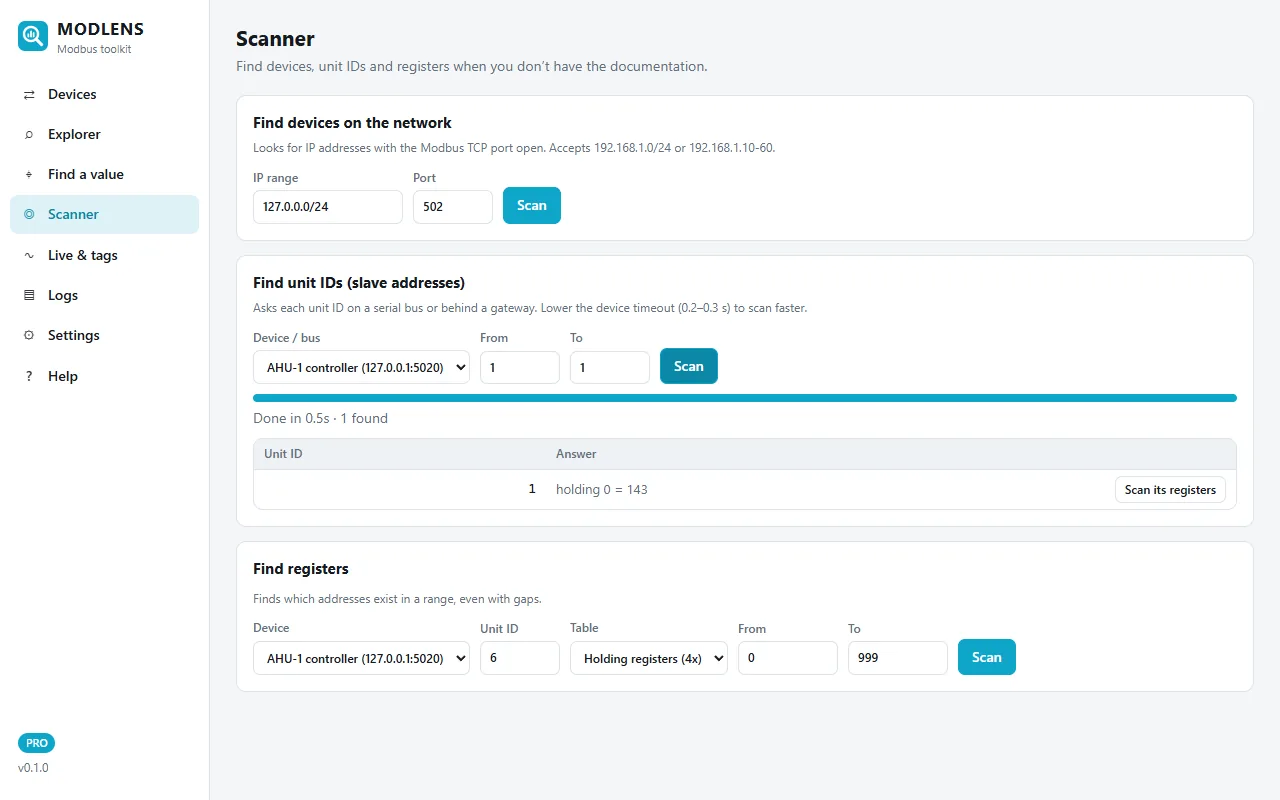
Scanner
Find Modbus TCP devices on a subnet, the unit IDs answering on a bus or behind a gateway, and which addresses exist in a range, even with gaps.
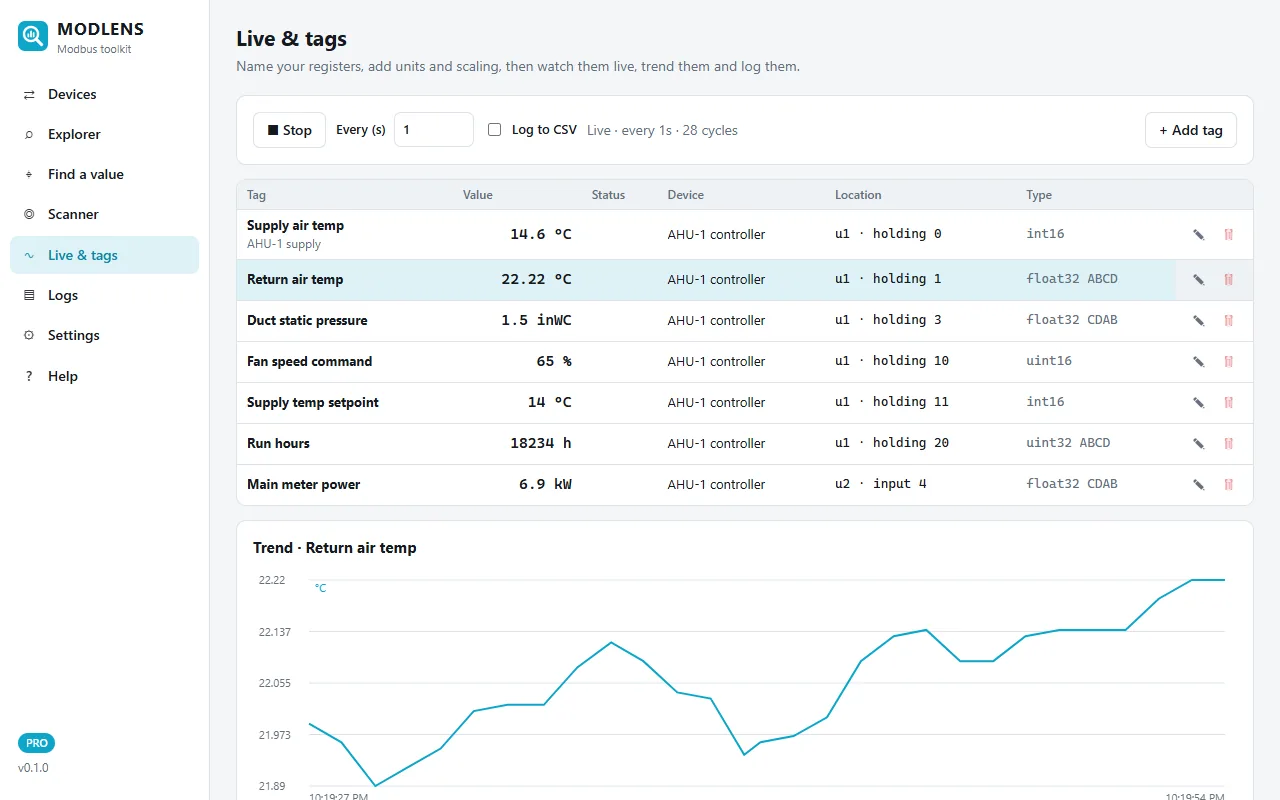
Live tags, trends & alarms
Name registers, set units, scale and offset, and watch them live with a trend chart and high/low alarms.
24/7 CSV logging
Daily CSV files that open in Excel. Logging resumes by itself after a reboot or a power cut, and old files are cleaned up automatically.
Remote dashboard
Leave a laptop or a Raspberry Pi on site and check the values from your phone or another PC, protected by a password.
Find a value
From the number on the screen to the register, in seconds
The controller shows a supply temperature of 21.2 °C. You don't have the register list. Enter 21.2, choose the unit IDs to search, and ModLens decodes every register as int16, float32, int32 and more, in four byte orders and with common scales (×0.1, ×0.01…).
- Searches several unit IDs and holding + input registers in one go
- Skips unit IDs that don't answer, so a 1–5 search takes seconds
- Several candidates? Change the value and click Re-check: only the real register stays
- One click turns a match into a named tag with the right type and scale
Built for the field
Clear errors, with what to try next
A timeout on RS-485 is not the same problem as a timeout behind a gateway. ModLens explains every Modbus exception and connection problem in plain language, with a checklist: unit ID, baud rate and parity, swapped A/B wires, address offset, table, block size.
- Modbus TCP, RTU over RS-485 (USB adapter) and RTU over TCP gateways
- Per-device limits: max registers per read, write with function 16 only, pause between requests
- Help built in: (?) on every term, a Modbus glossary and troubleshooting
- Works offline, nothing leaves your computer
Raspberry Pi data logger
A 24/7 Modbus logger for the price of a Raspberry Pi
Install ModLens on a Raspberry Pi with one command. It starts at boot, logs your tags to CSV, restarts by itself after a power cut, and serves a dashboard you can open from any phone or PC on the network.
Also from ModLens
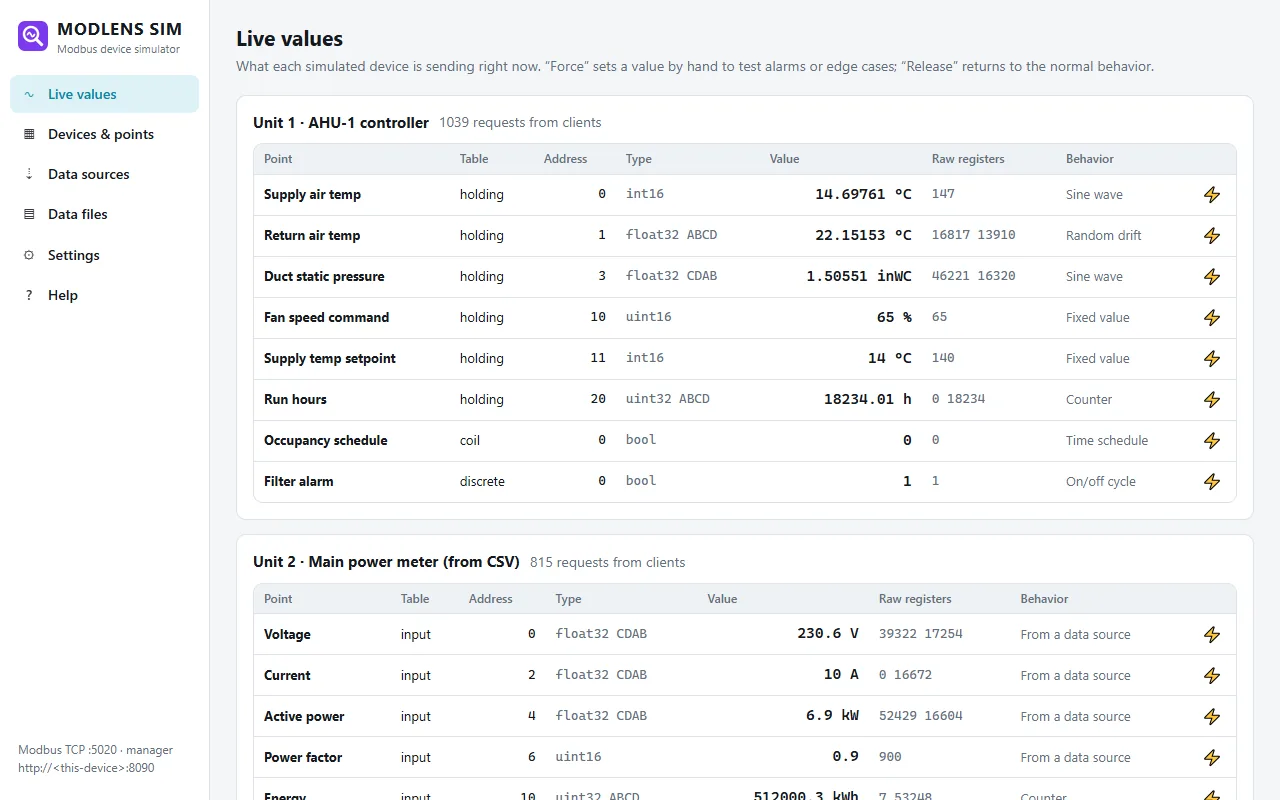
ModLens Sim: Modbus devices without the hardware
Simulate controllers, meters and sensors over Modbus TCP or RTU. Values move like real equipment (drift, cycles, counters, schedules) or come from your own CSV, Excel or JSON files and web APIs. Test a BMS or SCADA integration before the equipment arrives, or train technicians safely.
Standards
Follows the Modbus specifications, tested against an independent implementation
Function codes 1–6, 15 and 16, exception codes, standard limits, RTU framing with CRC-16. Every build is tested against the open-source pymodbus implementation, not just against itself.
Pricing
Try every Pro feature free for 14 days. Then pay once.
No subscription. After the trial, ModLens keeps working in a free Lite mode.
Pro
$89 one-time
- 1 computer, Windows or Linux
- Find a value, unlimited scans and tags
- Find devices and unit IDs
- 24/7 CSV logging, remote dashboard
Team pack
$349 one-time
- 5 computers, one key, one invoice
- Move seats between technicians
- Everything in Pro
- Priority support
Pi Logger
$49 one-time
- 1 Raspberry Pi left on site
- Logs 24/7, resumes after power cuts
- Dashboard from any phone or PC
- All Pro features on the Pi
ModLens Sim, the Modbus device simulator, is free. Learn more
Questions
Which devices does ModLens work with?
Any device that speaks Modbus TCP, Modbus RTU (RS-485 or RS-232 through a USB adapter) or Modbus RTU over TCP: energy meters, VFDs, HVAC and BMS controllers, PLCs, inverters, sensors and gateways. ModLens follows the public Modbus specifications and has per-device options for picky equipment.
Do I need special hardware?
For Modbus TCP, only a network connection. For Modbus RTU, a USB to RS-485 adapter (FTDI or CH340 based adapters are common and inexpensive). On a Raspberry Pi, the same USB adapter works out of the box.
Is it a subscription?
No. Try all Pro features free for 14 days, then buy a one-time license (Pro, Team pack or Pi Logger), or keep using the free Lite mode. You can move a license to another computer anytime.
Does ModLens send my data anywhere?
No. ModLens works offline and stores your devices, tags and logs on your computer. Only Pro license activation contacts the license server.
Does it run on Mac or Linux?
ModLens runs on Windows 10/11 and on Linux, including Raspberry Pi OS, where the dashboard opens in any browser. A native Mac version is not available yet.
What happens if Windows says "Windows protected your PC"?
New apps without a long download history can show this SmartScreen warning. Click "More info", then "Run anyway". The installation guide explains this step.
Your next Modbus job, without the guesswork
Try every Pro feature free for 14 days on your own equipment.