A chiller with an RS-485 port, a meter with an Ethernet jack: before you read anything, you need to know which flavour each device uses. This guide covers Modbus TCP vs RTU from a field technician's point of view: what is different, what is the same, when to pick each one, how gateways mix them, and how to test both before you go to site.
The short version: the data is identical, the transport is not. Holding register 0 is the same register over a twisted pair or over Ethernet. What changes is how the request travels, how the device is addressed, and what goes wrong.
What is the difference between Modbus TCP and Modbus RTU?
Modbus RTU is Modbus over a serial line (almost always RS-485). Modbus TCP is Modbus over Ethernet / IP networks. Both carry the same PDU (function code plus data), defined in the MODBUS Application Protocol Specification V1.1b3 from modbus.org. Only the wrapper around the PDU and the physical network change.
| Modbus RTU | Modbus TCP | |
|---|---|---|
| Specification | MODBUS over Serial Line V1.02 | MODBUS Messaging on TCP/IP Implementation Guide V1.0b |
| Physical layer | RS-485 two-wire (sometimes RS-232) | Ethernet (copper, fibre, Wi-Fi, VPN) |
| Topology | Daisy-chain bus, one master | Switched network, several clients |
| Addressing | Slave address 1-247 in each frame | IP address and port 502; unit ID mostly for gateways |
| Frame wrapper | Address + PDU + CRC-16 | 7-byte MBAP header + PDU, no CRC |
| Settings to match | Baud rate, parity, data bits, stop bits | IP address, subnet, port |
| Requests at a time | One on the whole bus | Several, matched by transaction ID |
Everything above the transport stays the same: function codes (03 read holding registers, 04 read input registers, 06 and 16 write), register tables, data types and byte orders (a float is still two registers, ABCD or CDAB) and exception codes. A register map written for the RTU version of a meter normally works on its TCP version, with the same addresses.
Same request, two frames: a real example
Here is one request, "unit 1, read 3 holding registers from address 0", and the answer. The values come from the simulator used later in this article: registers 0, 1 and 2 held 0x0091, 0x41B0 and 0x7075.
| Transport | Direction | Bytes (hex) |
|---|---|---|
| RTU | Request | 01 03 00 00 00 03 05 CB |
| RTU | Response | 01 03 06 00 91 41 B0 70 75 2D 54 |
| TCP | Request | 00 01 00 00 00 06 01 03 00 00 00 03 |
| TCP | Response | 00 01 00 00 00 09 01 03 06 00 91 41 B0 70 75 |
Compare them byte by byte:
- The PDU (
03 00 00 00 03, then03 06 00 91 41 B0 70 75) is identical. - RTU adds the slave address (01) in front and a 2-byte CRC at the end.
- TCP adds a 7-byte MBAP header: transaction ID (
00 01), protocol ID (00 00, always 0), length (00 06, the unit ID plus the PDU) and unit ID (01). There is no CRC, because TCP and Ethernet already check the data. - The transaction ID lets a TCP client send several requests and match each answer. RTU has no such field: the master sends one request and waits.
Modbus RTU on RS-485: what you must get right
RTU is still very common on HVAC controllers, energy meters, VFDs and small PLCs. It is cheap and robust, but it asks more of the installer.
Wiring and number of devices
RS-485 is a bus: one twisted pair plus a common wire runs from device to device in a daisy chain, with a 120 Ω terminator at each end and biasing at one point if needed. TIA-485 drivers handle 32 unit loads, so 32 standard devices per segment without a repeater (more with 1/4 or 1/8 unit-load transceivers). Length is commonly quoted at about 1200 m (4000 ft) at low data rates; the Modbus serial specification gives 1000 m at 9600 baud with AWG26 or thicker cable. Details are in the Modbus RS-485 wiring guide.
Unit IDs (slave addresses)
On RTU the unit ID is the only way to tell devices apart. Valid addresses are 1 to 247. Address 0 is broadcast: every slave acts on a write, none replies. 248 to 255 are reserved. Two devices with the same address answer together and corrupt each other, which shows up as CRC errors.
Serial settings must match exactly
The master and every device must use the same baud rate, data bits, parity and stop bits. The Modbus serial specification says:
- 19200 baud is the required default, and 9600 must also be supported. On site, 9600 and 19200 are the most common.
- Even parity is the required default (8E1). With no parity, the spec asks for 2 stop bits (8N2). Many devices use 8N1 anyway, so follow the manual.
- RTU always uses 8 data bits. A device set to 7 data bits is in Modbus ASCII mode.
Timing: one request at a time
RTU frames have no start or end marker. A frame ends when the line stays silent for 3.5 character times; a gap of more than 1.5 character times inside a frame breaks it. Above 19200 baud the spec fixes these at 1.75 ms and 750 µs. So the master sends one request, waits for the answer or a timeout, then sends the next.
Modbus TCP on Ethernet: IP, port 502 and the unit ID
Modbus TCP is what you meet on newer meters, PLCs, BMS controllers and every Modbus gateway.
IP address and port 502
The device is found by its IP address. Your laptop must be on the same subnet (for example 192.168.1.x, mask 255.255.255.0) or reach it through a router. The registered port is TCP 502. Some devices let you change it, and simulators often use another port (ModLens Sim uses 5020) so they don't clash with a real server. A firewall blocking 502 gives "connection refused" or a timeout.
What the unit ID means on TCP
On a device that speaks Modbus TCP directly, the IP address already identifies it. The Messaging on TCP/IP guide recommends 0xFF (255) in that case, and many devices accept any value. The unit ID still matters in two cases:
- Gateways: it tells the gateway which RS-485 device to forward the request to.
- Multi-device products: some controllers expose several internal units behind one IP.
If a TCP device answers on one unit ID and times out on another, it is using the unit ID.
Several clients at once
A TCP device accepts several clients up to its own limit. Some small meters accept only one or two, so your test tool can lock out the BMS.
Speed, distance and number of devices
Which is faster? A worked example with the frame above (8-byte request + 11-byte response = 19 bytes), RTU at 9600 baud, 8E1 (11 bits per character):
- 19 bytes × 11 bits = 209 bits → 209 / 9600 = 21.8 ms on the wire.
- Two silent intervals of 3.5 characters: 2 × 4.0 ms = 8.0 ms.
- Plus the device's own turnaround time (see its manual).
That is about 30 ms plus device time per request. At 19200 baud the wire time halves to 10.9 ms. With 20 devices and 5 requests each, one RTU poll cycle at 9600 baud takes at least 100 × 30 ms = 3 seconds: fine for temperatures and kWh, slow for fast control.
On a local Ethernet network the same bytes take well under a millisecond. The limit becomes the device's response time. TCP also lets you poll many devices at the same time, while RTU devices on one bus always wait in line.
For distance, a copper Ethernet run is limited to 100 m, but switches, fibre and routing extend it without limit. An RS-485 segment reaches about 1200 m at low baud rates with no active equipment.
When to use Modbus TCP vs RTU
Usually the device decides: it has an RS-485 terminal block, an Ethernet jack, or both. When you have a choice:
Choose RTU when many small devices sit in a row (VAV boxes, meters in a panel, fan coils), the devices only have RS-485, cable runs are long, or there is no network you are allowed to use.
Choose TCP when several systems (BMS, SCADA, energy software) must read the device, you need faster polling, or you want to troubleshoot from a desk or over a VPN.
Security: neither has authentication or encryption. RTU is protected by the need for physical access to the wires. Keep Modbus TCP on an isolated control network or VLAN, never exposed to the internet.
Mixing both: Modbus gateways and RTU over TCP
Real sites mix the two. A BMS reads Modbus TCP, but the meters are on RS-485. A Modbus gateway (TCP to RTU converter) sits in the middle:
- The BMS sends a Modbus TCP request to the gateway's IP, port 502, with unit ID 5.
- The gateway removes the MBAP header, adds slave address 5 and a CRC, and sends an RTU frame on RS-485.
- It returns the answer as a TCP response with the same transaction ID.
Two exception codes belong to gateways: 0A (10) Gateway Path Unavailable (no route to that unit ID) and 0B (11) Gateway Target Device Failed to Respond (the serial device did not answer, so check wiring, serial settings and unit ID on the RS-485 side).
Modbus RTU over TCP is not Modbus TCP
Many low-cost serial-to-Ethernet converters work in transparent (raw socket) mode: they pass serial bytes through a TCP connection unchanged. The network then carries RTU frames with a CRC, no MBAP header. This is Modbus RTU over TCP. It is not in the modbus.org specifications; it is a common vendor practice.
The client must match the gateway. A converting gateway needs a Modbus TCP client; a transparent one needs RTU over TCP. With the wrong mode you only get timeouts or garbage. If plain Modbus TCP times out on a gateway you can ping, and the port is open, try RTU over TCP.
How to test Modbus TCP and RTU (step by step in ModLens)
You can practise every step without hardware, using ModLens Sim, the free Modbus simulator, and ModLens on the same PC. The simulator answers as three devices: an AHU controller (unit 1), a power meter (unit 2) and a tank and weather station (unit 3).
Step 1: Check what the device serves
In the ModLens Sim manager, open Settings. The Modbus TCP card shows it listens on all interfaces (0.0.0.0), port 5020, standard Modbus TCP framing. The Modbus RTU (serial) card holds the serial settings (/dev/ttyUSB0, 9600 baud, no parity, 1 stop bit), disabled because this PC has no RS-485 adapter.
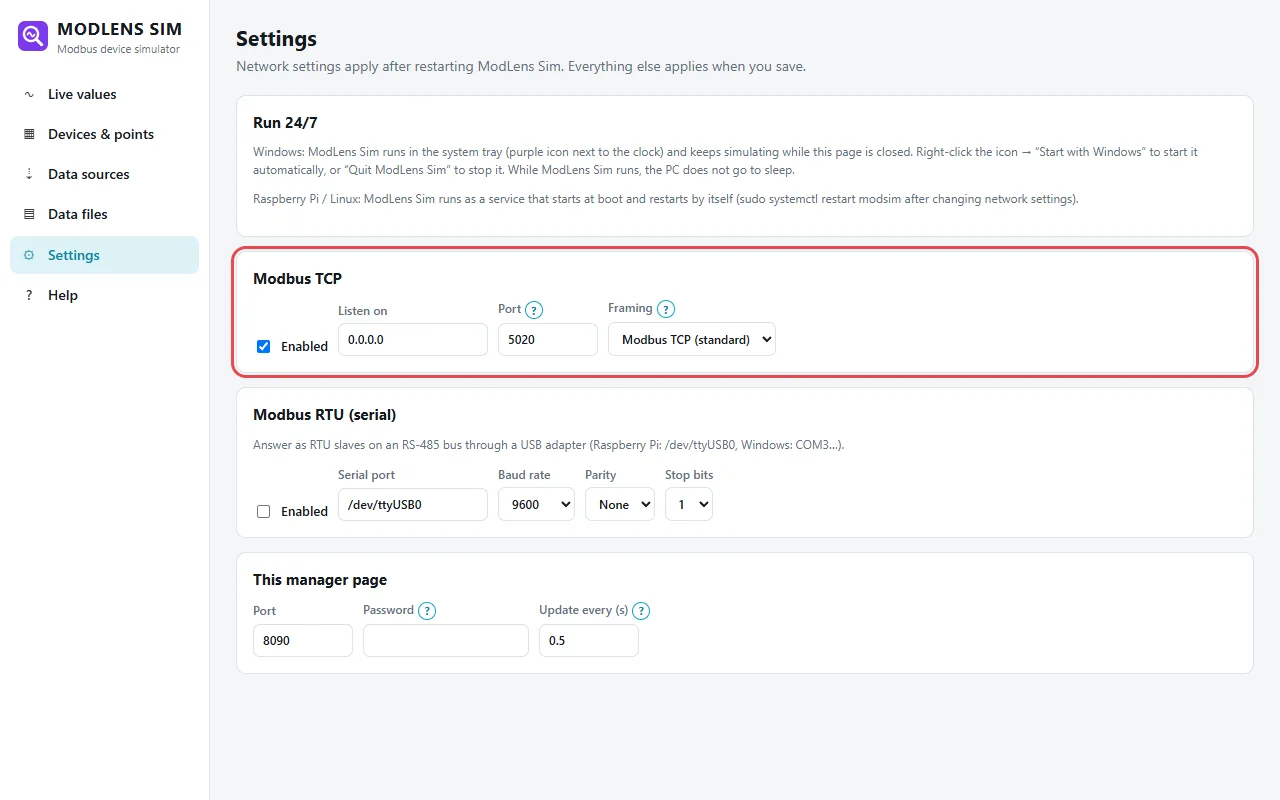
On site, this step means reading the device manual or setup menu.
Step 2: Set up a Modbus TCP connection
In ModLens, open Devices and add or edit a device. Choose Modbus TCP (network) and enter the IP address and port: 127.0.0.1 and 5020 for the simulator, the device's IP and usually 502 on site.
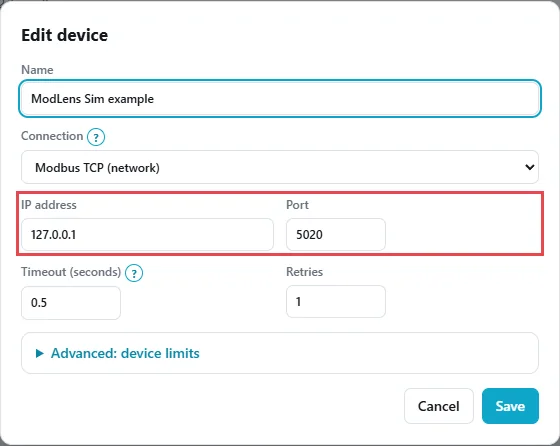
No baud rate, no parity: on TCP the network handles all of that.
Step 3: Find the unit IDs behind the connection
Open Scanner → Find unit IDs (slave addresses), pick the device, scan 1 to 10 and click Scan. It took 7.5 s and found 3 units:
- Unit 1:
holding 0 = 143(AHU supply air temperature, ×0.1). - Unit 2: "Illegal data address". Still a success: the power meter exists, it just has no holding register 0 (its data is in input registers).
- Unit 3:
holding 0 = 645(tank level, ×0.1).
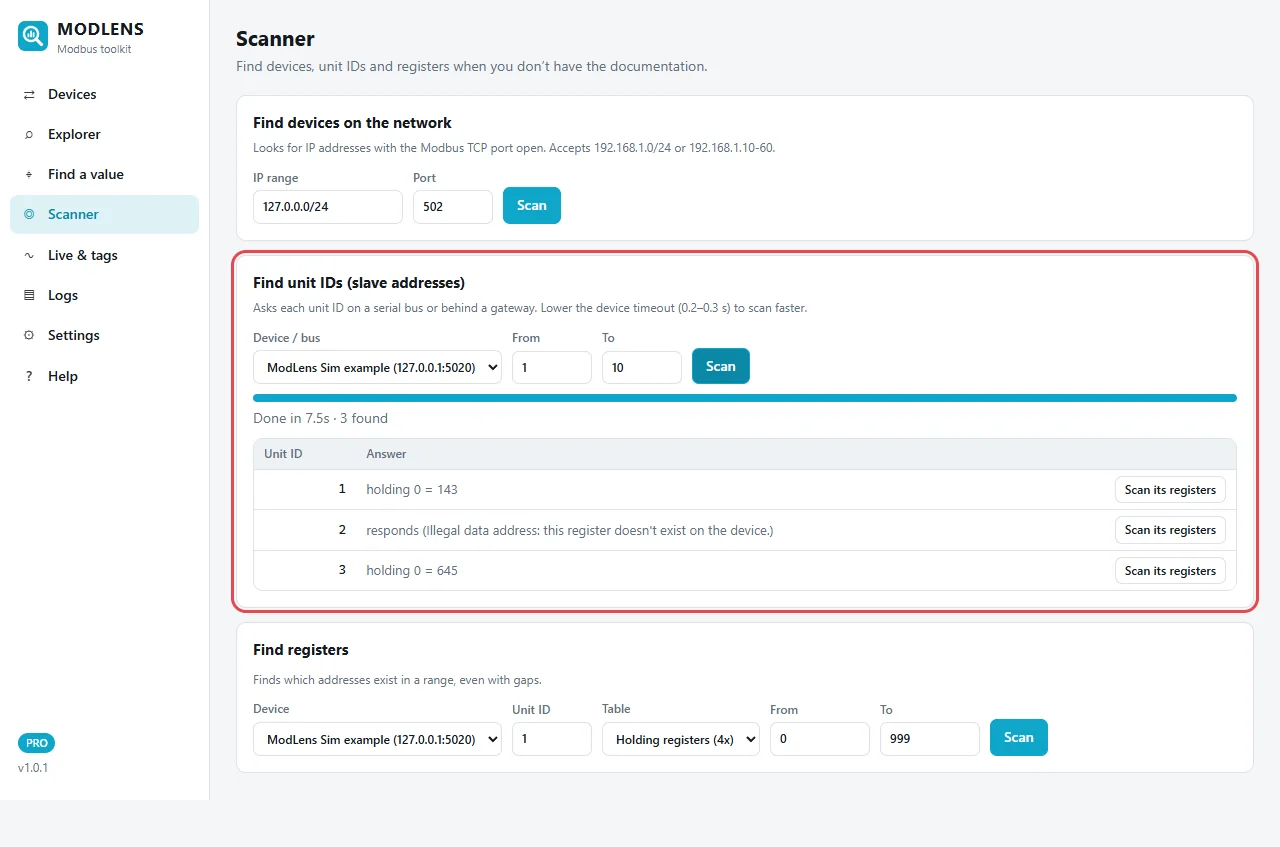
Behind a gateway you do exactly this: one IP, several unit IDs, each one a serial device on the RS-485 side.
Step 4: Read registers and check the values
Open Explorer: unit 1, Holding registers (4x), start address 0, count 3, Read. Raw values: 145, 16816, 28789 (0x0091, 0x41B0, 0x7075), the same data as in the frame example. Address 0 as int16 is 145, so 14.5 °C with a ×0.1 scale. Addresses 1-2 as float32 ABCD give 22.05, the return air temperature, highlighted in green as a realistic value.
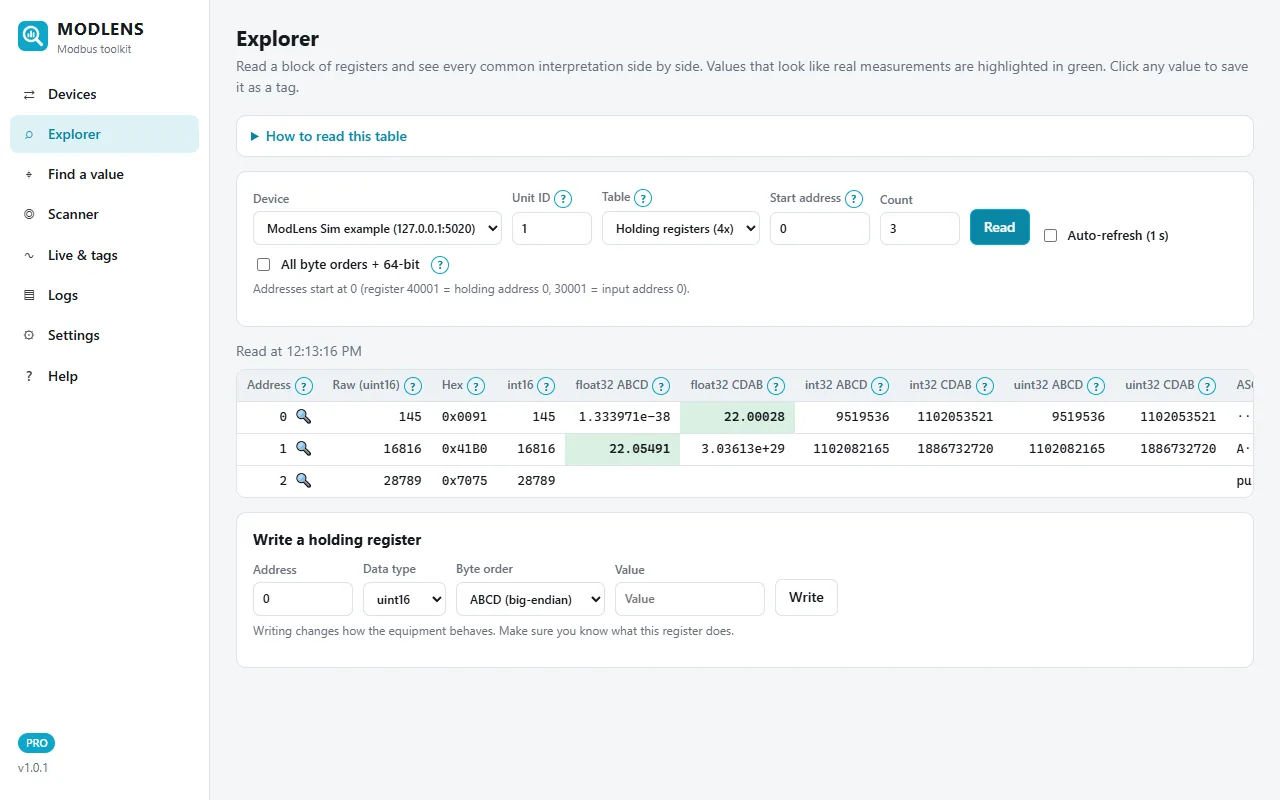
Over RTU these values would be identical. If they look wrong on site, the problem is the address or the format, not the transport. The free Modbus register converter checks a float or byte order by hand.
Step 5: Switch the same device to Modbus RTU
Edit the device and set Connection to Modbus RTU (serial / RS-485). The IP fields disappear and serial fields appear: COM port (your USB to RS-485 adapter), Baud rate, Parity, Data bits, Stop bits. Here: 19200 baud, even parity, 8 data bits, 1 stop bit (8E1), the Modbus default.
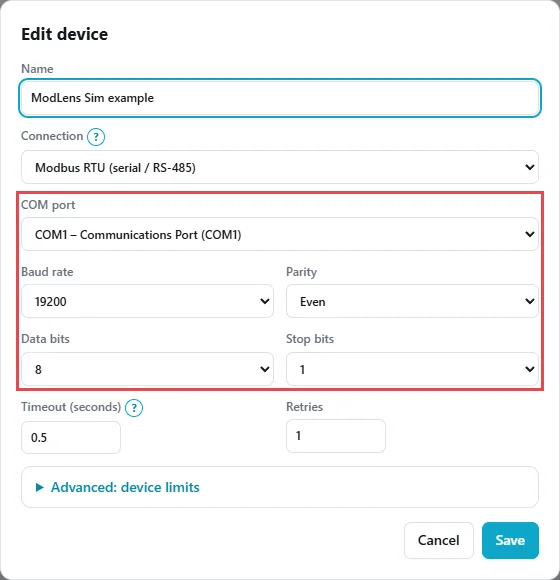
All of these must match the bus. With wrong serial settings a scan finds nothing, even with perfect wiring. If you don't know them, try 9600 and 19200 with 8N1 and 8E1 first.
Step 6: Use RTU over TCP for transparent gateways
For a serial-to-Ethernet converter in transparent mode, choose Modbus RTU over TCP (serial gateway in transparent mode). You enter the converter's IP and port, and ModLens sends RTU frames with a CRC inside the TCP connection. The serial settings live in the converter's own web page.
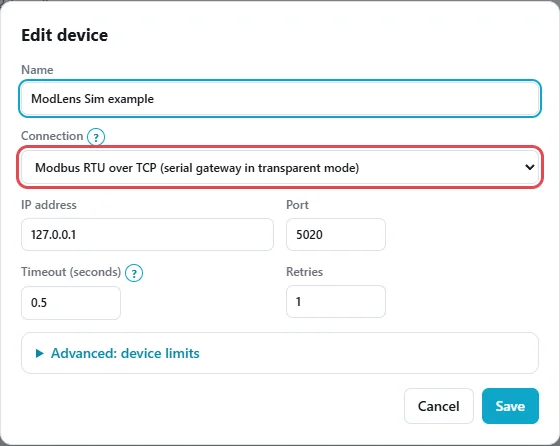
To try this on your own devices, the ModLens free trial unlocks every Pro feature for 14 days, and the install and user guide covers device settings in more detail.
Common mistakes and troubleshooting
| Symptom | Likely cause | What to try |
|---|---|---|
| RTU: no unit ID answers | A/B swapped, wrong baud or parity, wrong COM port | Swap A/B, try 9600/19200 with 8N1/8E1, check Device Manager |
| RTU: CRC errors, some replies OK | No termination, star wiring, duplicate unit IDs, noise | Terminate both ends, check IDs, separate from power cables |
| TCP: connection refused | Wrong port, Modbus TCP disabled, firewall | Check port 502 and the device's Modbus TCP setting |
| TCP: connects, every read times out | Wrong unit ID behind a gateway, or transparent gateway | Scan unit IDs, try RTU over TCP |
| Gateway: exception 0B (11) | Serial device behind it does not answer | Check the RS-485 side and the gateway serial settings |
| TCP: fails only while the BMS runs | Device connection limit reached | Disconnect your tool, check the allowed connections |
Three mistakes come up again and again:
- Calling a transparent gateway "Modbus TCP". If the manual says "raw socket", "TCP server mode" or "transparent", use RTU over TCP.
- Ignoring the unit ID on TCP. Directly on a device it often doesn't matter; behind a gateway it is everything.
- Changing several RTU settings at once. Change baud rate, then parity, then wiring, and scan after each change.
FAQ
Is Modbus TCP faster than Modbus RTU?
On the wire, yes: Ethernet runs at 10 Mbit/s or more, RS-485 at 9600 to 115200 baud. A 3-register read takes about 30 ms on RTU at 9600 baud, plus the device's own time. TCP also lets you poll many devices in parallel, while RTU devices on one bus wait in line.
Can Modbus TCP and Modbus RTU devices talk to each other?
Not directly, because the frames differ. A Modbus gateway removes the MBAP header, adds the slave address and CRC, and forwards the request on RS-485. Register addresses and function codes stay the same, so one register map works on both sides.
What is the difference between Modbus RTU over TCP and Modbus TCP?
Modbus TCP uses a 7-byte MBAP header and no CRC. Modbus RTU over TCP sends complete RTU frames, with slave address and CRC, inside a TCP connection, usually through a serial converter in transparent mode. The client must use the same mode as the gateway, or every request times out.
Do I need a unit ID for Modbus TCP?
The field is always sent, but a device that speaks Modbus TCP directly often ignores it, and the specification recommends 255 (0xFF). Behind a gateway the unit ID selects the serial device, so it must match that device's slave address. Scan unit IDs if a TCP device does not answer.
Is Modbus RTU the same as RS-485?
No. RS-485 is the electrical layer: wires, voltages and driver rules. Modbus RTU is the protocol on top of it. RS-485 also carries other protocols such as BACnet MS/TP, and Modbus RTU can run on RS-232 for a single device.
Which is better for a new installation, Modbus TCP or RTU?
It depends on the devices and the site. RTU is cheap and simple for many small devices in a row and long cable runs. TCP is better when several systems read the same device, when you need faster polling, or for remote access over an isolated control network. Many sites use both, with gateways in between.
How can I test Modbus TCP and RTU without hardware?
Run a Modbus simulator on your PC and connect a Modbus client to it over TCP on 127.0.0.1. ModLens Sim is free and serves several devices with moving values. To test RTU, you need a USB to RS-485 adapter on each side, or a virtual serial port pair.