You have the energy meter Modbus register map in front of you: hundreds of rows, columns called "Address", "Format" and "Scaling", and a voltage that should be easy to read. Then your tool shows 17254, or 2.4e-41.
A register map is easy to read once you know what each column tells you and which details manufacturers leave out. This guide explains the columns, checks an energy meter map against real readings, then applies the same method to VFD maps (control word, status word, speed reference) and HVAC controller maps (signed temperatures with ×10 scale, setpoints, status bits).
All example map rows here are made up to show the pattern. Always use the map for your exact model and firmware.
What is a Modbus register map?
A Modbus register map is the manufacturer's list of where each value lives in the device and how to decode it. Modbus itself only moves 16-bit registers and single bits. The map is what turns "input register 0 and 1" into "phase 1 voltage, float32, volts".
The MODBUS Application Protocol Specification V1.1b3 (modbus.org) defines four data tables:
| Table | Size | Access | Read function code | Write function code | Old-style number |
|---|---|---|---|---|---|
| Coils | 1 bit | Read/write | 01 | 05 (single), 15 (multiple) | 0xxxx (00001…) |
| Discrete inputs | 1 bit | Read only | 02 | — | 1xxxx (10001…) |
| Input registers | 16 bits | Read only | 04 | — | 3xxxx (30001…) |
| Holding registers | 16 bits | Read/write | 03 | 06 (single), 16 (multiple) | 4xxxx (40001…) |
The specification numbers data elements from 1 to n, but the address sent in the request goes from 0 to 65535. That is the source of most "off by one" problems.
The columns of a register map, one by one
Most maps, whatever the brand, use some version of these columns.
| Column | What it tells you | What to watch for |
|---|---|---|
| Address / Register | Where the value is | Is it 0-based, 1-based, or 30001/40001 style? Decimal or hex? |
| Table / Function code | Holding (FC03) or input (FC04) | Some maps only show "FC04" and never say "input register" |
| Data type / Format | uint16, int16, uint32, int32, float32, 64-bit | "Float" without saying 32 or 64 bit; "long" meaning 32-bit integer |
| Size / Registers | 1, 2 or 4 registers | A 2-register value takes the listed address and the next one |
| Word order / Byte order | ABCD, CDAB, "high word first", "little endian" | Often missing; sometimes a device setting |
| Scale / Multiplier / Resolution | Raw × factor = engineering value | "0.1", "×10", "/100", "1 = 0.01 Hz" all mean different things |
| Unit | V, A, kW, kWh, Hz, °C, % | kW vs W, kWh vs Wh: a factor of 1000 hides here |
Address formats you will meet
| Written in the map | Address to put in your tool (0-based) |
|---|---|
| 40001 | Holding 0 |
| 30011 | Input 10 |
| 1 in a 1-based map | 0 |
| 400101 (6-digit style) | Holding 100 |
Most modern tools, ModLens included, ask for the 0-based address plus the table. Type 30001 into a tool that expects 0-based addresses and you get exception code 2 (see Modbus exception code 2 (illegal data address)). The free Modbus register converter converts any of these formats.
How to read an energy meter Modbus register map
Here is a made-up excerpt, laid out the way many meter manuals present it:
| Register | Description | Format | Regs | Unit | Access |
|---|---|---|---|---|---|
| 30001 | Voltage L1-N | float32 | 2 | V | R |
| 30003 | Current L1 | float32 | 2 | A | R |
| 30005 | Total active power | float32 | 2 | kW | R |
| 30007 | Power factor | uint16, ×0.001 | 1 | — | R |
| 30011 | Total active energy import | uint32 | 2 | kWh | R |
Read it like this:
- "30001" = input register number 1 = input register address 0, read with function code 04.
- "float32, 2 regs" = the voltage uses addresses 0 and 1. The current starts at 2, not at 1.
- No word order is given. You will need to find it (most meters use ABCD or CDAB).
- Power factor "×0.001" = a raw value of 900 means 0.900.
- Energy at 30011 is uint32 = addresses 10 and 11. Addresses 7 to 9 are not listed, so reading them may fail.
Energy counters: precision and rollover
A uint32 goes up to 4,294,967,295. In 0.1 kWh steps the counter rolls over at 429,496,729.5 kWh; counted in Wh, much sooner. A float32 has only about 7 significant digits, so a counter of 12,345,678 kWh loses its decimals and small increments seem to "stick". That is why many meters use integers for energy and floats for instant values.
Some meters split energy over several registers that each hold 0 to 9999 ("modulo 10000"). Follow that formula exactly; standard int64 decoding gives a wrong number. For a full explanation of word order on 32-bit values, see Modbus float byte order explained.
CT ratio and primary vs secondary values
With external CTs, check whether the map gives primary values (CT ratio already applied) or secondary values. Secondary means you multiply yourself, for example ×40 for a 200/5 A CT. A reading exactly 40 times too small usually means this.
Step by step: check an energy meter map live in ModLens
A map is only trustworthy once it matches the device. Any Modbus tool can do these checks one register at a time; ModLens shows every interpretation side by side, which is faster. The screenshots below are real readings from ModLens connected to ModLens Sim, the free Modbus simulator, set up as a power meter on unit ID 2 (input registers, floats in CDAB order).
Step 1: Read the block the map describes
Open Explorer, choose unit ID 2, table Input registers (3x), start address 0, count 12, and click Read. Read a little more than you need: the gaps are useful information.
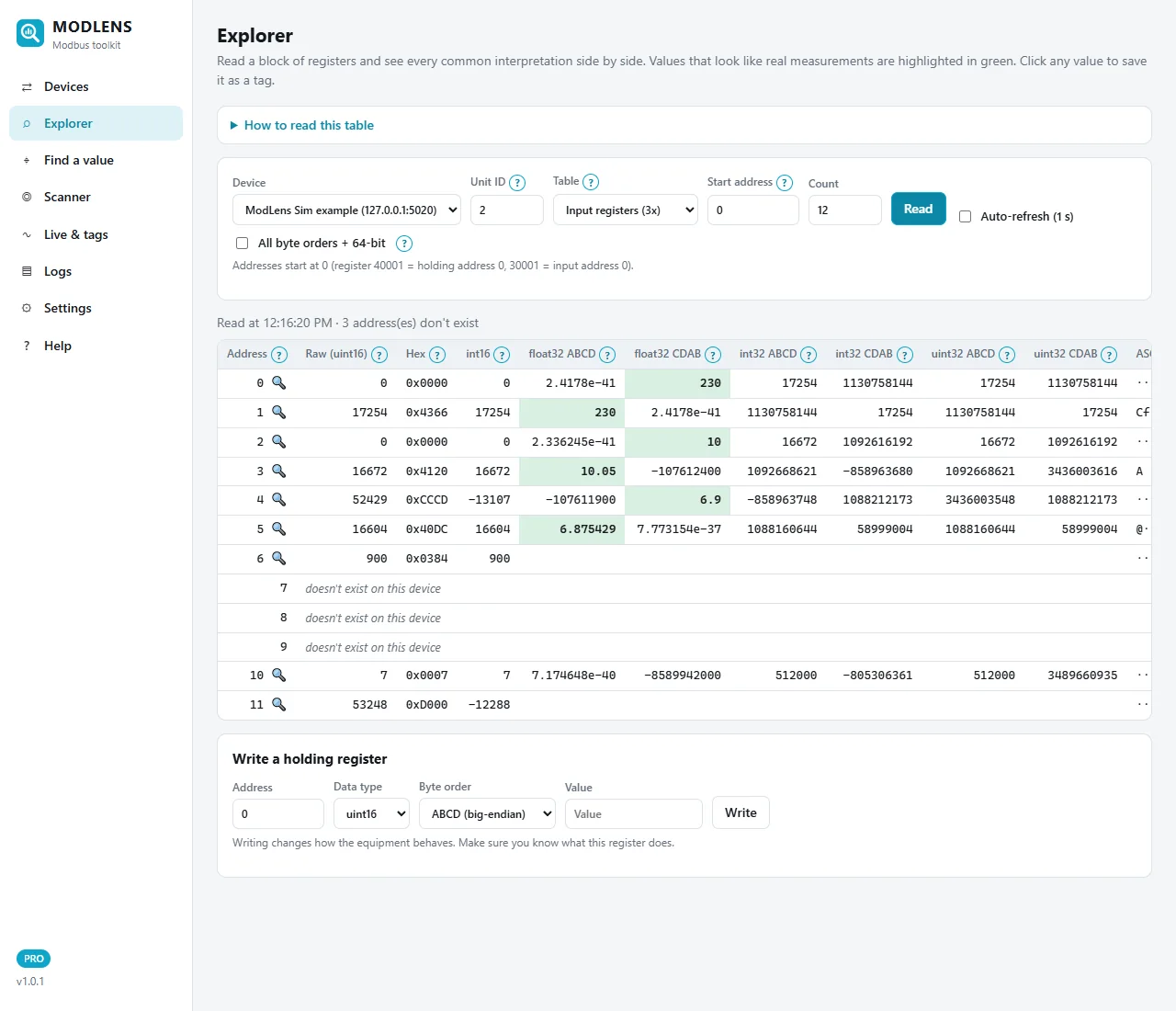
Compare this screen with the made-up map above:
- Address 0, float32 CDAB = 230: the voltage. In float32 ABCD the same address shows 2.4178e-41, a typical wrong word order.
- Address 2 = 10 (current, A) and address 4 = 6.9 (power, kW), both float32 CDAB, 2 registers apart as the map says.
- Address 6, raw 900: the power factor, still unscaled.
- Addresses 7 to 9: "doesn't exist on this device", as the map suggested.
- Address 10, uint32 ABCD = 512000: the energy counter in kWh.
Watch the green "trap" values: address 1 shows 230 in float32 ABCD and address 3 shows 10.05. These are the same bytes read one register too late. Green only means "looks like a real measurement"; the map says the value starts at address 0.
Step 2: Apply the scale on a 16-bit value
Click the address 6 🔍 to open the register inspector.
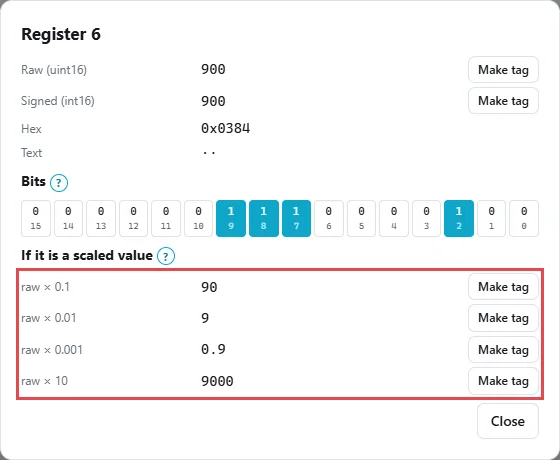
Under If it is a scaled value, raw 900 gives ×0.1 = 90, ×0.01 = 9, ×0.001 = 0.9 and ×10 = 9000. Only 0.9 is a valid power factor, matching the map's "×0.001". When a map forgets the scale, this list shows which factor fits the unit.
Step 3: Decode a 32-bit energy counter
Close the inspector and click address 10 🔍.
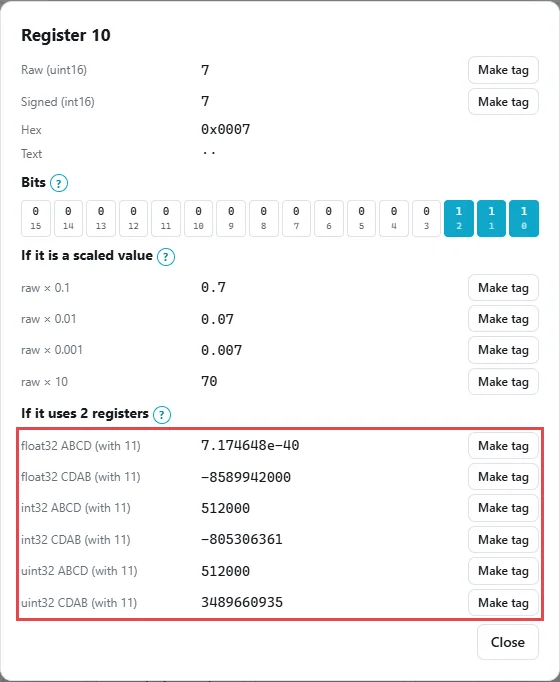
Register 10 holds 7 and register 11 holds 53248. Read with the high word first (ABCD): 7 × 65,536 + 53,248 = 512,000 kWh. In CDAB the same pair gives 3,489,660,935, which is clearly wrong for this site. Notice that word order matters for integers too, not only for floats.
Step 4: Confirm one row with the meter display
The last check is to match a register with the number on the meter screen. Open Find a value, type the voltage shown on the display (here 230.0) and click Search.
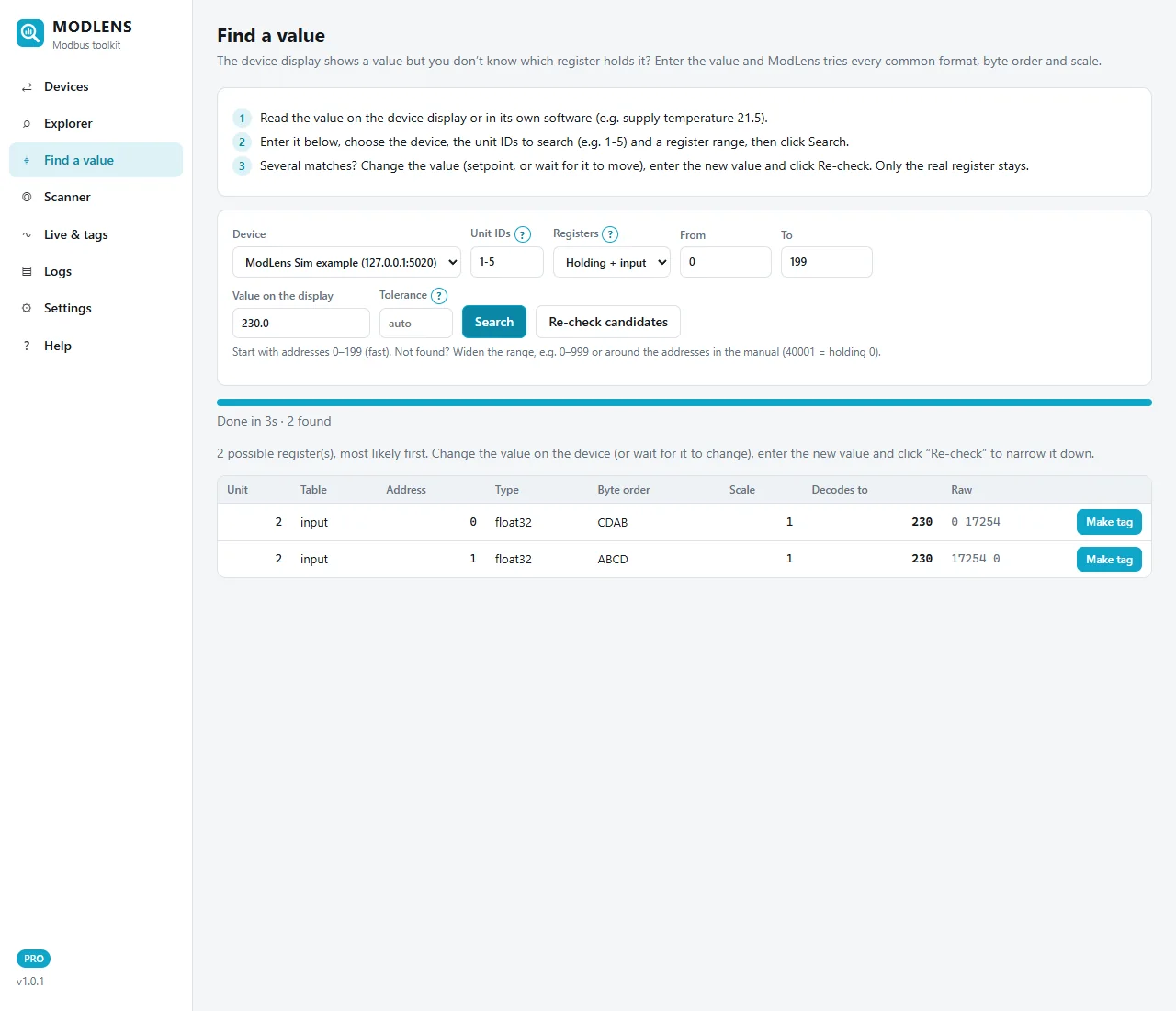
ModLens searched unit IDs 1 to 5, both tables, addresses 0 to 199, and found two candidates: input 0, float32, CDAB and input 1, float32, ABCD (the same trap as in step 1). The map says 30001 = input 0, so input 0 CDAB is right. Without a map, wait for the value to change, enter the new value and click Re-check candidates: only the real register stays. The full method is in How to find a Modbus register address.
Once one row matches, the rest of the map is very likely right too. Still check one value per data type: a float, a scaled integer and a counter.
How to read a VFD Modbus register map
A drive is controlled, not just read, so its map has two main groups:
- Process data: control word, status word, speed reference, actual speed, current, fault code. A PLC or BMS reads and writes these all the time.
- Parameters: hundreds of settings (ramps, motor data, limits), mapped to registers by a formula given in the manual. Do not guess it.
Here is a made-up process data excerpt:
| Address (0-based) | Name | Type | Scale / meaning | Access |
|---|---|---|---|---|
| 0 | Control word | uint16, bit field | Bit 0 = run, bit 1 = reverse, bit 2 = fault reset | R/W |
| 1 | Speed reference | uint16 | 1 = 0.01 Hz (5000 = 50.00 Hz) | R/W |
| 10 | Status word | uint16, bit field | Bit 0 = ready, bit 1 = running, bit 3 = fault | R |
| 11 | Output frequency | int16 | 1 = 0.01 Hz, negative = reverse | R |
| 12 | Motor current | uint16 | 1 = 0.1 A | R |
Control word and status word: read them bit by bit
A control or status word is not a number, it is 16 on/off flags packed in one register. A status word of 3 (binary 0000 0000 0000 0011) means bits 0 and 1 are on: in the example above, "ready" and "running". A value of 11 (binary 1011) adds bit 3: a fault.
On site, open the register's bits (the ModLens inspector shows all 16, as in step 2), then change the drive state and watch which bit changes: start, stop, trip a fault.
Many drives need a sequence of control words before the motor starts, and many ignore Modbus commands until the control source is set to fieldbus. If writes are accepted but the motor does not move, check these two points first.
Speed reference scaling
Common styles are frequency in 0.01 Hz (5000 = 50.00 Hz), a percentage (for example 0 to 10000 = 0 to 100.00 % of maximum frequency), or a drive-specific range where a fixed raw value equals 100 % of a reference parameter. The fieldbus chapter says which applies. Write 50 meaning 50 Hz to a 0.01 Hz register and the drive runs at 0.5 Hz, or stays at its minimum frequency.
How to read an HVAC controller or gateway map
HVAC controllers, BMS gateways, chillers and boilers mostly use 16-bit holding registers with a ×10 scale for temperatures, plus coils and bit fields for status and alarms. The simulator's AHU controller on unit ID 1 is a good example.
Signed temperatures with ×10 scale
Read holding registers 0 to 11 of unit 1 in the Explorer:
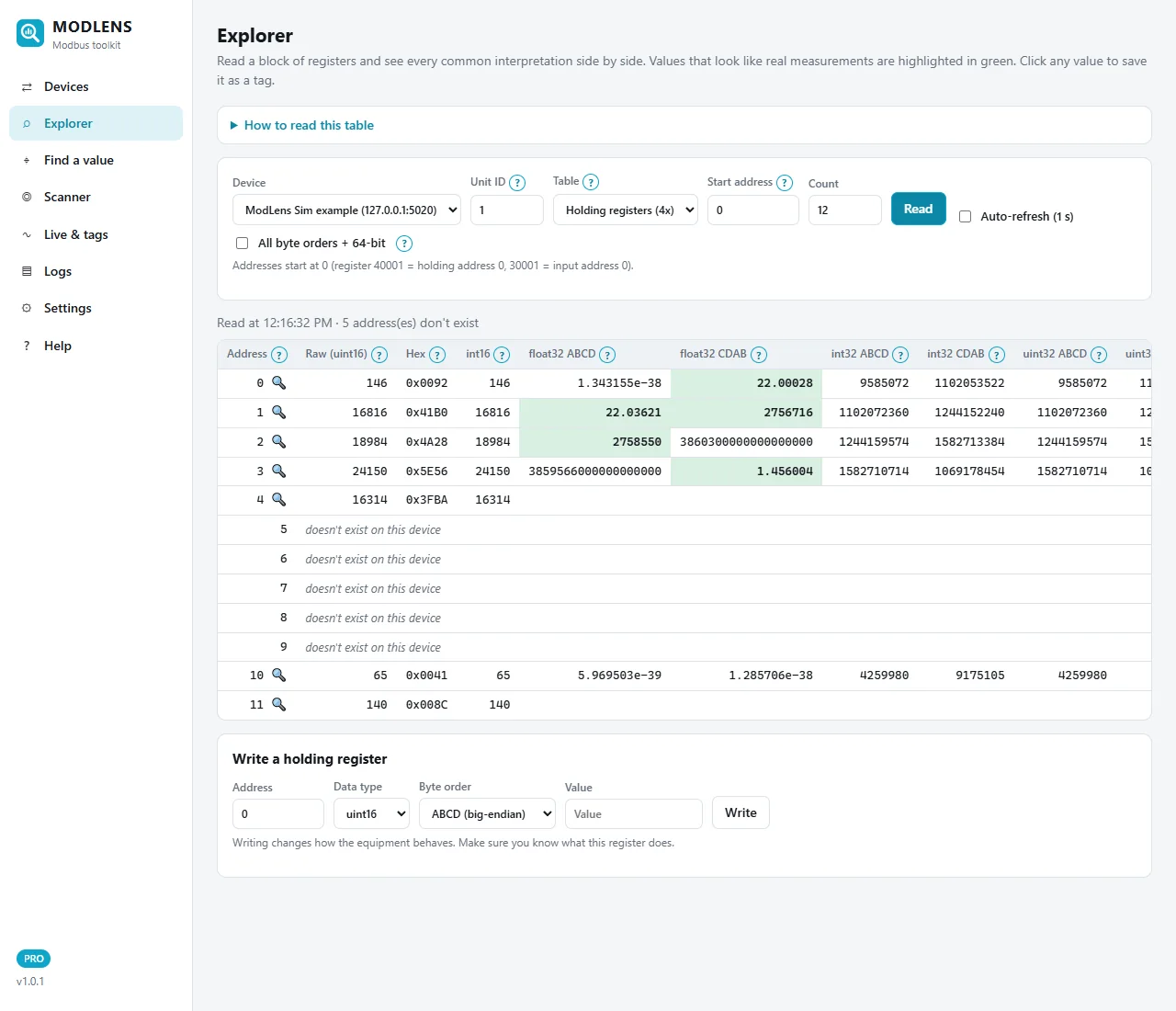
- Address 0, raw 145: the supply air temperature, int16 ×0.1 = 14.5 °C.
- Address 1, float32 ABCD = 21.79: the return air temperature as a float.
- Address 3, float32 CDAB = 1.43: duct static pressure in inWC, with the other word order. One controller can mix word orders; read each row of the map, not only the first.
- Address 10, raw 65: fan speed command, 65 %.
- Address 11, raw 140: supply temperature setpoint, ×0.1 = 14.0 °C.
Note address 0 in the float32 CDAB column: 21.75, in green. It is a coincidence built from register 0 and half of the return air float. The map says address 0 is a single 16-bit value, so ignore it. You need the map and the live values; neither alone is enough.
Why "int16" and not "uint16"? Outdoor air, freezer and chilled water temperatures can go below zero. −5.0 °C at ×10 is −50, which is 65,486 when read as unsigned. If a map says "signed" or gives a negative range, use int16.
Save the value with the map's scale and unit
Click address 11 🔍, then Make tag on the raw × 0.1 line. Set the name, the data type (int16 for a temperature) and the unit:
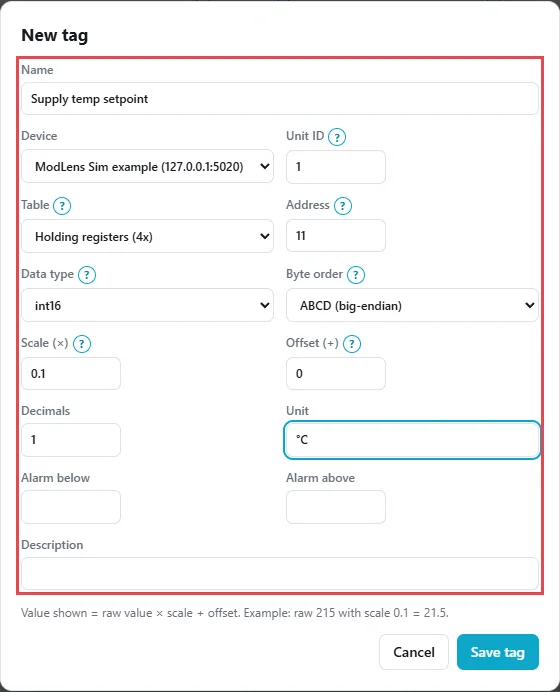
Value shown = raw × scale + offset, so 140 × 0.1 + 0 = 14.0 °C. The saved tag shows live with its unit, can trend and alarm, and can be logged to CSV 24/7 on Windows or a Raspberry Pi (see the ModLens install and user guide).
Status bits and alarms
HVAC maps put on/off states in coils (occupancy, enable), discrete inputs (filter alarm, fan proof) or bits of one alarm word. Read them like a VFD status word: trigger the condition and watch the bit.
Common mistakes when reading a Modbus register map
1. Reading one register too late
The map says 40001, you type 1, and the value is "almost right" or nonsense, like the trap values in step 1. Convert to 0-based first.
2. Reading across a gap
If you read 12 registers from 0 and the device lacks 7 to 9, a strict device rejects the whole request with exception code 2. Read in blocks that follow the map, and stay under the device limit (the specification allows up to 125 registers per read; many devices accept less). The ModLens Explorer marks missing addresses and still shows the others, so you see where the gaps are.
3. Applying the scale twice
Some gateways and SCADA drivers already apply the scale, and then the integrator applies it again: 22.5 °C becomes 2.25 °C. Decide in one place where the scale is applied, and write it down.
4. Ignoring the sign
A power value that jumps from 3 kW to 65,533 kW when the site starts exporting is an int16 read as unsigned (−3 becomes 65,533). Use the signed type when the value can go negative.
5. Using the wrong unit ID
A perfect map is useless if you read unit 1 and the meter is unit 2. Check the meter's communication menu or scan the unit IDs. Also check device settings: some meters change word order or register layout in a menu, so two identical meters can disagree.
To run these checks on your own meters, drives and controllers, the free 14-day ModLens trial has every feature, and Lite mode stays free afterwards for basic reading and writing. For long-term recording, see the Raspberry Pi Modbus data logger guide.
FAQ
How do I read an energy meter Modbus register map?
For each row, note the address, the table (holding or input), the data type, the word order, the scale and the unit. Convert the address to 0-based (30001 = input 0), read the register with the right function code, decode it with the listed type and word order, then apply the scale. Finally compare one value with the meter display to confirm the whole map.
What does 30001 or 40001 mean in a register map?
These are old-style register numbers. The first digit gives the table (3 = input registers, 4 = holding registers) and the rest is a 1-based number. So 30001 is input register address 0 and 40001 is holding register address 0. Most tools ask for the 0-based address and the table separately.
Why does my energy meter show a huge or tiny number instead of the voltage?
It is usually a 32-bit float read in the wrong word order, or read one register too late. Decode the same two registers in ABCD and CDAB and check the address is 0-based. A value like 2.4e-41 or a very large integer is a typical symptom.
How do I read a VFD status word?
Read the status word register as a 16-bit value and look at its bits, not the number. Each bit is a flag such as ready, running or fault, as listed in the drive manual. To confirm the bit list, change the drive state (start, stop, trip) and watch which bit changes.
What does scale 0.1 or ×10 mean in a Modbus map?
It means the register holds a whole number that you multiply (or divide) to get the real value. With scale 0.1, a raw value of 225 means 22.5. Check the wording carefully: some maps write "×10" to mean the value was stored 10 times larger, so you divide by 10 to read it. Compare with the display when in doubt.
What should I do if the register map does not match the device?
First check the model, the firmware version and the device settings (some meters change word order or layout in a menu). Then check the address offset and the table. If it still does not match, find the registers from the display values with a search tool and ask the vendor for the correct map.