Your energy meter shows 228.3 V on its display, but your Modbus tool reads 107,617,056. Or 2.4e-41. Or NaN. The register is right and the wiring is fine. The problem is the Modbus float byte order: the device sends the four bytes of a 32-bit float in an order your software does not expect. The most common case is CDAB, also called word swap.
This guide explains the four byte orders (ABCD, CDAB, BADC, DCBA) in plain words, decodes the same two registers four ways with real numbers, lists the symptoms of a wrong order, and gives a step-by-step method to find the right one in minutes.
Why a float needs two Modbus registers
A Modbus register is 16 bits (2 bytes): a whole number from 0 to 65,535, or −32,768 to 32,767 if signed. Fine for 225 meaning 22.5 °C, not enough for 228.3 V or millions of kWh.
So devices use two registers next to each other for 32-bit values:
- float32 (IEEE 754 single precision): 1 sign bit, 8 exponent bits, 23 fraction bits. This is the "floating point" format almost every device uses.
- int32 / uint32: signed or unsigned 32-bit whole numbers, often used for counters, run hours and kWh.
Four bytes need to travel inside two registers. That is where the trouble starts.
What the Modbus specification says (and does not say)
The MODBUS Application Protocol Specification V1.1b3 (modbus.org) says Modbus uses a big-endian representation for addresses and data items: inside one 16-bit register, the most significant byte is sent first. A register holding 0x1234 goes on the wire as 0x12, then 0x34.
The specification does not define floats or 32-bit values. It never says which of the two registers holds the "high" half. Each manufacturer decides. That is why the same float can appear in four different orders depending on the device, the firmware or the gateway in between.
Modbus float byte order: ABCD, CDAB, BADC and DCBA
Name the four bytes of the float A B C D, where A is the most significant byte (it holds the sign and most of the exponent) and D is the least significant. The byte order name tells you how they are placed in register N and register N+1.
| Name | Also called | Register N | Register N+1 | Where you meet it |
|---|---|---|---|---|
| ABCD | Big-endian, "standard", high word first | A B | C D | Many PLCs, controllers and meters; the natural reading of the spec |
| CDAB | Word swap, swapped float, low word first | C D | A B | Many energy meters, some PLCs and gateways |
| BADC | Byte swap | B A | D C | Rare; some older or unusual devices |
| DCBA | Little-endian, byte and word swap | D C | B A | Rare; devices that copy memory straight from a little-endian processor |
Two simple ideas cover all four:
- Word order: which register comes first, the high half (AB) or the low half (CD).
- Byte order: inside each register, whether the bytes are in normal order or swapped.
ABCD = normal words, normal bytes. CDAB = swapped words, normal bytes. BADC = normal words, swapped bytes. DCBA = both swapped.
In practice, ABCD and CDAB cover most devices you will meet. BADC and DCBA exist, but if you are guessing, try ABCD and CDAB first.
Worked example: one float, four byte orders
Take a clean value: 230.0. In IEEE 754 single precision, 230.0 is the hex value 0x43660000. So A = 0x43, B = 0x66, C = 0x00, D = 0x00.
| Byte order | Register N | Register N+1 |
|---|---|---|
| ABCD | 0x4366 (17254) | 0x0000 (0) |
| CDAB | 0x0000 (0) | 0x4366 (17254) |
| BADC | 0x6643 (26179) | 0x0000 (0) |
| DCBA | 0x0000 (0) | 0x6643 (26179) |
Now the classic mistake. The meter sends CDAB, so the registers are 0x0000, 0x4366. Your tool decodes them as ABCD and gets 2.4178e-41: a tiny number that cannot be a voltage. Swap the words and you get 230.0 back.
Real example from the screen: a power meter in CDAB
Here is a real reading from the simulated main power meter in ModLens Sim (unit ID 2, input registers 0 and 1). The raw registers are 19661 (0x4CCD) and 17252 (0x4364). The same two registers decode to:
| Decoded as | Result | Realistic? |
|---|---|---|
| float32 ABCD | 107,617,056 | No |
| float32 CDAB | 228.3 | Yes, a mains voltage |
| float32 BADC | −214,320,176 | No |
| float32 DCBA | 1.44 × 10²² | No |
Only one answer looks real, and it matches the display: 228.3 V. You can check these numbers yourself in the free Modbus register converter: enter 19661 and 17252 and compare the orders.
How to recognize a wrong Modbus float byte order
A wrong order rarely gives a value that is "a little off". It usually gives something absurd. Learn these patterns and you will spot a swap in seconds.
| What you see | Likely cause | What to try |
|---|---|---|
| Tiny numbers like 2.4e-41, 1.2e-38, 3.2e-41 | Words swapped: the zero half is read as the high word | CDAB (or ABCD if you set CDAB) |
| Huge numbers like 1.07e8, 3.2e14, 1.4e22 | Words or bytes swapped | Try all four orders |
| Value changes sign or jumps wildly when the real value barely moves | Low word read as high word | Swap words |
| NaN or "infinity" | Exponent bits are all ones: wrong order, or the device sends 0xFFFF 0xFFFF as "not available" | Swap; check the manual for a "no data" value |
| Value is close but has strange decimals (228.96 instead of 228.3) | Reading starts one register too late | Check the start address (see "Common mistakes") |
| A counter jumps by 65,536 for each step | int32/uint32 in CDAB read as ABCD | Swap words |
A useful rule: if the value is realistic in one order and absurd in all the others, you have found the order. If two orders both look realistic, take a second reading after the value changes; only the right one follows the display.
How to find the right byte order in ModLens (step by step)
You can do this with any Modbus tool by changing the format one setting at a time. ModLens shows all orders at once, which turns a guessing game into reading a table. The screenshots below are real readings from ModLens connected to ModLens Sim, the free Modbus simulator.
Step 1: Read a block in the Explorer
Connect to the device, open Explorer, set the unit ID, table and start address, and click Read. Each row is one register; the float32 and int32 columns combine that register with the next one, in ABCD and CDAB.
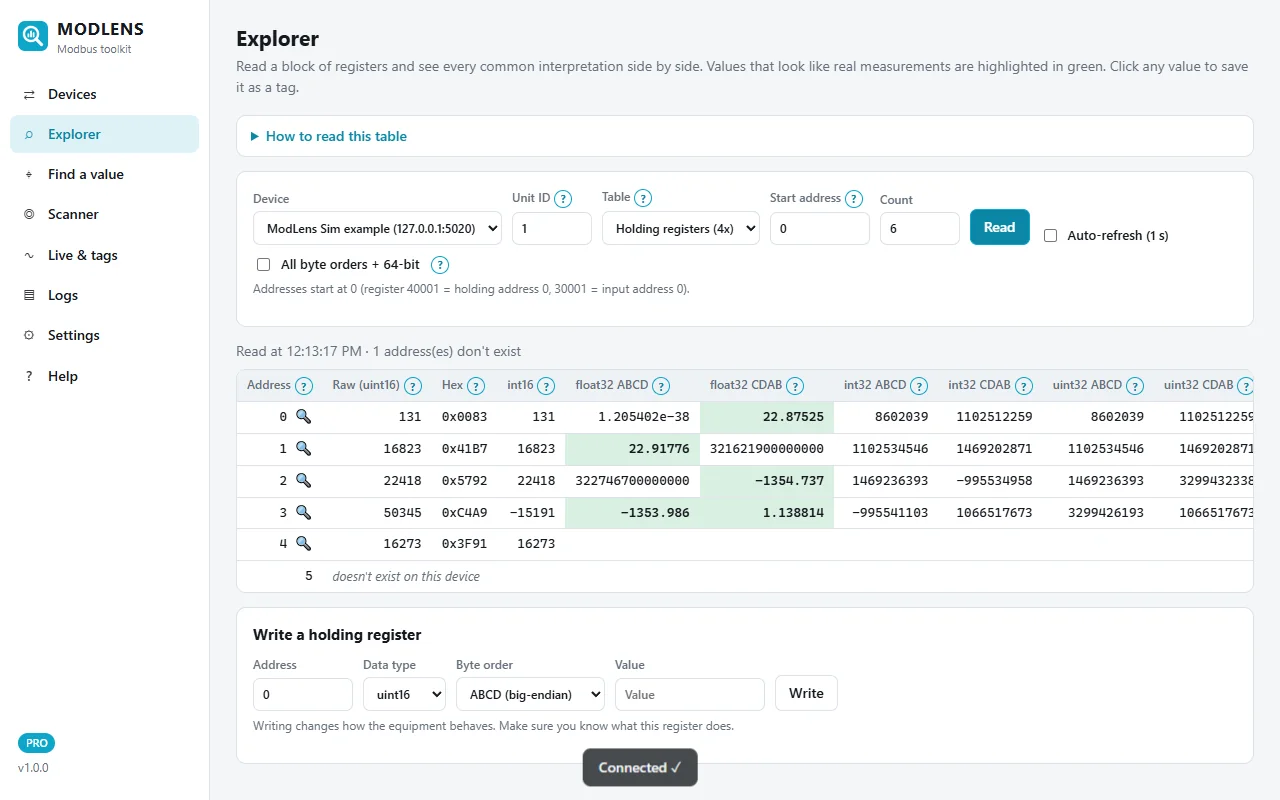
On this air handler controller (unit 1, holding registers), two different floats live in the same block:
- Address 1, float32 ABCD = 22.92: the return air temperature in °C. In CDAB the same row reads 3.2 × 10¹⁴, clearly wrong.
- Address 3, float32 CDAB = 1.139: the duct static pressure in inches of water. Raw registers 0xC4A9 and 0x3F91. In ABCD the same pair reads −1,353.99, which no duct ever had.
The simulator mixes the two orders on purpose, but it also happens in the field, for example behind a gateway that maps several devices into one table. Do not assume one byte order per site or even per device.
Also notice that green cells appear in rows that are not real values (address 0 in CDAB, address 2 in CDAB). The green highlight means "looks like a measurement", not "is correct". The display, or a second reading, decides.
Step 2: Show all four orders and 64-bit values
Tick All byte orders + 64-bit. The table adds BADC and DCBA, then float64, int64 and uint64 in all four orders.
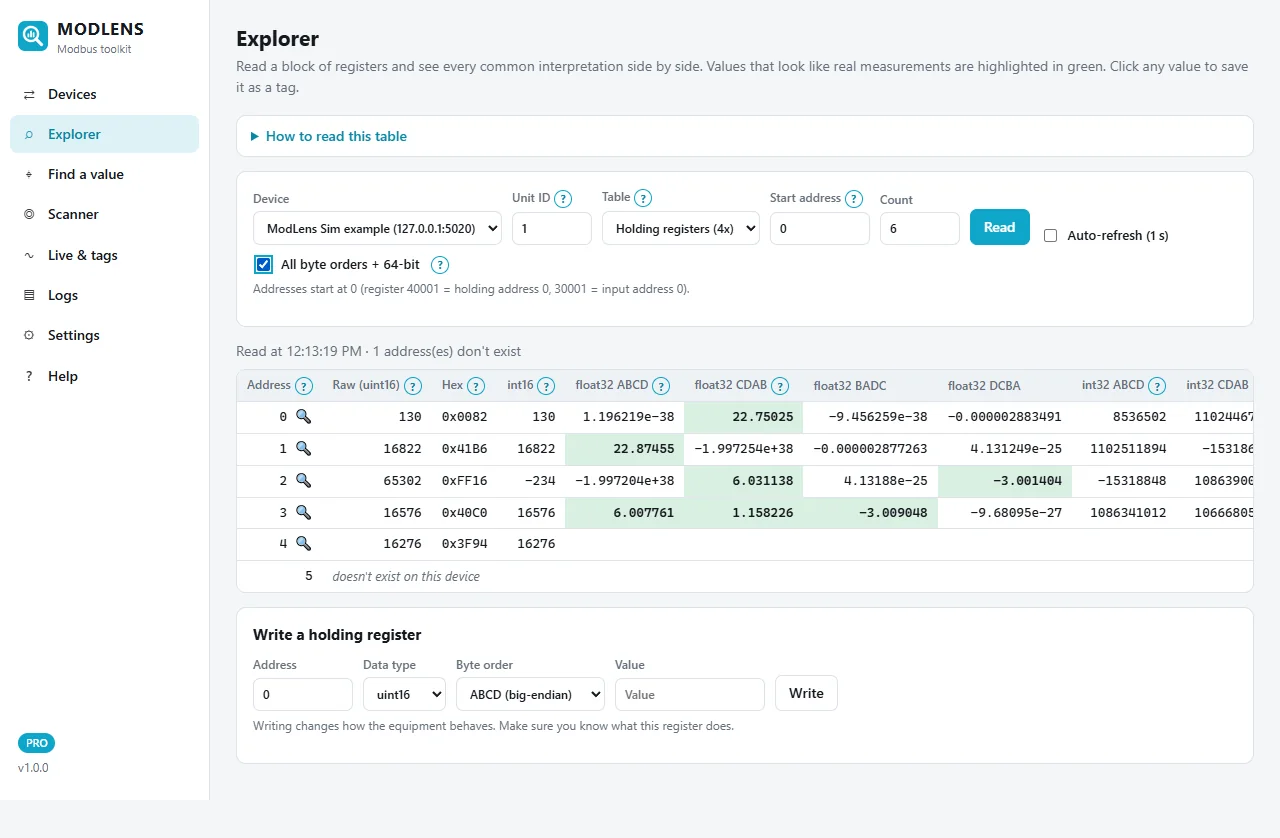
The live values have moved a little since step 1. Look at row 2: float32 CDAB shows 6.03, DCBA shows −3.00 and BADC on row 3 shows −3.009. All green, all wrong. They are just halves of two neighbouring floats glued together. This is why you should know roughly what value to expect before trusting a column.
Step 3: Inspect one register
Click an address with the 🔍 icon. The inspector shows the raw value, hex, the 16 bits, scaled versions (×0.1, ×0.01…) and, under If it uses 2 registers, every 32-bit interpretation with the next register.
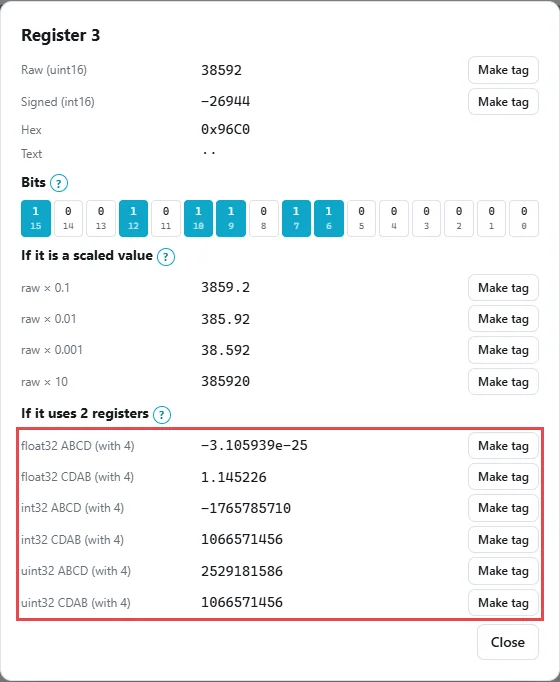
For register 3 (with 4), float32 ABCD gives −3.1 × 10⁻²⁵ and float32 CDAB gives 1.145, a realistic duct static pressure. Each line has a Make tag button, so you can save the right interpretation directly.
Step 4: Check a meter with input registers
Energy meters usually put measurements in input registers (function code 04). Change Table to Input registers, set unit ID 2, start address 0, count 8, and read.
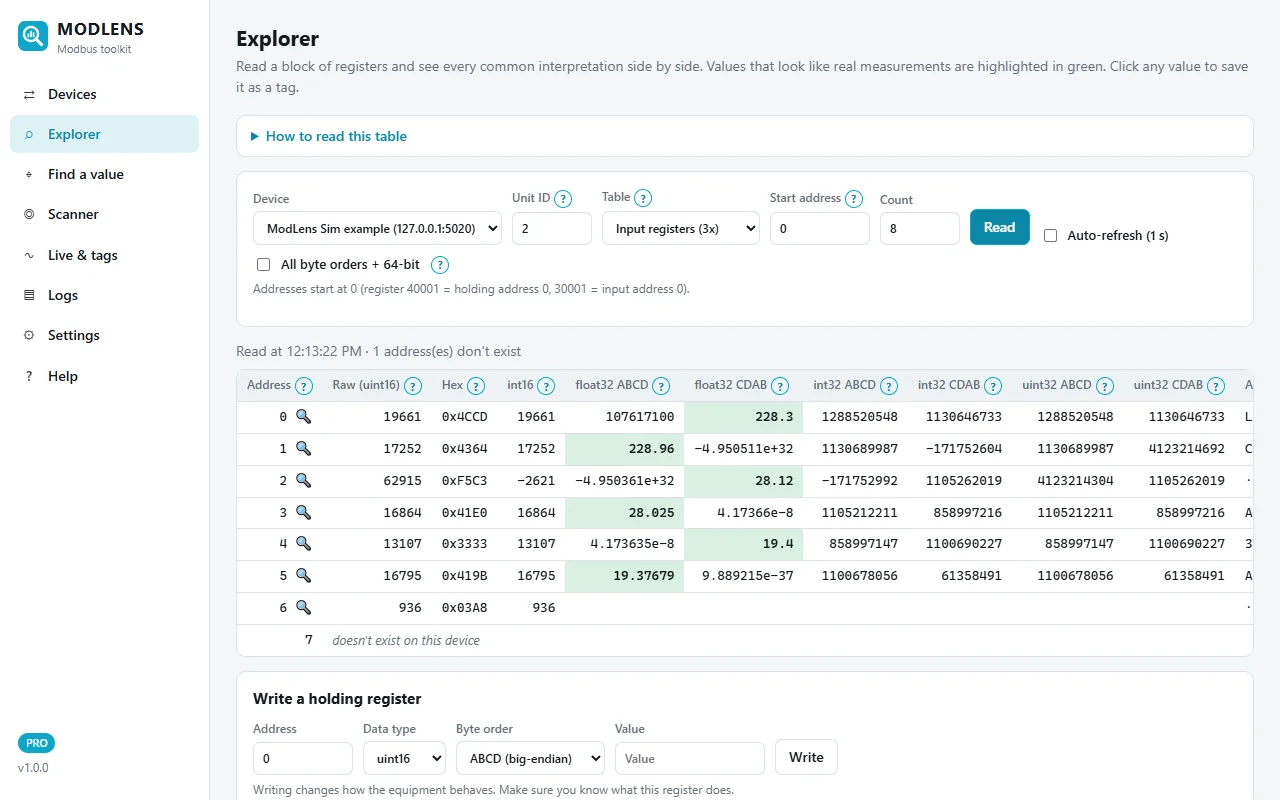
The float32 CDAB column reads 228.3 at address 0 (voltage), 28.12 at address 2 (current) and 19.4 at address 4 (active power). The pattern every two registers is the sign of a meter that uses CDAB throughout. But look at the float32 ABCD column on the odd addresses: 228.96, 28.025, 19.38. Also green, also close. That is the trap described in "Common mistakes" below.
Step 5: Let Find a value test every order
If you know the value on the display but not the register, open Find a value, type the displayed value (here 228.3) and click Search. ModLens tries every data type, all four byte orders and common scales across the unit IDs and both register tables.
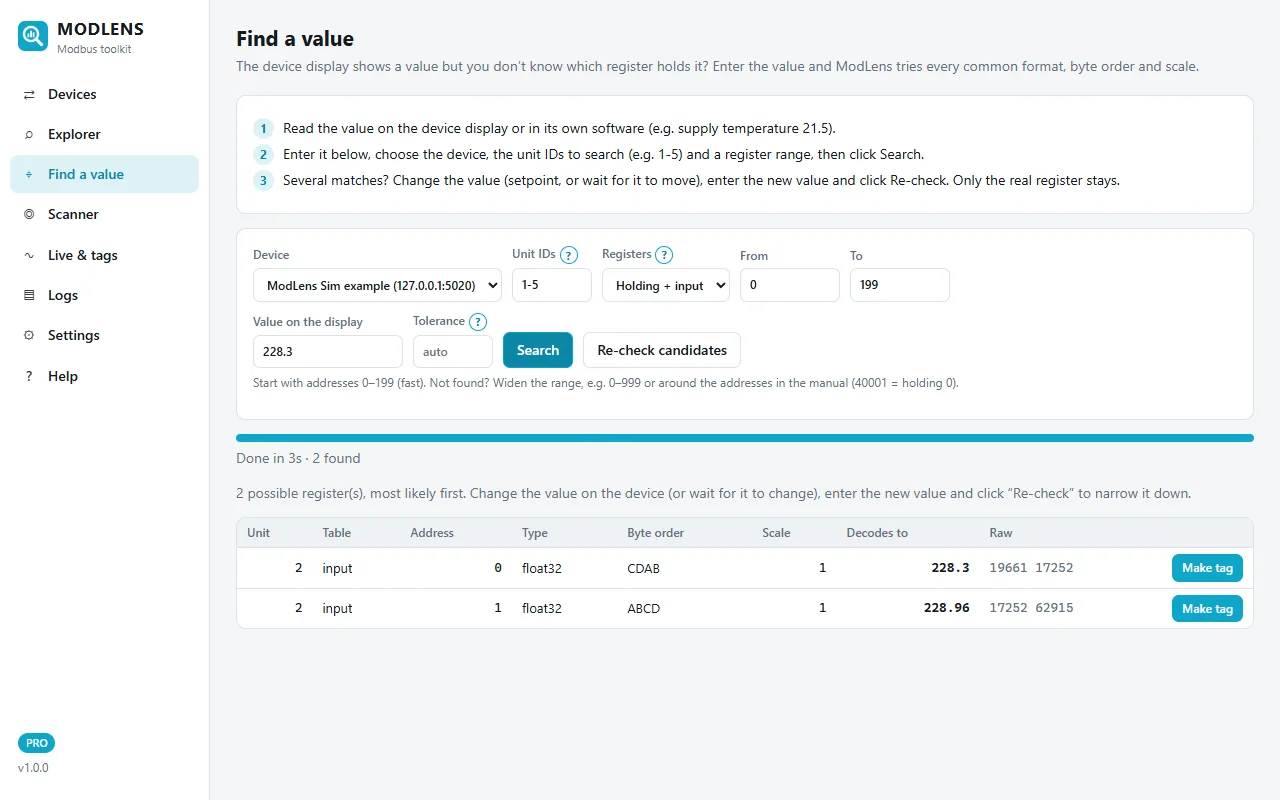
It found two candidates in 3 seconds: input 0, float32, CDAB = 228.3 (raw 19661 17252) and input 1, float32, ABCD = 228.96 (raw 17252 62915). The first one matches exactly. To be sure, wait for the voltage to change, type the new value and click Re-check candidates: only the real register stays. The method is explained in more detail in the ModLens install and user guide.
Step 6: Save it as a tag with the right byte order
Click Make tag. The form is filled with unit 2, input registers, address 0, float32 and CDAB (word swap). Add a name and the unit (V), then save.
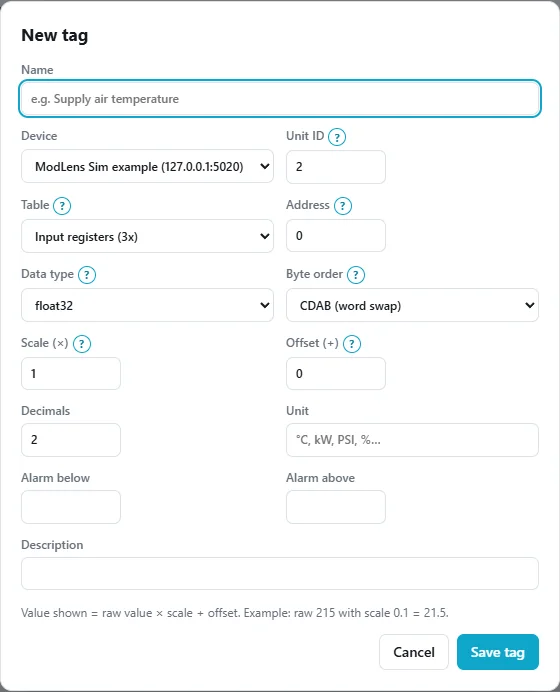
From now on the tag shows 228.3 V live, can trend and alarm, and can be logged to CSV 24/7, on Windows or on a Raspberry Pi (see the Raspberry Pi Modbus data logger guide). If you want to try this on your own devices, the free 14-day trial has every feature.
Common mistakes with Modbus float byte order
1. Reading one register too late (the "close but wrong" value)
This one fools experienced technicians. With a CDAB float at registers 0 and 1, the high word (AB) is in register 1. If you read starting at register 1 as ABCD, you get the right high word plus the low word of the next value. The result is close to the real value but with wrong decimals: 228.96 instead of 228.3 in the example above.
Why close? The high word holds the sign, the exponent and the first 7 fraction bits; alone it gives 228.0 here. The low word only fine-tunes the decimals. So a "nearly right" float is often an address problem, not a byte order problem. Compare with the display to one decimal, and check the second reading.
2. Mixing up 1-based and 0-based addresses
Register 30001 in a manual is input register address 0 on the wire. If the manual says "voltage at 30001-30002" and you read from address 1, you land exactly in mistake number 1. ModLens and most tools use 0-based addresses; some manuals and tools are 1-based. Off-by-one plus word swap is the most common combination on site.
3. Using the wrong table
Holding registers (function code 03) and input registers (function code 04) are separate tables. Input register 0 and holding register 0 are different values. If none of the four byte orders gives a sensible number, check the table before anything else.
4. Forgetting the scale on integers
Not every value is a float. A uint32 with a scale of 0.01 or 0.001 is common for energy. If the float columns are all absurd but the int32 or uint32 column gives a number that is the display value × 10, × 100 or × 1000, it is a scaled integer, not a float.
5. Writing a float in the wrong order
Writing a setpoint as float32 ABCD to a device that expects CDAB writes a completely different value, sometimes a dangerous one. Always read the register first, confirm the order, then write with the same order. Most devices also need function code 16 (Write Multiple Registers) for a 32-bit value, because both registers must change together.
32-bit integers and 64-bit values
int32 and uint32 follow exactly the same four orders. Example: a counter at 100,000 is 0x000186A0, so in ABCD the registers are 0x0001 and 0x86A0 (1 and 34,464). If the device sends CDAB (34,464 then 1) and you decode as ABCD, you read 2,258,632,705 as uint32 (or −2,036,334,591 as int32). When the counter increases by one, your reading jumps by 65,536. That jump is a clear sign of word swap.
64-bit values (float64, int64, uint64) use four registers (8 bytes), common for large energy totals. Byte order names get longer (ABCDEFGH, GHEFCDAB…) and naming is less consistent between tools. The idea is the same: the words may be in normal or reversed order, and the bytes in each word may be swapped. For example, 230.0 as float64 is 0x406CC00000000000. In ModLens, tick All byte orders + 64-bit to see float64, int64 and uint64 in four orders.
Byte order settings in other software
Every tool names the same four orders differently. A few examples:
| Software | ABCD | CDAB | BADC | DCBA |
|---|---|---|---|---|
| ModLens | ABCD (big-endian) | CDAB (word swap) | BADC (byte swap) | DCBA (little-endian) |
Home Assistant Modbus (swap:) |
none (default) |
word |
byte |
word_byte |
| libmodbus (C library) | modbus_get_float_abcd |
modbus_get_float_cdab |
modbus_get_float_badc |
modbus_get_float_dcba |
Home Assistant's documentation describes word as "ABCD -> CDAB" and word_byte as "ABCD -> DCBA", and notes that word swaps are not valid for 16-bit types. For other tools (PLC blocks, SCADA drivers, Node-RED nodes), look for "swap", "word order" or "endian" in the help. Labels are not always consistent between tools, so test against a known value: the number on the display is the proof.
If you are comparing Modbus tools for this kind of work, our Modbus Poll alternatives comparison lists how each common tool handles data formats.
FAQ
What does CDAB mean in Modbus?
CDAB is a byte order for 32-bit values where the two 16-bit registers are swapped: the low word (bytes C and D) comes first and the high word (bytes A and B) second. Inside each register, the bytes stay in normal order. It is also called "word swap" or "swapped float". Many energy meters use it.
What is the default byte order for Modbus floats?
There is no official default, because the Modbus specification does not define floats. The specification says each register is big-endian, and many devices extend that to ABCD (high word first). CDAB is the most common alternative. Always check the manual, then confirm with a value you can see on the display.
Why does my Modbus float read a tiny number like 2.4e-41?
The words are almost certainly swapped. The register that holds zero (or the low half) is being read as the high word, which makes the exponent tiny. Switch between ABCD and CDAB; one of them will show the realistic value. If neither does, check the start address and the register table.
Is CDAB big-endian or little-endian?
Neither, exactly. Each register is big-endian (high byte first), but the words are in little-endian order (low word first). Some documents call it "mid-little-endian" or "little-endian word order". To avoid confusion, describe it with the letters: CDAB.
How do I know if my device uses ABCD or CDAB?
Decode the two registers both ways. The right order matches the display; the wrong one gives a huge, tiny or NaN value. If both look possible, compare again after the value changes. The ModLens Explorer or the free register converter shows both side by side.
What is word swap in Home Assistant Modbus?
In the Home Assistant Modbus integration, swap: word turns ABCD into CDAB, which is what you need for a word-swapped device. swap: byte swaps the bytes inside each register (BADC), and swap: word_byte does both (DCBA). The default is none (ABCD). Word swaps only apply to 32-bit and 64-bit data types.
Do 32-bit integers have byte order problems too?
Yes. int32 and uint32 values use the same four orders as floats. A word-swapped counter read in the wrong order shows a huge number that jumps by 65,536 each time the real value increases by one. Swap the words and it counts normally.
Why is my float value close but not exactly right?
Usually the reading starts one register too late or too early. The high word of a float holds the sign, exponent and first fraction bits, so it gives a value close to the real one even when the low word comes from the wrong register. Check the start address (1-based vs 0-based) before changing the byte order.