Modbus Poll from Witte Software is one of the best-known Modbus master tools for Windows. It is mature, it is still updated, and many technicians have used it for years. So why look for an alternative?
Usually for one of these reasons: you need something free, you work on Linux or a Raspberry Pi, or the job on site is not "read register 40001" but "find out where this value lives and what format it uses". This article looks at the common options and what each one is good at, so you can pick the right tool for the job in front of you.
Facts below come from the vendors' official pages and the projects' own repositories, checked in October 2026. Prices and versions change, so check them again before you buy.
What a field technician needs from a Modbus tool
A tool that is fine on the bench can be slow on site. Before comparing names, list what your work actually needs:
- Connection types. Modbus TCP, Modbus RTU over RS-485, and often RTU over TCP through a gateway. Some sites still have Modbus ASCII.
- Data formats. Modbus registers are 16 bits. The Modbus Application Protocol specification says data items are sent big-endian, but it does not define how two registers combine into a 32-bit integer or float. Each manufacturer chooses, so you meet ABCD, CDAB, BADC and DCBA word and byte orders.
- Discovery. Finding the unit ID, finding which registers answer, and sometimes finding the device's IP address.
- Unknown or wrong register maps. Old firmware, a map for the wrong model, or 1-based vs 0-based addresses.
- Logging. A client often asks for a week of data to prove a problem. A tool that only shows live values cannot do that.
- Platform. A Windows laptop, a Linux laptop, or a small computer left in the panel.
No single tool is best at all of these. That is the honest starting point.
The common options
Modbus Poll (Witte Software)
The reference most people compare against.
- Platform: Windows 7, 8, 8.1, 10 and 11, with x64, ARM64 and x86 installers.
- Price: $129 for a single-user licence, less per licence in volume. Perpetual for the major version you buy. One user can install it on any number of their own computers.
- Trial: each connection is limited to 10 minutes (restart to get another 10), and after 30 days it stops connecting.
- Strong points: many protocols (RTU, ASCII, TCP/IP, RTU over TCP, UDP variants and Modbus/TCP Security), 28 display formats including 64-bit types in four byte orders, address and slave ID scans, logging to text files or straight into Excel, real-time charts, and OLE Automation from VBA or Python.
- Limits for field work: Windows only. You choose the display format cell by cell, so testing an unknown value means trying formats one at a time.
ModScan64 / ModScan32 (WinTECH Software)
ModScan has been around since 1990, and many older technicians learned Modbus on it.
- Platform: ModScan64 for Windows 10 and 11; ModScan32 for older Windows.
- Price: a paid one-time licence (check WinTECH's site for the current price). A combo with the ModSim64 simulator is also sold.
- Trial: a time-limited, fully functional demo.
- Strong points: serial RTU and ASCII, Modbus/TCP, a Secure Modbus version, a debug mode showing the raw serial stream, test scripts and OLE Automation.
- Limits: Windows only, and the official product pages say less about data formats and scanning than the other vendors do. Check the demo on your own devices.
OpenModScan (free, open source)
A modern ModScan-style tool, released under the MIT licence and actively maintained (version 1.16.1 at the time of writing).
- Platform: Windows, plus Linux packages (DEB, RPM and Flatpak).
- Strong points: read and write of all four tables, a Modbus Scanner for devices (RTU, TCP and RTU over TCP), a register address scan, many data types (including 64-bit and swapped versions), and a traffic log.
- Limits: no Raspberry Pi or macOS builds in the releases. Its logging is a traffic log, not long-term value logging with trends.
QModMaster (free, open source)
A simple Qt-based Modbus master, LGPL licence, updated in September 2026.
- Platform: Windows binaries (unzip and run); on Linux you compile it yourself.
- Strong points: light and quick for reading and writing RTU or TCP registers, with a bus monitor that shows the raw traffic.
- Limits: fewer data types, and the float word order is a global setting rather than per value.
Chipkin Modbus Explorer (free)
A newer free tool from Chipkin, the company behind the long-standing free CAS Modbus Scanner.
- Platform: Windows and Linux (Ubuntu 18.04+). A Mac version is announced as coming soon.
- Strong points: INT16 to INT64, FLOAT32, DOUBLE and strings with byte and word swap options, IP range and subnet scans, unit ID and register range scans, export of a CSV register map, and a built-in simulator.
- Limits: its manual says you scan the list of byte orders by eye to find your value, and that you apply scaling yourself.
mbpoll (free, command line)
If you are comfortable in a terminal, mbpoll is a small command-line Modbus master (GPL v3) for RTU and TCP.
- Platform: Linux (including ARM boards), Windows and macOS.
- Strong points: easy to script, reads 16-bit values, 32-bit integers and floats, and runs on almost anything.
- Limits: no graphical view, and you need to know the address and format you want.
Vendor software
Many drive, meter and controller manufacturers offer free configuration software for their own devices. Use it when it exists: it knows the device's parameters by name. It does not help with a mixed site of ten different brands.
Where field work gets slow
The tools above all read registers well. Time is usually lost in three places.
1. The register map is missing or wrong
You can see 231.7 V on a meter display, but the map you found online is for another firmware. A scan tells you which registers answer, not which one holds 231.7.
2. Guessing the format and byte order
This is the classic trap. Here is one value, a voltage of 231.7 stored as a 32-bit float in CDAB order (low word first), over two holding registers:
| Register | Raw (hex) | Raw as uint16 |
|---|---|---|
| 40101 | B333 | 45875 |
| 40102 | 4367 | 17255 |
Now see what you get depending on how you decode those same two registers:
| Decoded as | Result | Looks right? |
|---|---|---|
| float32 ABCD (big-endian) | −0.0000000417 | No |
| float32 CDAB (word swap) | 231.7 | Yes |
| float32 BADC (byte swap) | 9.2 × 10²³ | No |
| float32 DCBA (little-endian) | 0.0000000835 | No |
| Two uint16 values | 45875, 17255 | No |
With a tool where you pick one format at a time, you try each line of this table by hand, for each candidate register. With 16-bit integers you also have to guess the scale (×0.1, ×0.01) and whether the value is signed. You can try the conversions yourself with the free Modbus register converter.
3. Nobody stays on site to log
Some tools log to a file, but they are desktop applications: the laptop has to stay open and connected. For a week of data you need something that runs by itself, restarts after a power cut, and lets you check it remotely.
How ModLens handles those problems (the method, step by step)
ModLens is the tool we build, so take this section as our view and test it yourself. It was built by a controls technician for the three problems above. Here is the whole method on a real example: a three-phase power meter on an RS-485 bus behind a Modbus TCP gateway, with no register map. The screenshots come from ModLens talking to ModLens Sim, our free Modbus simulator, so the numbers are real readings, not mock-ups.
Step 1: find who answers on the bus
The first question on an unknown bus is "which unit IDs are there?". In Scanner → Find unit IDs, choose the gateway and a range of IDs (1 to 6 here), then click Scan.
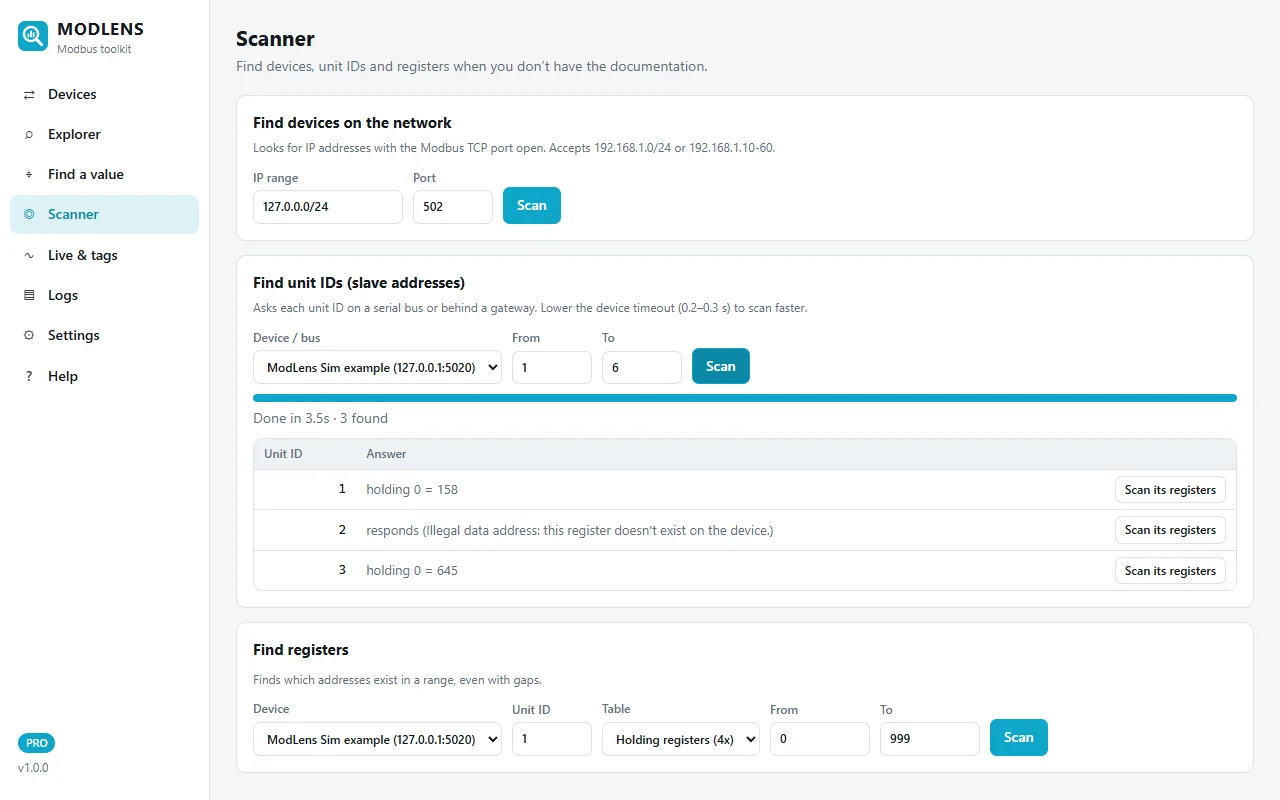
Three devices answer. Look at unit 2: it replies "Illegal data address" for holding register 0. That is still a useful answer. The device exists, it just has nothing at that address, which is typical of power meters that only expose input registers (function 4). Many tools show this as a plain error and you move on; it is actually the clue that tells you which register table to look in next.
Step 2: read a block and see every format at once
In the Explorer, read unit 2, input registers 0 to 7. Instead of one format per cell, ModLens decodes the whole block in every common format side by side: raw value, hex, int16, float32 in ABCD and CDAB order, 32-bit integers in both orders, and more with the "All byte orders + 64-bit" option. Values that look like real measurements are highlighted in green.
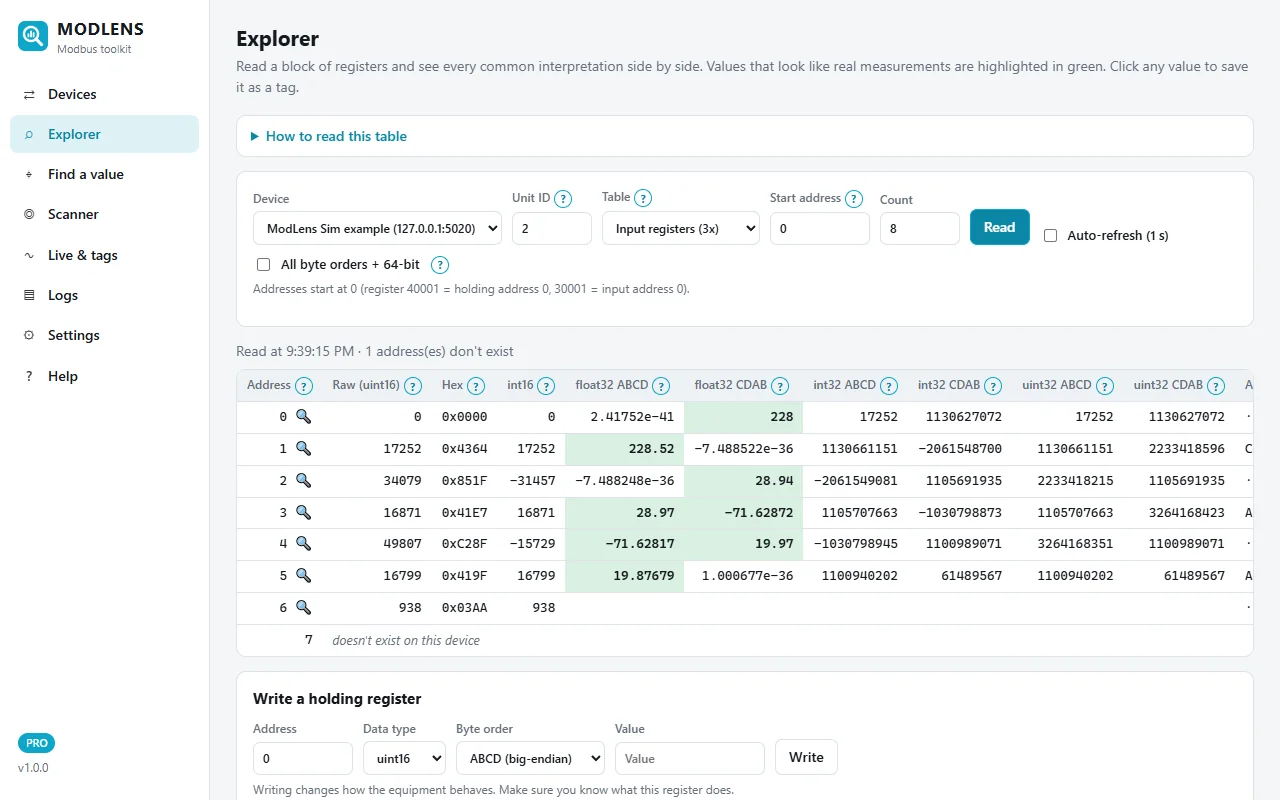
The pattern jumps out. In the float32 ABCD column, address 0 decodes to 2.4 × 10⁻⁴¹, a meaningless number. In the float32 CDAB column, the same registers give 228: a mains voltage. Addresses 2 and 4 in CDAB give 28.94 and 19.97, the next measurements of the meter. That is exactly the trap from the byte order table above, solved by looking at one screen instead of trying four formats on every register.
Step 3: type the number from the display
When you know a value but not where it lives, use Find a value. Type what the meter display shows (228.0 V here), choose the unit IDs to search and click Search. ModLens reads the registers, tries the 16, 32 and 64-bit types, all four byte orders and the usual scales (×1, ×0.1, ×0.01, ×0.001), and ranks the matches.
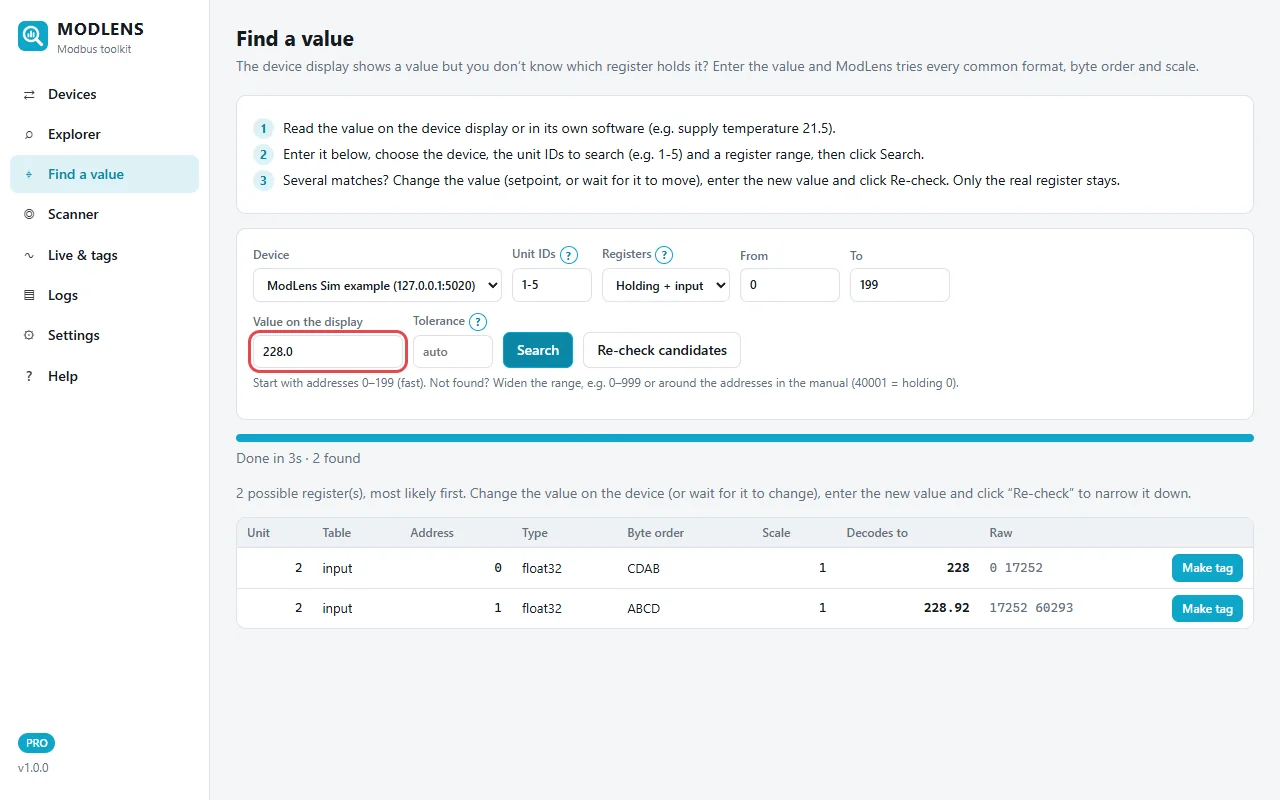
The first result is unit 2, input register 0, float32, CDAB, scale 1, decoding to exactly 228. The second result, input register 1 read as ABCD (228.92), is a classic false match: it is built from the second half of one float and the first half of the next. Two ways to settle it:
- Re-check: wait for the value on the display to change, type the new value and click "Re-check candidates". Only the register that follows the display stays.
- Look at the neighbours in the Explorer: the real alignment gives sensible values for the registers next to it too (28.94 and 19.97 at addresses 2 and 4 in CDAB).
Step 4: name it, watch it, log it
Once you know the register, make it a tag: a name, a unit, a scale and the right format. In Live & tags you see all your tags updating together, with a trend for the selected one, high/low alarms, and a "Log to CSV" switch.
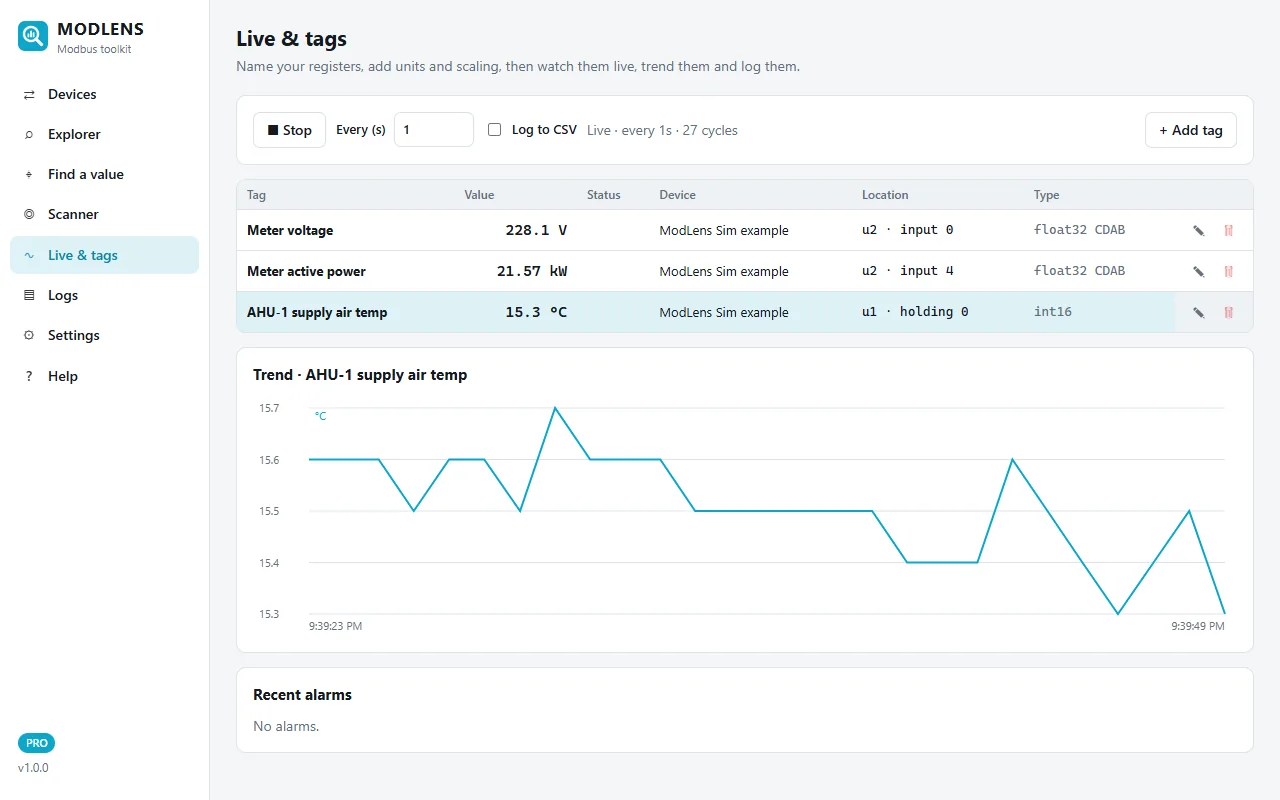
Here the meter voltage and active power sit next to an air handler's supply temperature (holding register 0, int16 with a ×0.1 scale) from another device on the same bus. For long-term logging, the same setup runs headless on a Raspberry Pi: it logs to daily CSV files, resumes after a power cut and serves a password-protected dashboard. The Raspberry Pi Modbus data logger guide shows that setup.
Where ModLens is weaker
It has no Modbus ASCII, UDP or secure Modbus, no Excel/OLE automation and no raw traffic view, and it is a new product. If you need those, Modbus Poll or ModScan are the better fit. If you want to try the method above without real equipment, run ModLens Sim on the same PC and follow the steps.
Comparison table (features only)
| Modbus Poll | ModScan64 | OpenModScan | QModMaster | Chipkin Modbus Explorer | mbpoll | ModLens | |
|---|---|---|---|---|---|---|---|
| Price | $129 one-time | Paid, one-time | Free | Free | Free | Free | Free Lite; Pro $89 one-time (launch price) |
| Windows | Yes | Yes | Yes | Yes | Yes | Yes | Yes |
| Linux | No | No | Yes | Compile | Yes | Yes | Yes |
| Raspberry Pi | No | No | Not stated | Not stated | Not stated | Yes (CLI) | Yes (headless) |
| RTU / TCP | Yes / Yes | Yes / Yes | Yes / Yes | Yes / Yes | Yes / Yes | Yes / Yes | Yes / Yes |
| Modbus ASCII | Yes | Yes | Not stated | Not confirmed | Not stated | Not stated | No |
| Unit ID / register scan | Yes | Not stated | Yes | Not stated | Yes | No | Yes |
| All formats side by side | No (per cell) | Not stated | No (per window) | No | Yes (byte orders) | No | Yes |
| Search for a known value | Not stated | Not stated | Not stated | Not stated | No (by eye) | No | Yes |
| Value logging | Text file / Excel | Disk file (scripts) | Traffic log | Traffic log | Message log | Script it yourself | CSV, 24/7 |
| Excel / scripting | OLE (VBA, Python) | OLE, scripts | Not stated | Not stated | Not stated | Shell scripts | No |
"Not stated" means the official source did not say either way, not that the feature is missing. For more detail, see our comparison page.
How to choose
- You only need to read and write known registers on Windows, and you already own Modbus Poll: keep it. It does that job very well.
- You need ASCII, UDP, secure Modbus or Excel automation: Modbus Poll or ModScan.
- You need a free tool for basic polling and discovery: OpenModScan or Chipkin Modbus Explorer on Windows or Linux, QModMaster for a quick look.
- You script on Linux or a Pi: mbpoll.
- You often work without a reliable register map, or need to leave a logger on site: try ModLens.
Whatever you pick, test it on your own equipment before you go to site. A bench setup with a USB to RS-485 adapter and a simulator takes ten minutes; the RS-485 wiring guide explains how to wire it. Most of these tools can run side by side, so compare them on the same device. ModLens has a free 14-day trial key (email only, no card) and keeps a free Lite mode afterwards.
FAQ
Is there a free alternative to Modbus Poll?
Yes. OpenModScan, QModMaster and Chipkin Modbus Explorer are free graphical tools, and mbpoll is a free command-line tool. They cover basic reading, writing and (except QModMaster) device discovery.
Does Modbus Poll run on Linux or a Raspberry Pi?
The official download page lists Windows builds only (x64, ARM64 and x86). On Linux, look at OpenModScan, Chipkin Modbus Explorer, mbpoll or ModLens.
How long is the Modbus Poll trial?
Each connection is limited to 10 minutes, and after 30 days you can no longer connect, according to the Witte Software download page.
Why do I get strange numbers like 9.2 × 10²³ when reading a float?
The tool is decoding the two registers in a different byte or word order from the device. Try the other orders (ABCD, CDAB, BADC, DCBA) until the value matches the device display.
Which Modbus tool can find a register when I only know the value on the display?
Most tools read a register you already know. ModLens has a dedicated "Find a value" search: you type the number from the display and it tries every common type, byte order and scale across the unit IDs and register ranges you choose. With other tools you can do the same by hand, reading a block and comparing each format with the display, which the side-by-side byte order view in Chipkin Modbus Explorer also helps with.
How do I find the unit ID of a Modbus device?
Check the device menu or label first: many meters and drives show their Modbus address in a communication menu. If you can't, use a unit ID scan: the tool asks each ID in turn and lists the ones that answer. On RS-485, use a short timeout (0.2 to 0.3 seconds) so the scan is quick, and remember that two devices with the same ID on one bus will corrupt each other's replies.
What is the difference between Modbus Poll and Modbus Slave?
Both come from Witte Software. Modbus Poll is a master (client): it reads and writes registers in real devices. Modbus Slave is a simulator: it pretends to be a device so you can test a master, a SCADA or a PLC program without hardware. Free alternatives for the simulator side include ModLens Sim and the simulator built into Chipkin Modbus Explorer.
Can I use two Modbus tools at the same time?
On Modbus TCP, usually yes, if the device accepts several connections. On an RS-485 bus, no: only one master may talk on the bus, so close one tool before you start the other.